
  1. Home
  2. Computing
  3. Legacy Archives

Asus ViVoPC specs revealed, can hold up to 16GB of RAM

Add as a preferred source on Google
AsusViVoPCPic
Image used with permission by copyright holder
Nvidia CEO showing the RTX 4060 Ti at Computex 2023.
This story is part of our coverage of Computex, the world's biggest computing conference.

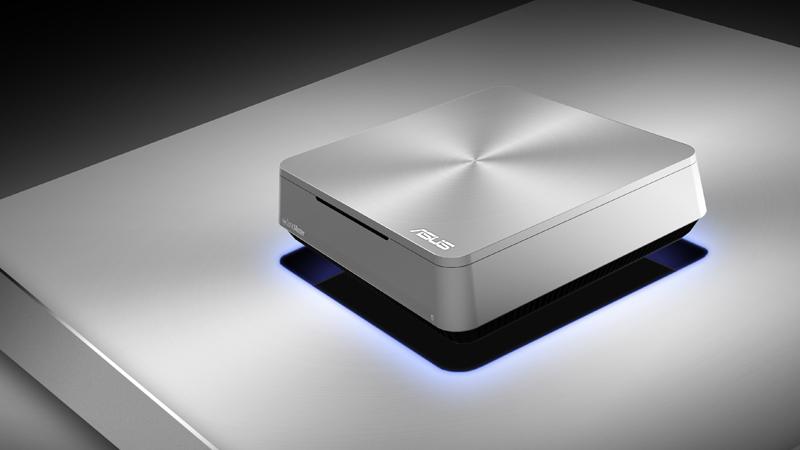
If you were scouring deep into Computex 2013 coverage last week, you may recall catching a glimpse at a new miniature creation from Asus. We got a quick sneak peek at the Asus ViVoPC, but the company kept most things concerning its device shrouded in mystery. We knew what the little guy looked like, but we had no idea what to expect in terms of specifications and upgrades. Thankfully, we now have a better picture of the ViVo’s internal hardware, thanks to a spec sheet popping up on the Asus website.

The heart of the ViVoPC is an Intel processor. The spec sheet doesn’t really specify what type of Intel processor, but it’s possible we will see a brand new Haswell integrated. The board comes complete with two DDR3 SO-DIMM RAM slots that are capable of housing up to 16GB of system memory. The spec sheet reveals that you’ll have an option when it comes to storage, either and SSD or an HDD, and the graphics controller is classified as “Intel HD Integrated graphics” (on-board). The ViVoPC is 802.11ac ready, and includes Bluetooth 4.0 connectivity.

Recommended Videos

There are a lot of ports here, including three USB3, four USB2, one HDMI, one VGA, three audio jacks, one SPDIF out, and one LAN (RJ45). Asus has also included a specialized set of what it calls “Sonic Master” speakers. The Asus ViVoPC mini is reportedly Windows 8 ready. Dimensions were also revealed, showcasing a square white-topped casing and measuring in at 190 mm (length) by 190 mm (width) by 56.2 mm (height). The casing also features a sliding quick release top that will give you immediate access to the ViVo’s hard drive bay and memory slots.

Unfortunately, that’s all the information we’ve managed to milk from Asus so far. We still have no idea how much the device will cost or when we can expect to see it hit store shelves. Stay tuned and we will keep you updated as new information becomes available.

Russ Boswell
Former Digital Trends Contributor
Russ Boswell is an aspiring video game and technology journalist from Colorado. He's been an avid gamer since he was old…
The refurbished MacBook Neo may be your best way around Apple’s price hike
MacBook Neo has hit Apple’s refurbished store after its price increase
Student using MacBook Neo in classroom.

The MacBook Neo launched in March as Apple’s most affordable notebook, but it has already been caught in the company’s recent price hike. The base model with 8GB of RAM and 256GB of storage now costs $699, while the 512GB version with Touch ID is priced at $799.

Just days later, Apple has already listed refurbished MacBook Neo models on its online store, giving buyers a cheaper official option, though the savings are not as generous as you might expect.

Read more
This cross-device clipboard app solves the copy-paste problem I keep running into on my Mac
ClipboardAI keeps a searchable history of everything you copy
Text, Electronics, Mobile Phone

I have lost count of how many times I have copied something important, copied another thing before pasting it, and then realized the first item was gone. It is a small frustration, but it happens often enough to become annoying. I recently came across ClipboardAI, which caught my attention because it goes beyond Apple’s built-in clipboard by saving copied items into a searchable history.

Instead of replacing the last thing you copied every time, ClipboardAI keeps a searchable record of copied text, links, codes, email addresses, phone numbers, addresses, and images across iPhone, iPad, and Mac. That means an older clip does not disappear just because you copied something new.

Read more
If you miss the feel of paper in the digital age, this app gives your Mac’s screen a textured look
A paper-like screen overlay could make long work sessions feel less harsh.
Advertisement, Poster, Electronics

Most screen-comfort tools work by changing color temperature. Apple’s Night Shift makes the screen warmer, often giving everything an orange tint. Paperman is an interesting alternative because it adds a subtle paper-like texture over the display instead.

The app is available for Mac and Windows, and it is designed to make a screen look closer to paper, matte glass, or an e-ink display. It softens the harsh contrast and reduces the glossy look of modern screens during long reading or writing sessions.

Read more