“Why you can trust Digital Trends – We have a 20-year history of testing, reviewing, and rating products, services and apps to help you make a sound buying decision. Find out more about how we test and score products.“
English is the second most commonly spoken language on the planet, with about 1.2 billion speakers across the globe. Mandarin, a dialect of Chinese, is spoken by almost 1.4 billion. These common languages help facilitate conversation across the globe, but their popularity spans not even a quarter of the world’s populace.
The ability to communicate in your native language is an advantage, especially in business, even if your partner is fluent. Conversing in the native language of a friend or business partner, however, is an act of courtesy which can strengthen a relationship.
What if you could have the best of both worlds? What if you could communicate in whatever your language you’re comfortable with, while also speaking in the language of the listener? This idea is the foundation of many science-fiction stories, but Microsoft’s new Skype Translator hopes to make it science fact.
The future of translation is invite-only
Registration for the Skype Translator Preview is still open. If you’re using Windows 8/8.1/10 preview and are interested in commonly spoken languages like English, Spanish, Mandarin, or German, you may have a better chance of receiving an invitation.
It took us several weeks before we received an invitation. Fortunately, only one person in a conversation needs to have Skype Translator. Once you’re in you can invite anyone into a translator-aided conversation with you.
A familiar Skype interface
Microsoft recommends that you uninstall your current version of Skype. We missed that during the initial setup and still managed to get it running.
The Skype Translator Preview sports the familiar Skype interface. On the far left you can see your recent messages. A horizontal scroll to the right shows your favorites and people on your contact list. In the top left you’ll find shortcuts for calling a phone number, setting up a group call, and searching people by name, Skype Name, or email. You can toggle your own status and access account information via your profile icon in the top right.

Right-click anywhere and the top and bottom portion of your current window will be overlayed by a horizontal list of your messages on the top and shortcuts to adding a contact or saving a phone number at the bottom. You can also access these additional commands with the keyboard shortcut Windows + Z or by clicking the button in the bottom right.
You can enter Settings via the hamburger menu in the top left. Under Options , you can change your audio and video settings, select your spoken and written language, choose the voice that will represent you (Jane or Bob), and control privacy and notification settings.
How does it work?
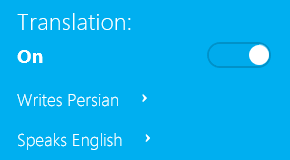 Before you begin a chat, you can toggle the translation feature on or off via a button underneath your contact’s profile, which is located to the left of the chat window. When you first turn it on, Skype will ask you to confirm the settings for written and spoken languages. You can change these later.
When you send your first message, your conversation partner will receive the following message in English and in their written language.
***You’re about to get an automatically translated message. The message may be recorded by Microsoft in order to improve the quality of the automatic translation service.***
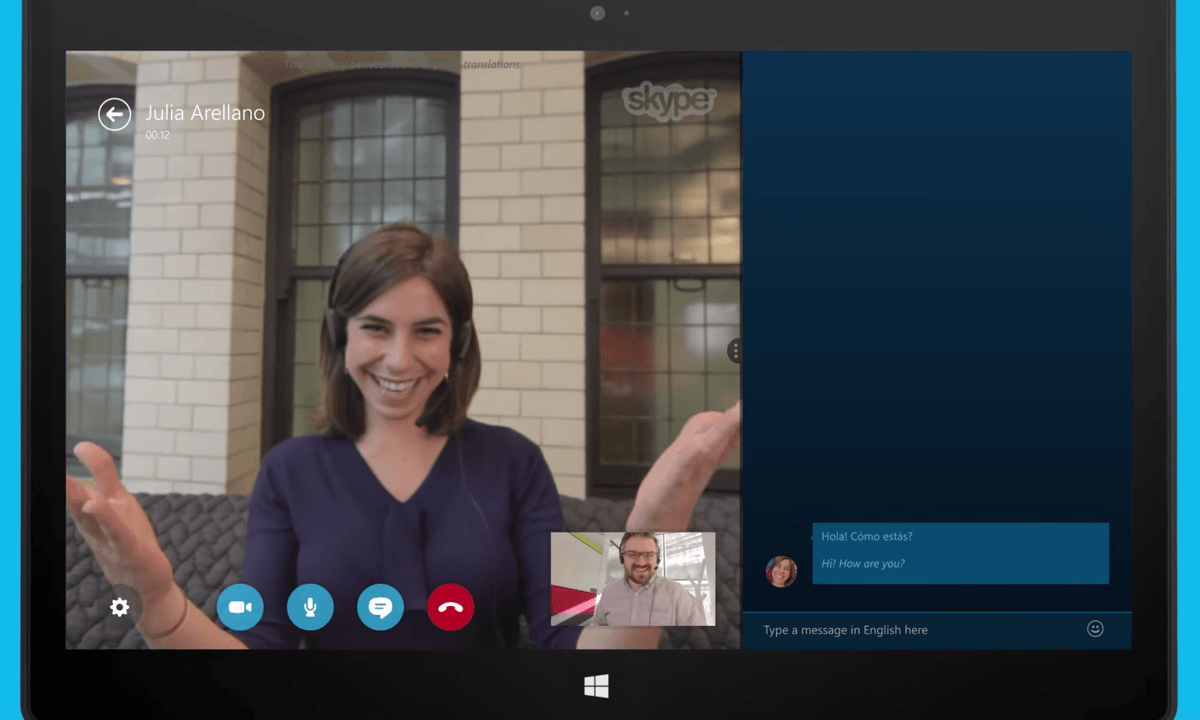
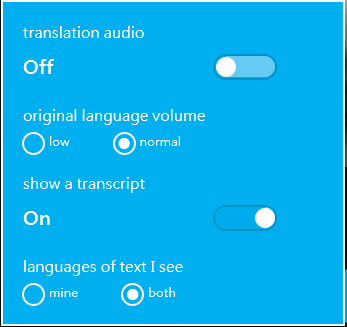 Something similar happens when you start a voice chat. The translator voice will explain the procedure to your partner before the two of you can begin your conversation. Per default, both the audio translation and the text transcript are turned on. You can change these settings via the cogwheel icon in the bottom left.
For best results in voice chat, Skype Translator recommends to wear a headset. Moreover, both you and your partner need to set the “Who can call you?” privacy setting to “Everyone.” Microsoft warns that it can take much longer to connect a translated call than a normal call. Despite being patient, we weren’t able to establish a voice chat call using Skype Translator when the test candidate was using Skype on Android. Also, we weren’t able to accept voice calls, although this may be due to the fact that we didn’t uninstall other versions of Skype on our test machine. Note that if your partner doesn’t have Skype Translator, you need to initiate the call, otherwise the translation feature won’t be available.
Whether you converse via text or voice, both you and your partner will see the original text that was entered or recorded and the resulting translation. This helps you catch mistakes and correct them. While you’re having a voice chat, you can also enter text messages and they will appear as part of the transcript.
If speech recognition or translation isn’t working well during your call, you can report this via the menu option that appears when you hover with the mouse over the text bubble.
https://www.youtube.com/watch?v=YvUk4EBV2FI
For meetings, the voice transcript can be extremely useful, even if you don’t make use of the translations. You can even use it when the language is set to English for both conversation partners.
Should your conversation partner decide to speak English although their spoken language is set to Spanish, the transcript will be comical. The automatic translator isn’t smart enough to notice your partner started speaking in another language and thus will continue to listen for Spanish words in spoken English and translate them back to English. Surprisingly, it recognizes a lot of valid words, but of course it will be complete nonsense.
Once your call is finished, you can download the voice transcript as a nicely formatted HTML file.
Text translation is good, but could be better
As mentioned above, Skype Translator Preview has some bugs, especially when setting up voice calls. The text translator on the other hand worked reliably and supports over 40 languages. We tested it with native speakers of Catalan, German, Hindi, Hungarian, Persian, and Turkish. Unfortunately, we weren’t able to find a candidate to test Klingon with us.
In terms of translation quality, it’s not better or worse than any other standard technology aided translator. Some of our test candidates told us the translations had flaws, but they could understand the essence (German, Persian, and Spanish). Others said the translations were pretty bad (Turkish, Hindi, Hungarian). Two of them remarked it was similar to Google Translate. Apparently, the quality depends on the language and how well developed the translation algorithms are.
Skype Translator’s text translations rely on the Bing Translator algorithm. On most of the tests that have been done by various other people so far, Google Translate offered better translations than Bing Translator. One study thoroughly tested various aspects of machine translation and found that Google Translate produced the best results. While you as a user cannot change the supporting algorithm, it at least indicates Microsoft can improve on the beta over time.
Translation technology is promising, but definitely still in beta
Voice translation currently only supports English and Spanish. Our multilingual Catalan tester agreed to play along and we thought it worked quite well. It takes some discipline to wait for the translator to finish before you begin to speak. Surprisingly, the translator was able to record fairly long stretches of spoken word. If you’re using a microphone and speak clearly, the transcript portion is almost flawless.
Taken together, we thought the preview was promising and it’s a nice aid when you have to converse with someone whom you don’t share a language with. At this point, the quality of the translation leaves much to be desired and won’t replace foreign language skills anytime soon. The voice transcript feature, however, would be nice to have in any version of Skype, regardless of whether or not a translation is desired.
Meanwhile, Microsoft’s business communication tool Lync is being re-branded as Skype for Business in Office 2016. We wouldn’t be surprised if we saw some of these features appear in the business version of the new Office suite.