
  1. Home
  2. Computing
  3. Mobile
  4. Legacy Archives

Google begins integrating Waze’s real-time traffic reports into its Maps app

Add as a preferred source on Google

Following Google’s acquisition of socially sourced navigation app Waze back in June, the Mountain View company has now started to incorporate some of its data into Google Maps.

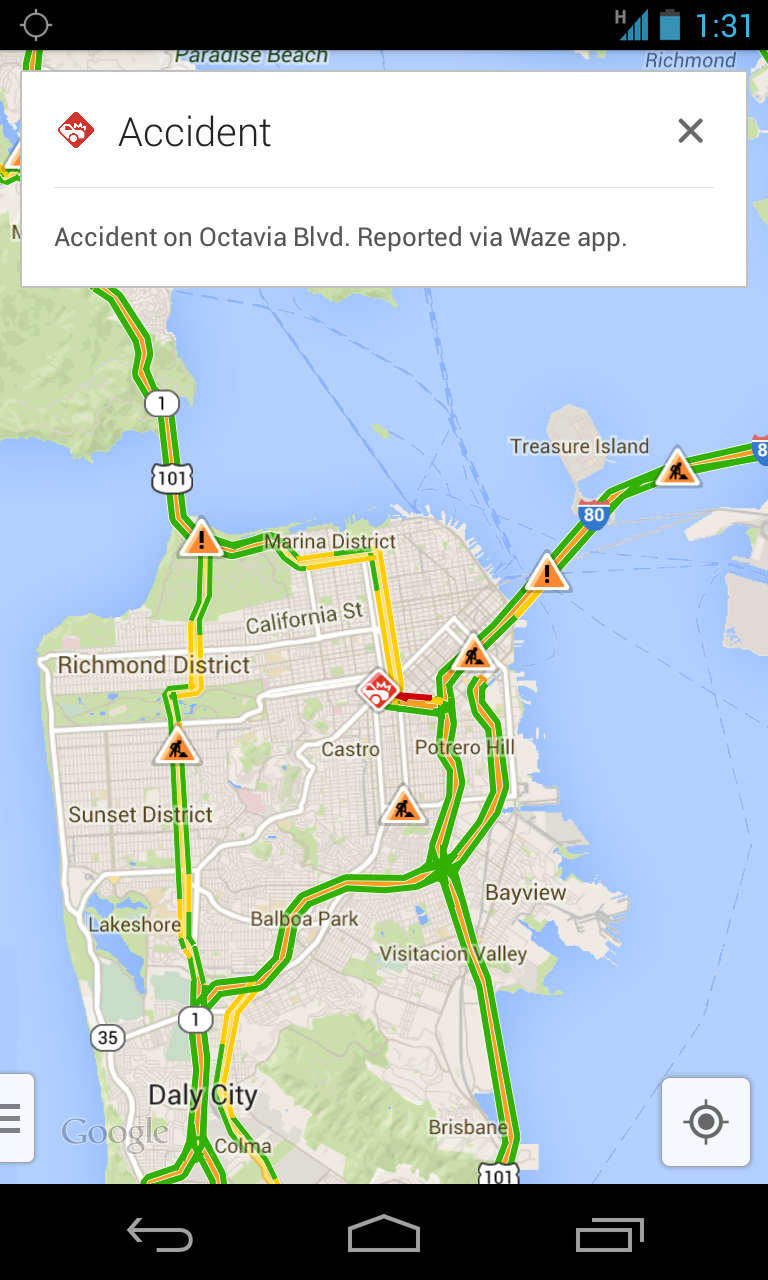
“Users of Google Maps for mobile will now benefit from real-time incident reports from Waze users,” VP of Google Maps Brian McClendon said in a blog post announcing the news. So when Wazers (yes, that’s the name given to members of the Waze community) report, for example, accidents, construction, and road closures on Waze, “the updates will also appear on the Google Maps app for Android and iOS in Argentina, Brazil, Chile, Colombia, Ecuador, France, Germany, Mexico, Panama, Peru, Switzerland, UK and the US.”google_maps_waze
Recommended Videos

Users of the Waze app – of which there are said to be around 50 million – will also see some changes. Both the Android and iOS versions of the free app now incorporate Google Search, meaning Wazers  “will now have access to even more search results when navigating.”

Also, Street View and satellite imagery have been incorporated into the Waze Map Editor “to build out the map and make it easier to correct map errors reported by the community.”

With Maps now making use of Waze’s up-to-the-minute crowd-sourced traffic information, the app will suddenly prove itself to be a whole lot more useful for drivers using it to make their way around.

Waze gained a lot of exposure in September last year in the wake of Apple’s disastrous launch of its own Maps app. In an open letter to disgruntled users of the tech giant’s troubled maps offering, Apple boss Tim Cook suggested users give Waze a try. 

“While we’re improving Maps, you can try alternatives by downloading map apps from the App Store like Bing, MapQuest and Waze,” Cook said at the time. Nine months later, Google bought the company for around $1 billion.

Almost a year on, Apple Maps is showing signs of improvement, though it could be years before it catches up with Google’s broad offering. However, the battle for in-car dominance is certainly on, with the Cupertino company recently announcing iOS in the Car, an initiative involving a dozen automakers that will allow drivers to, for example, ask Siri for directions with the navigation results appearing on the vehicle’s LCD screen.

Trevor Mogg
Contributing Editor
Not so many moons ago, Trevor moved from one tea-loving island nation that drives on the left (Britain) to another (Japan)…
Your broken Windows 11 PC no longer needs a USB drive to come back to life
The Windows recovery tool we’ve all been waiting for is finally here.
Windows 11

If your Windows PC has ever refused to boot, you know the panic that follows. You scramble to find another computer, download the Windows installer, and create a bootable USB drive just to get your machine running again. Microsoft wants to end that headache with a new feature called Cloud Rebuild.

As reported by Windows Central, Cloud Rebuild lets you perform a full reinstall of Windows 11 without USB media or a custom image. Better yet, it doesn’t depend on your current installation being healthy, so it can even rescue a PC that won’t start.

Read more
Granola’s new voice typing feature lets you ditch the keyboard
Why type when you can just say it? Granola’s new trick works in any app.
Granola voice typing feature

Granola is an AI notepad for people whose calendars are packed with meetings. It quietly captures your calls using your computer’s audio, which means no awkward bot sitting in your meetings. By the time you hang up, it has already sorted out your notes, to-dos, and follow-ups.

Now, Granola wants to help you outside your meetings too. The company has added a new voice typing feature that lets you speak instead of type in any app you use. Best of all, every Granola user gets it at no cost, and there’s no cap on how many words you can dictate.

Read more
Google Gemini can now create and edit PDFs, documents, and more right inside your chat
No more downloading, editing, and uploading files all over again.
Gemini AI on a phone.

Google has recently released many updates introducing new features to its AI suite, and the latest one could save users dealing with documents a lot of tedious work. The company has added the ability to create, preview, and edit documents, PDFs, presentations, spreadsheets, and code directly within Gemini conversations. Previously, you could generate and download files, but now you can work on them without leaving the chat.

You can now make changes without starting over

Read more