1. Home
  2. Phones
  3. Computing
  4. Mobile
  5. Web
  6. Evergreens

Digital Trends may earn a commission when you buy through links on our site. Why trust us?

How to turn off Restricted Mode on YouTube

Add as a preferred source on Google
 

YouTube’s Restricted Mode feature is useful if you’d rather not view videos with mature content. It also prevents children from viewing such content when they use a web browser or Google’s app. But what happens when you no longer need this restriction?

Recommended Videos

This guide will teach you how to turn off Restricted Mode on YouTube in any web browser and through Google’s YouTube app for mobile. Simply follow these instructions again to toggle it back on if you want to enable Restricted Mode later.

Note: Turning off Restricted Mode for one device or browser doesn’t disable it for all devices and browsers since changes in this setting don’t automatically sync across devices or different web browsers. If you want to turn off Restricted Mode across all devices and browsers, you need to disable it for each device and browser individually. You can also turn Restricted Mode on and off for individual user profiles within any browser.

Desktop method: Any web browser
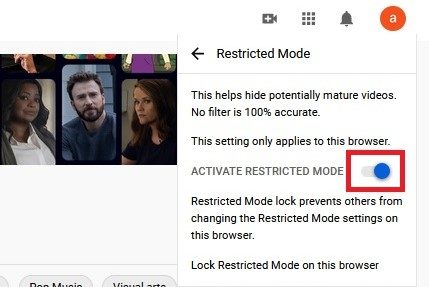
YouTube Restricted Mode desktop website menu
screenshot

Step 1: Visit YouTube.com via your chosen browser and log in to your account if you haven’t already.

Step 2: Click on your profile picture icon in the top right corner.

Step 3: Select the Restricted Mode: On setting located at the bottom of the drop-down menu.

Step 4: The Restricted Mode menu appears. Click the blue toggle next to Activate Restricted Mode to turn Restricted Mode off. The YouTube webpage should then refresh itself with its Restricted Mode feature turned off.

Mobile app method: Android and iOS
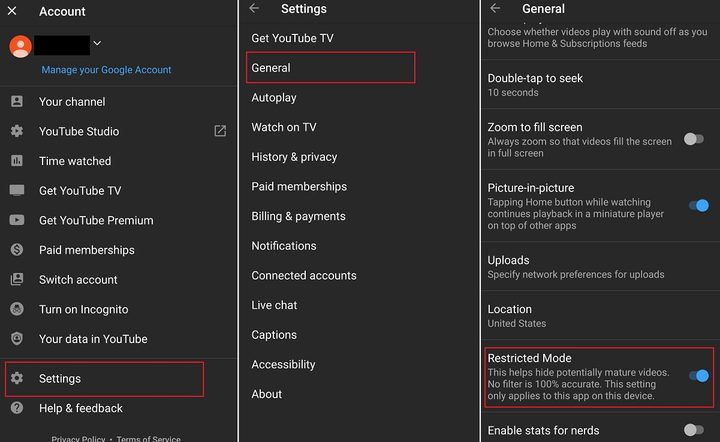
series of three Restricted Mode screenshots on Android YouTube mobile app
screenshot

Step 1: Open the YouTube mobile app for Android or iOS and select your profile picture icon in the top right corner.

Step 2: On the next screen, select Settings.

Step 3: If you’re working from an Android device, all you need to do is select General and move on to the next step.

For iOS device owners, there won’t be a General section. Instead, you should search down the Settings screen until you find the Restricted Mode setting option. It’s likely in between the Dark Theme and Play HD on Wi-Fi Only categories. With just one click, you can switch the Restricted Mode toggle off.
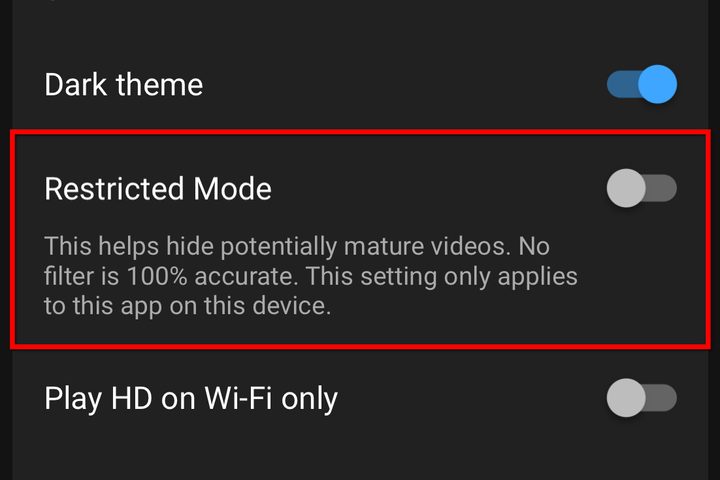
YouTube iOS Restricted Mode
Image used with permission by copyright holder

Step 4: Android phone users should look for their Restricted Mode setting under General for the final step. That setting switch will be along the bottom of the screen. A few additional icons surround it, but you can quickly toggle it on or off after spotting it.

If you want to enable or restrict additional features in the future, follow the same steps to censor mature content and more by adjusting the toggle buttons.

Anita George
Anita George has been writing for Digital Trends' Computing section since 2018. So for almost six years, Anita has written…
Samsung’s July 22 Galaxy Unpacked event will be all about foldables, here’s how you can tune in live
Samsung has confirmed the date for its next Unpacked show. Here's how you can watch it live.
Samsung Galaxy Unpacked July 22 invite featured

Samsung is heading back to London for its next Galaxy Unpacked event, and this time the spotlight is squarely on foldables. The company has sent out formal invites for a July 22 show built around the tagline "A New Shape Unfolds," a clear signal that new additions to the Galaxy Z lineup are the main event. If you want to watch the announcement as it happens, here's everything you need to know.

When and where to watch

Read more
Samsung sets July 22 date for Unpacked to launch Galaxy Z Fold 8 series foldable phones
Samsung has already confirmed that apart from the usual book-style and clamshell-style foldable phones, it is launching a third new form factor.
Samsung Unpacked official invite.

Samsung has just announced the date for its next Galaxy Unpacked event, where the company is expected to launch a new slate of foldable phones and wearable devices. This time around, the event is scheduled for July 22, and it's moving to London. As usual, it will also be live-streamed for those watching at home through Samsung's official website, its newsroom portal, and the brand's official YouTube channel. The event will kick off at 2 p.m. BST, 9 a.m. EDT, and 3 p.m. CEST.

What to expect at Galaxy Unpacked 2026?

Read more
Budget smartphones are getting squeezed, and AI is one reason why
Analysts warn shipments of phones under $400 could drop by more than 22% this year.
Person holds Pixel 9a in hand while sitting in a car.

For years, smartphone buyers have had it pretty good. Even budget phones now offer fast processors, high-refresh-rate displays, and cameras that would've seemed flagship-worthy just a few years ago. But that trend may be about to slow down, and AI is playing a big role.

According to a new report from Omdia, global shipments of smartphones priced below $400 are expected to decline by more than 22% in 2026, largely because the cost of DRAM and NAND memory continues to rise. As AI features demand more memory across the industry, manufacturers are finding it increasingly difficult to build capable budget phones without sacrificing their already razor-thin margins.

Read more