  1. Home
  2. Computing
  3. Deals

This HP Omen gaming PC is $300 cheaper for 4th of July

Add as a preferred source on Google
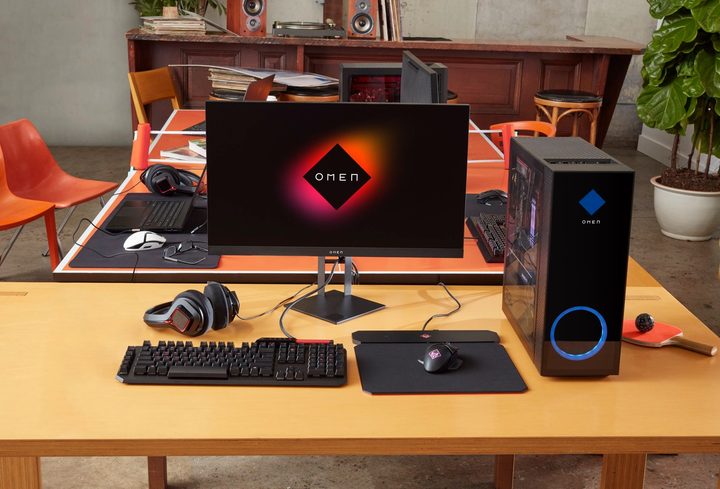
An HP Omen 25L setup on a desk with external gaming monitor.
HP

There comes a time in every gamer’s life when one must ask themselves: Is my PC setup working for me? And if you find that the answer is no, then it’s probably time to upgrade your gaming rig. Now the only issue is coming up with the dough and sifting through all the gaming PC deals out there. Fortunately, your pals at Digital Trends are always on the lookout for the best promotions, and we found this killer deal at Best Buy.

For a limited time, you can purchase the HP Omen 25L Gaming Desktop for $1,350. Normally priced at $1,650, you can go ahead and put that $300 you saved toward a great monitor by checking out all the best monitor deals we found this week.

Buy Now

Why you should buy the HP Omen 25L

When it comes to any PC, it pays to know what’s running the show underneath the hood. In the case of the HP Omen, the desktop is powered by an Intel Core i7-14700F with 32GB of DDR5 memory. All your GPU needs are handled by an NVIDIA GeForce RTX 4060 Ti, and you’ll have up to 2TB of internal storage to work with. Those are solid numbers on paper, but how does it translate to reality? Quite nicely.

As any PC gamer will tell you, lightning-fast performance is key, especially when playing demanding online titles like Helldivers 2 and Counter-Strike 2. So the fact that the Omen’s i7 CPU contains 20 cores and reaches top clock speeds of 5.4GHz is pretty extraordinary. Even the most action-heavy sequences from the most bandwidth-hungry games should look amazing; both from a picture quality and frame-to-frame point of view. 

As far as ports go, the HP Omen is equipped with everything from USB-C and USB-A inputs to Ethernet and 3.5mm auxiliary for a gaming headset. HP also went out of its way to deliver a chassis that optimizes heat dissipation and overall noise. 

Not every gaming PC sale is as good as this one, and Best Buy deals only tend to last for a week at most. If you think now may be the time to invest in an updated rig, don’t hesitate to do so!

Buy Now

Michael Bizzaco
Former AV Contributor
Michael Bizzaco has been selling, installing, and talking about TVs, soundbars, streaming devices, and all things smart home…
Asus ExpertBook Ultra review: A dreamy ultra-thin machine that surprised me with raw power
If thin and light is what you value the most, this one will serve you perfectly, without the obvious performance compromises.
Asus ExpertBook Ultra laptop

See at Amazon

Quick Review

Read more
I found a free Mac diagnostic app that tells you what Apple’s tools don’t
It can check your Mac’s storage, memory, battery, and network
Techtool Lite UI screenshot

Macs have a strong reputation for being smooth and reliable, and Apple’s tight control over hardware and software is a big reason for that. Use one long enough, however, and you may still run into slowdowns, freezes, strange behavior, or that familiar feeling that something is simply off.

Apple’s own tools can help, but only to a point. Disk Utility is useful for storage-related checks, but it does not give you a wider picture of your Mac’s overall health. I recently came across Techtool Lite, a free diagnostic and maintenance app from Micromat that looks at more than just your drive.

Read more
Claude redefined my bond with Macs. I am building my own apps and it’s a bliss.
I talk to Claude. It builds me apps. It's as simple as that!
Claude AI on Mac.

A few days ago, one of my colleagues asked me a favor. They wanted a few iOS and macOS screenshots turned into a mockup image where the UI is rendered on an iPhone and a MacBook. The problem? It was 3 am PST, which meant asking one of my design team colleagues was out of the question. 

Now, there are plenty of online tools that will do it, but you either have to pay for a subscription (as in Canva), or sign up to buy usage credits after a few free trials. Moreover, these editors limit you to a handful of design presets. I turned to Anthropic’s Claude, and within half an hour, I had a screenshot-to-mockup editor built for the entire team to use. Take a look:

Read more

