  1. Home
  2. Computing
  3. Deals

You don’t want to miss this crazy Samsung OLED curved monitor deal

Add as a preferred source on Google
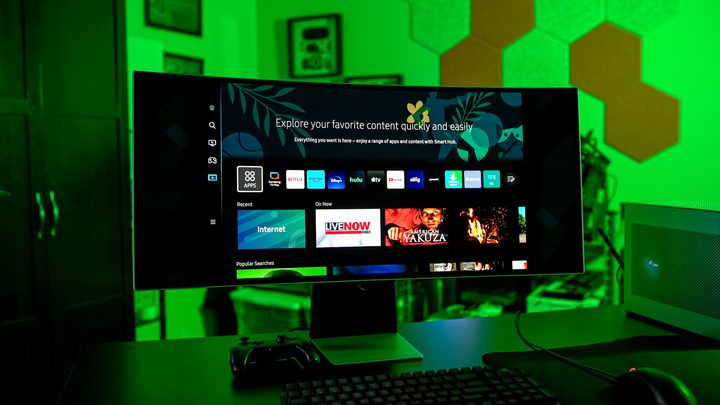
Operating system on the Samsung Odyssey OLED G8.
Jacob Roach / Digital Trends

When it comes to PC gaming, you’ll want a monitor that provides as much visual real estate as possible. After all, games these days have immense playing fields with tons of detail packed into every nook and cranny. It also doesn’t hurt to have a display that supports exceptional motion clarity and lag reduction tech. Fortunately, there are numerous flagship monitors that deliver crystal-clear picture, but many of these products are expensive. This is why we’re always on the lookout for monitor deals, and we found an awesome one from Samsung.

Right now, when you purchase the Samsung 34-inch G85SB Curved OLED Gaming Monitor through Samsung, you’ll pay $800. At full price, this big screen typically sells for $1,200. 

Buy Now

Why you should buy the Samsung 34-inch G85SB 

For those unaware, Samsung makes some of the best TVs and monitors for 2024. The 34-inch G85SB is a curved Odyssey OLED with 3440 x 1440 resolution and a 175Hz native refresh rate. That pixel count is a few rungs higher than traditional HD, which means all your favorite games (even some of the older titles) are going to look better than you’ve ever seen them before. This is also thanks in part to Samsung’s Neo Quantum Processor, a picture engine that prioritizes color and contrast accuracy. 

If you’re the kind of gamer who enjoys fast, action-heavy hits like Helldivers 2, the G85SB is designed to give you the best frame by frame performance. AMD FreeSync Premium Pro is onboard to cut down on lag and improve response time, and with connections like USB-C and Micro HDMI 2.1, you’ll be future-proofed for most new PCs and consoles. We’re also big fans of the Core Sync technology and Core Lighting+, which mirrors in-game lighting to the RGB fixture on the back of the monitor!

It’s hard to say how long this Samsung sale is going to last, so it’s best to take advantage while you still can. Save $400 when you purchase the Samsung 34-inch G85SB Curved OLED Gaming Monitor. We also recommend checking out some of other Samsung deals and gaming PC deals we found this week.

Buy Now

Michael Bizzaco
Former AV Contributor
Michael Bizzaco has been selling, installing, and talking about TVs, soundbars, streaming devices, and all things smart home…
Topics
Asus ExpertBook Ultra review: A dreamy ultra-thin machine that surprised me with raw power
If thin and light is what you value the most, this one will serve you perfectly, without the obvious performance compromises.
Asus ExpertBook Ultra laptop

See at Amazon

Quick Review

Read more
I found a free Mac diagnostic app that tells you what Apple’s tools don’t
It can check your Mac’s storage, memory, battery, and network
Techtool Lite UI screenshot

Macs have a strong reputation for being smooth and reliable, and Apple’s tight control over hardware and software is a big reason for that. Use one long enough, however, and you may still run into slowdowns, freezes, strange behavior, or that familiar feeling that something is simply off.

Apple’s own tools can help, but only to a point. Disk Utility is useful for storage-related checks, but it does not give you a wider picture of your Mac’s overall health. I recently came across Techtool Lite, a free diagnostic and maintenance app from Micromat that looks at more than just your drive.

Read more
Claude redefined my bond with Macs. I am building my own apps and it’s a bliss.
I talk to Claude. It builds me apps. It's as simple as that!
Claude AI on Mac.

A few days ago, one of my colleagues asked me a favor. They wanted a few iOS and macOS screenshots turned into a mockup image where the UI is rendered on an iPhone and a MacBook. The problem? It was 3 am PST, which meant asking one of my design team colleagues was out of the question. 

Now, there are plenty of online tools that will do it, but you either have to pay for a subscription (as in Canva), or sign up to buy usage credits after a few free trials. Moreover, these editors limit you to a handful of design presets. I turned to Anthropic’s Claude, and within half an hour, I had a screenshot-to-mockup editor built for the entire team to use. Take a look:

Read more

