  1. Home
  2. Computing
  3. Audio / Video
  4. Legacy Archives

Toshiba’s 3D laptop uses webcam to track eyes, eliminates glasses

Add as a preferred source on Google
Image used with permission by copyright holder

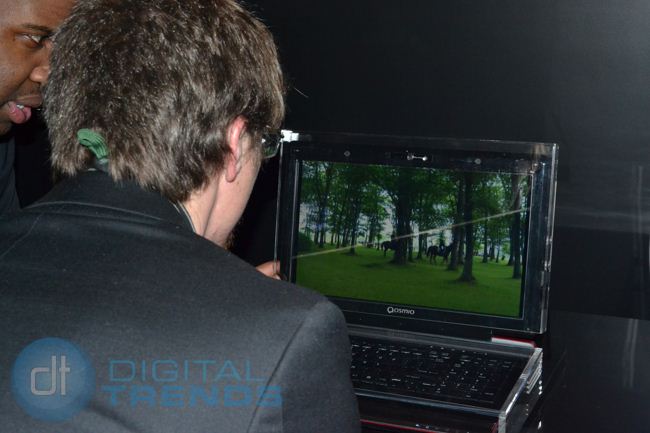
Following the anti-glasses backlash from involuntarily bespectacled 3D TV viewers everywhere, glasses-free TVs are riding the angst and taking CES 2011 by storm. While most companies at the show use the same parallax barrier technology, which spits out a number of fixed 3D “zones” around the TV, Toshiba has taken a different tack with its latest 3D laptop, which actually uses a webcam intelligently target the 3D effect on the fly. We lent our eyes to see how this seemingly novel concept works in the real world.

Toshiba had the demo set up on a Qosmio notebook, but the production version due out later this year could be on any Toshiba notebook (a Qosmio, though, is likely, according to our rep). As you approach the screen, the notebook’s tracking technology locks onto your eyes in a matter of seconds – even with glasses on. As they catch your eyes, the diverging images on the screen suddenly converge and form a 3D image, though a pretty poor one from a quality standpoint. Objects had a very watery, ethereal feel, and toward the edges of the screen, very thin objects like trees seemed to break apart and lose the cohesive 3D feel. This isn’t a final product, but there’s no question that it lacks the quality of displays that use active or passive glasses.

Image used with permission by copyright holder

A demo screen on the notebook showed us a monochrome version of the webcam feed, with yellow boxes creepily overlaid on the eyes being tracked. While the software managed to plot them accurately, an obvious processing delay causes the boxes to visibly lag behind the face when you move around, and the 3D picture distorts accordingly. Even the smallest wag of your head throws causes the picture to momentarily lapse out of 3D while the system adjusts. It’s quick, but nowhere near the instant speeds it would need to create truly uninterrupted viewing.

Recommended Videos

What eye-tracking 3D lacks in quality and comfort (locking your head in front of the screen for a 30-minute show wouldn’t really fly), it makes up in convenience. The final production model should be able to flick it on and off at a moment’s notice, which could make it practical, at the very least, for viewing 3D photographs and movie trailers without digging out a pair of glasses. Still, the less-than-dazzling picture quality and delayed head tracking will need to be resolved before this technology grows legs that will carry it beyond early adopters.

Nick Mokey
As Digital Trends’ Editor in Chief, Nick Mokey oversees an editorial team covering every gadget under the sun, along with…
DuckDuckGo’s browser now blocks the YouTube ads everyone hates
DuckDuckGo adds a Brave-like YouTube ad blocking feature
Text, Aircraft, Airplane

DuckDuckGo has spent the past few months gaining fresh attention as more users look for alternatives to Google’s increasingly AI-heavy Search experience. Now, the privacy-focused company is adding a feature that could make its browser even more tempting for everyday use. DuckDuckGo says its browser can now block most video ads, including those on YouTube, when a video is playing inside the browser.

What’s happening?

Read more
ChatGPT Live could make talking to AI feel straight out of the movies
We might finally get the AI sidekick sci-fi movies promised
Elderly women using ChatGPT live on a smartphone

AI voice assistants have been chasing the sci-fi dream for years, but they still have a hard time holding a conversation with humans. Most voice systems still need clear turns, clean pauses, and a few seconds before they respond. OpenAI is now rolling out GPT-Live, a new voice model for ChatGPT Voice that is designed to make those exchanges feel faster and less scripted.

The main upgrade is what OpenAI calls a full-duplex architecture. In simpler terms, GPT-Live can listen and speak at the same time. It continuously processes what the user is saying while also generating its own response, allowing it to decide when to talk, when to pause, when to keep listening, and when to use a tool.

Read more
A broken Galaxy Fold 5 just became the Pixel desktop future I want Google to steal
A broken Galaxy Fold 5 became a tiny PC because Samsung already built the desktop mode Google keeps treating like a side quest.
Desktop mode within Android 16.

A broken Galaxy Fold 5 should be a sad little monument to modern gadget math. One busted outer display, one repair bill nobody wants to inspect too closely, and suddenly a powerful foldable starts heading toward a drawer. Instead, a Redditor turned one into a glowing acrylic DeX box with spare parts, fans, a USB hub, and the kind of LED lighting that makes every homebrew computer look mildly illegal.

https://www.reddit.com/r/SamsungDex/comments/1upica7/fold_5_dexbox/

Read more