  1. Home
  2. Computing
  3. Mobile
  4. Legacy Archives

Windows 8 will be able to run Windows Phone apps, says Nvidia

Add as a preferred source on Google
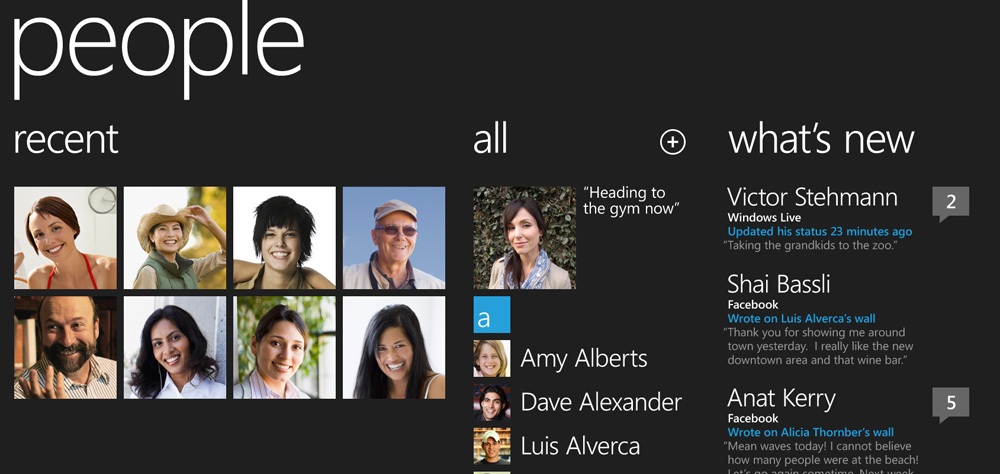
windows-phone-7-people-hub-stretched-out
Image used with permission by copyright holder

If this rumor isn’t true, we’d like Microsoft to file it under “to do.” Speaking with reporters, Nvidia CEO Jen-Hsun Huang said that he believes Windows Phone 7 apps will be able to run on Windows 8, Microsoft’s upcoming PC and tablet operating system. The prediction came with a host of other statements by the outspoken CEO, according to CNET

The fact that Microsoft hasn’t yet announced this capability, if it is indeed true, is puzzling, as it would no doubt be a boon to Windows Phone 7 app development, which is already trudging forward at a healthy pace despite languid sales of WP7 devices at retail. The Windows Phone Marketplace surpassed 30,000 apps about a week ago.

Recommended Videos

This news would also mean Microsoft isn’t abandoning Silverlight as WP7 apps are developed using Silverlight and XNA. Previously, Microsoft has indicated that new touch-based apps would be HTML5. It will be interesting to see if Microsoft takes a Google approach to scaling and allows developers to create apps that run in different ways when on larger resolution devices. As seen above, Windows Phone apps somewhat naturally lend themselves to scaling. If so, could developers target Windows 8 and easily scale down their efforts as well? We hope so.

The more Microsoft can leverage cooperation between its platforms, the better. Both Windows 8 and Windows Phone face stiff opposition and will need strong and varied app support. We imagine Microsoft is keenly aware of this reality, though some of the design team’s recent choices have us doubting the direction of the new OS. Still, if Microsoft doesn’t do this, then somebody else will. Phones and desktops are about to merge. 

Would you be more open to a Windows Phone if it could fully cooperate with and run variations of your desktop software? 

Jeffrey Van Camp
As DT's Deputy Editor, Jeff helps oversee editorial operations at Digital Trends. Previously, he ran the site's…
The refurbished MacBook Neo may be your best way around Apple’s price hike
MacBook Neo has hit Apple’s refurbished store after its price increase
Student using MacBook Neo in classroom.

The MacBook Neo launched in March as Apple’s most affordable notebook, but it has already been caught in the company’s recent price hike. The base model with 8GB of RAM and 256GB of storage now costs $699, while the 512GB version with Touch ID is priced at $799.

Just days later, Apple has already listed refurbished MacBook Neo models on its online store, giving buyers a cheaper official option, though the savings are not as generous as you might expect.

Read more
This cross-device clipboard app solves the copy-paste problem I keep running into on my Mac
ClipboardAI keeps a searchable history of everything you copy
Text, Electronics, Mobile Phone

I have lost count of how many times I have copied something important, copied another thing before pasting it, and then realized the first item was gone. It is a small frustration, but it happens often enough to become annoying. I recently came across ClipboardAI, which caught my attention because it goes beyond Apple’s built-in clipboard by saving copied items into a searchable history.

Instead of replacing the last thing you copied every time, ClipboardAI keeps a searchable record of copied text, links, codes, email addresses, phone numbers, addresses, and images across iPhone, iPad, and Mac. That means an older clip does not disappear just because you copied something new.

Read more
If you miss the feel of paper in the digital age, this app gives your Mac’s screen a textured look
A paper-like screen overlay could make long work sessions feel less harsh.
Advertisement, Poster, Electronics

Most screen-comfort tools work by changing color temperature. Apple’s Night Shift makes the screen warmer, often giving everything an orange tint. Paperman is an interesting alternative because it adds a subtle paper-like texture over the display instead.

The app is available for Mac and Windows, and it is designed to make a screen look closer to paper, matte glass, or an e-ink display. It softens the harsh contrast and reduces the glossy look of modern screens during long reading or writing sessions.

Read more


