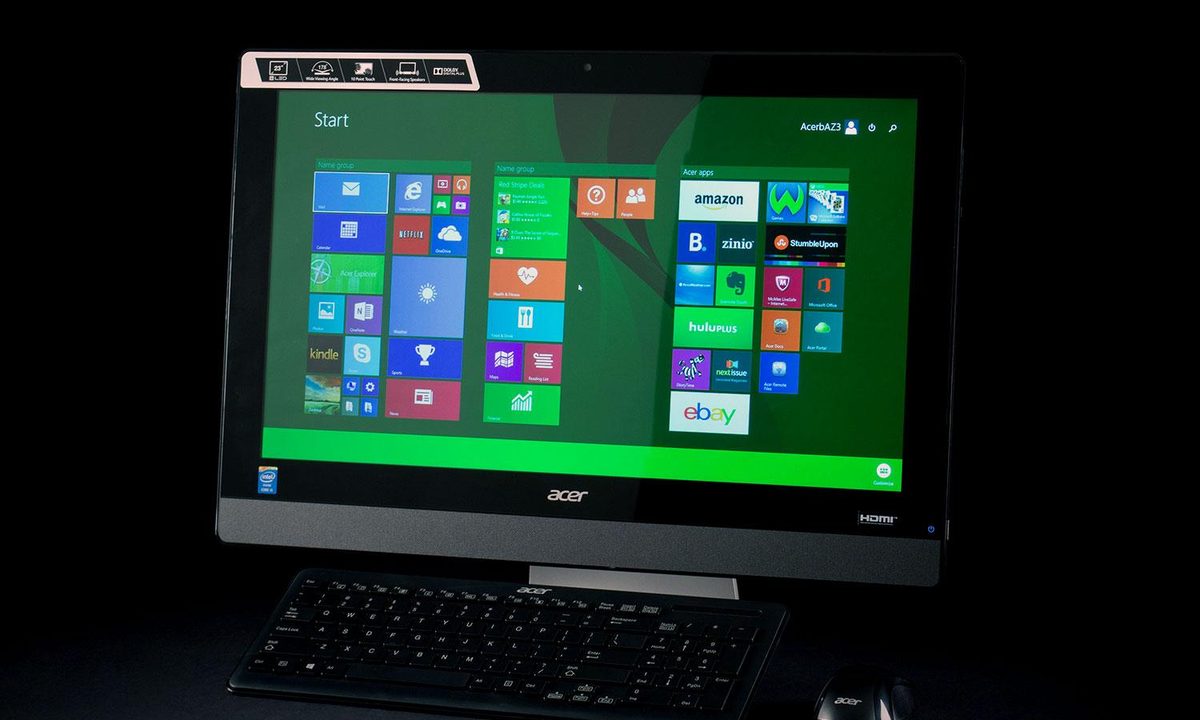

“You'll be hard pressed to buy a better AIO than the Acer Aspire AZ3-615.”
- Affordable price
- Lots of connectivity
- Good display
- Speedy performance
- Extremely glossy screen
- No VESA mount
“Why you can trust Digital Trends – We have a 20-year history of testing, reviewing, and rating products, services and apps to help you make a sound buying decision. Find out more about how we test and score products.“
Anyone looking to spend around $1,000 on an all-in-one desktop has a wide selection of quality choices to pick from these days. Almost every PC maker has something available for about a grand, usually with a 23-inch display. Even Apple now flirts with this range, thanks to its new 21.5-inch $1,099 iMac.
This is the competitive field that Acer’s new mid-range AIO, the AZ3-615, must deal with, but it looks well equipped for this battle. Our review unit arrived with an Intel Core i5-4570T processor, 8GB of RAM, and a 1TB mechanical hard drive. A quick survey of online retailers indicates that this gives Acer’s latest an edge on paper. The $949.99 price tag is more than reasonable for such a system.
So far, so good, but Acer’s history in this segment is rocky. This model’s predecessor, the AZ3-605, suffered from boring design, and a lackluster processor that failed to keep up with competitors. Does the AZ3-615 differ from its grandfather, or is it just a chip off the ol’ block.
It’s all in the base
The AZ3-605’s worst aesthetic affront was its simplistic kickstand. A few years ago, that design was a bit unusual, perhaps even premium, but it takes up more space than is necessary, and makes ergonomic adjustment impossible. Today it feels cheap, and we don’t like seeing it on anything that costs close to a thousand bucks.
Thankfully, the AZ3-615 takes a different approach, and provides a beefy metal stand that holds the system firmly in place, despite its small footprint. Tilt adjustment is available, and a slot in the back of the stand helps with cable management. One small downside is a missing VESA mount, which makes switching to a third-party stand impossible.


Metallic base aside, the AZ3-615 looks plain. The front of the system consists mostly of black plastic, though a silver speaker grille below the display adds some aesthetic variety. The rear panel is made of plastic as well. Still, we can’t complain about build quality. Panel gaps are tight, and the system feels absolutely rigid when the screen is moved or adjusted.
Connectivity consists of five USB ports, two of which are 3.0, HDMI in and out, microphone in, audio out, a card reader, and an Ethernet jack. Wireless support is restricted to 802.11 b/g/n, but Bluetooth is here. A DVD writer is part of the package as well. We’d prefer to see 802.11ac, but overall, this is a robust selection that covers everything we want to see in a mid-range AIO.
No keyboard complaints
Acer wisely bundles a wireless keyboard and mouse with the Aspire AZ3-615. Both operate by communicating with a single dongle that connects to a USB port near the top of the system. This keeps the majority of ports, which are placed in more convenient locations, usable.
Both peripherals are basic, but they do their jobs well. The keyboard is full-sized, includes a numpad, and offers a variety of hotkey functions, including volume adjustment. The mouse, meanwhile, only has three buttons, and uses infrared technology. We’d like to see an invisible laser, but that’s a small complaint given the system’s $950 MSRP.
Glossy, but good
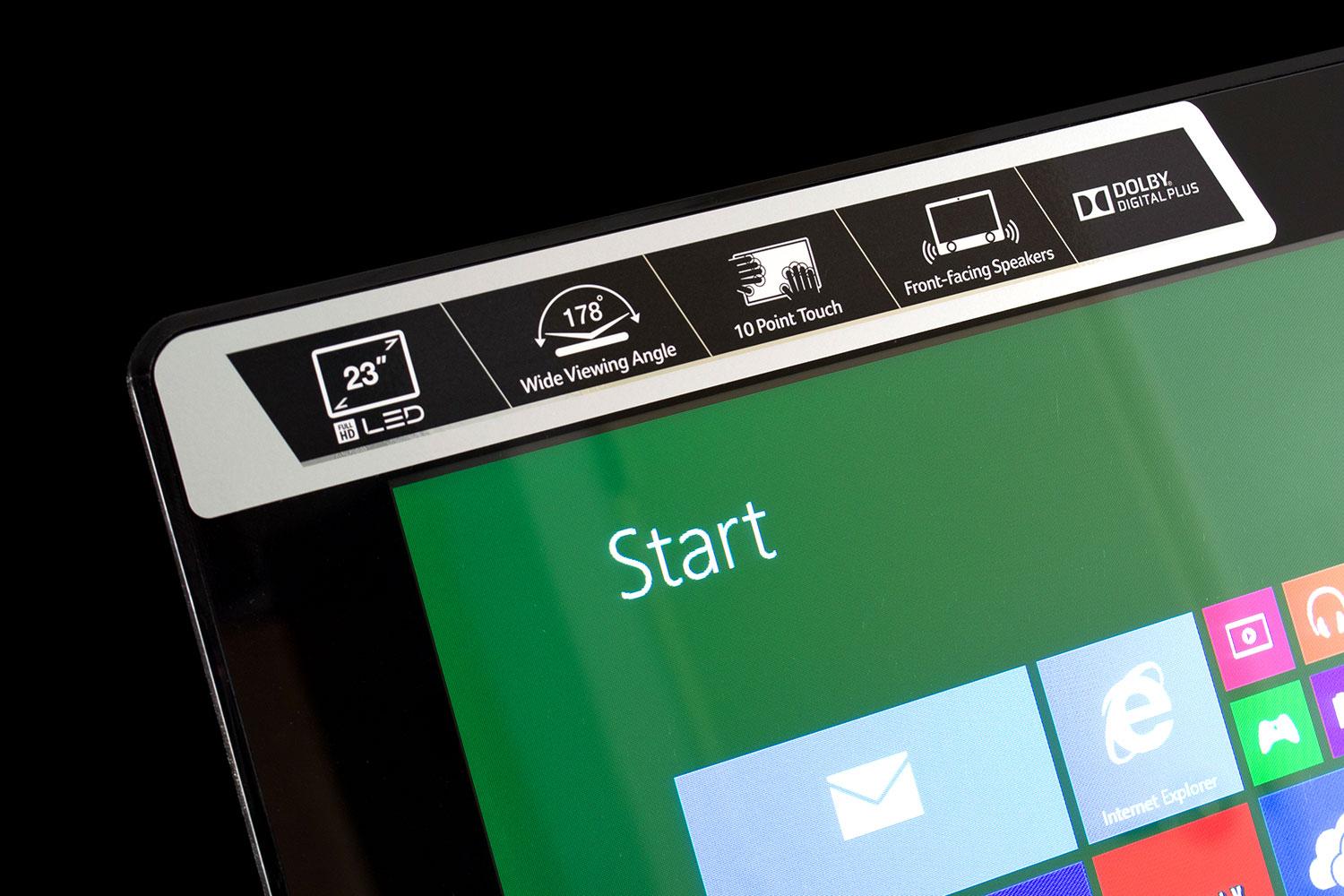
Acer ships the AZ3-615 with a mirror-like touchscreen that easily reflects light. While this is distracting, the backlight’s maximum output of 227 lux mostly negates the problem. Only direct light sources cause undefeatable glare.
The Acer AZ3-615 is what a respectable mid-tier AIO should be.
We noticed the display’s positive qualities while watching Netflix and movie trailers on YouTube. The contrast ratio is not high enough to wow us with outstanding depth, but colors are vibrant, and lend a realistic look to content. Also, this Acer has an HDMI-in port, so it can be used to watch television (via an HDMI-compatible set top box), or to play console games.
Audio quality is adequate. Like most AIO systems, the speakers are loud enough to fill a bedroom or office, and aren’t prone to excessive distortion, but bass oomph is lacking, and stereo staging is mediocre. A pair of $100 external speakers would make for a good upgrade.
Reasonably quick
Our review unit came with Intel’s Core i5-4570T, a low-voltage dual-core CPU with a base clock of 2.9 GHz, and a Turbo Boost maximum of 3.6 GHz. We began our tests by throwing SiSoft Sandra at the system, where it performed well against the competition.
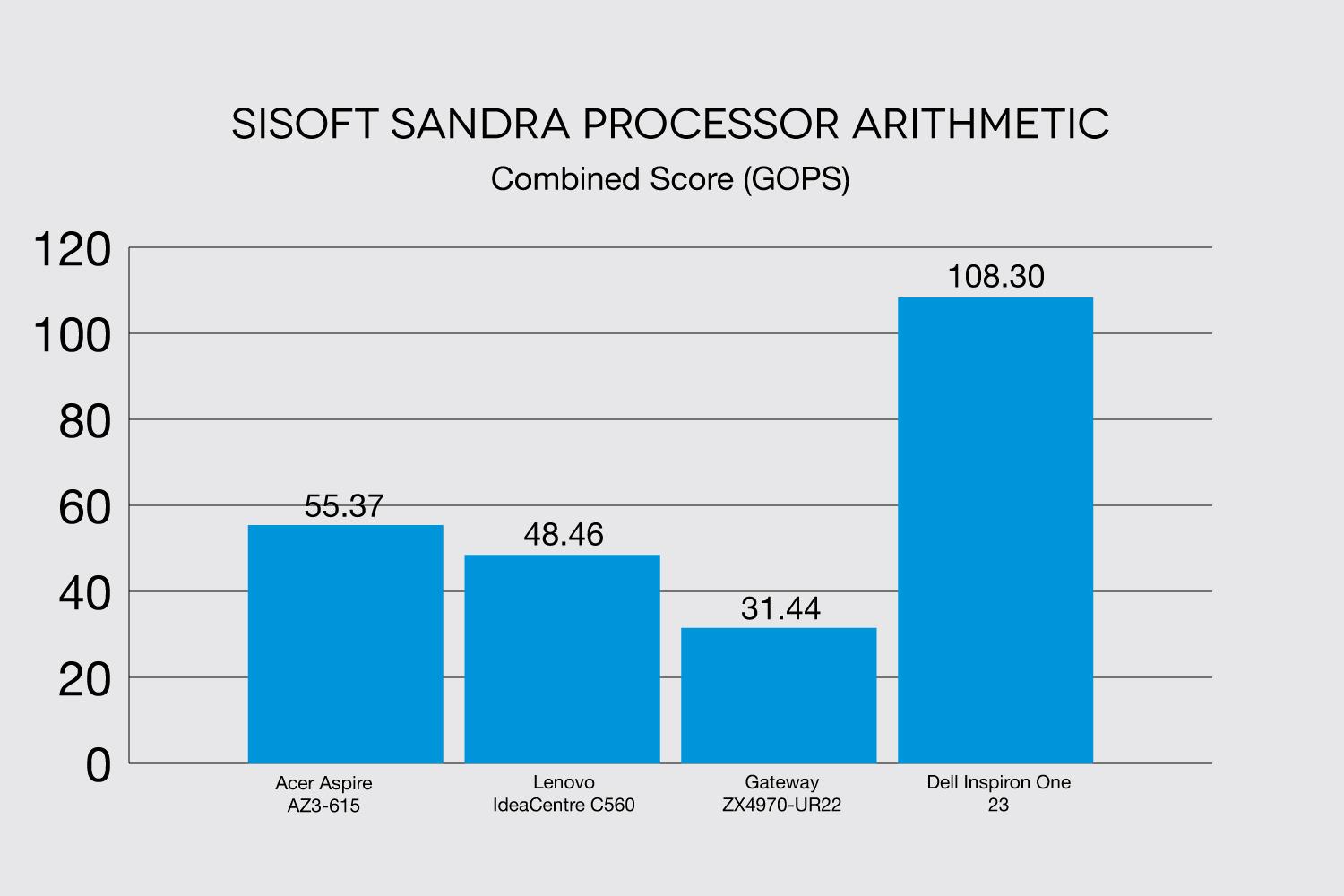
While the Dell Inspiron One 23 scores much higher than the AZ3-615, the configuration we reviewed had a quad-core CPU, and was several hundred dollars more expensive. The Acer stands out among the remaining dual-cores, and provides performance that’s substantially above a dual-core laptop, though a bit behind a typical tower-based desktop.
The Acer’s 7-Zip score of 8,228 tells much of the same story. Lenovo’s IdeaCentre C560 manages a mark of 7,436 in the same test, while the less expensive Gateway ZX4970-UR22 only hits 6,263. Dell’s quad-core Inspirion manages more than double the Acer’s score though, rocketing up to 19,054.
We tested storage performance with PCMark 8, and received a score of 2,609. This is barely behind the Lenovo C560, which reaches 2,698, and is slightly ahead of the Gateway ZX4970-UR22, which scores 2,447. Dell’s more expensive Inspiron One seizes victory again, thanks to its solid state drive, which scores 4,682.
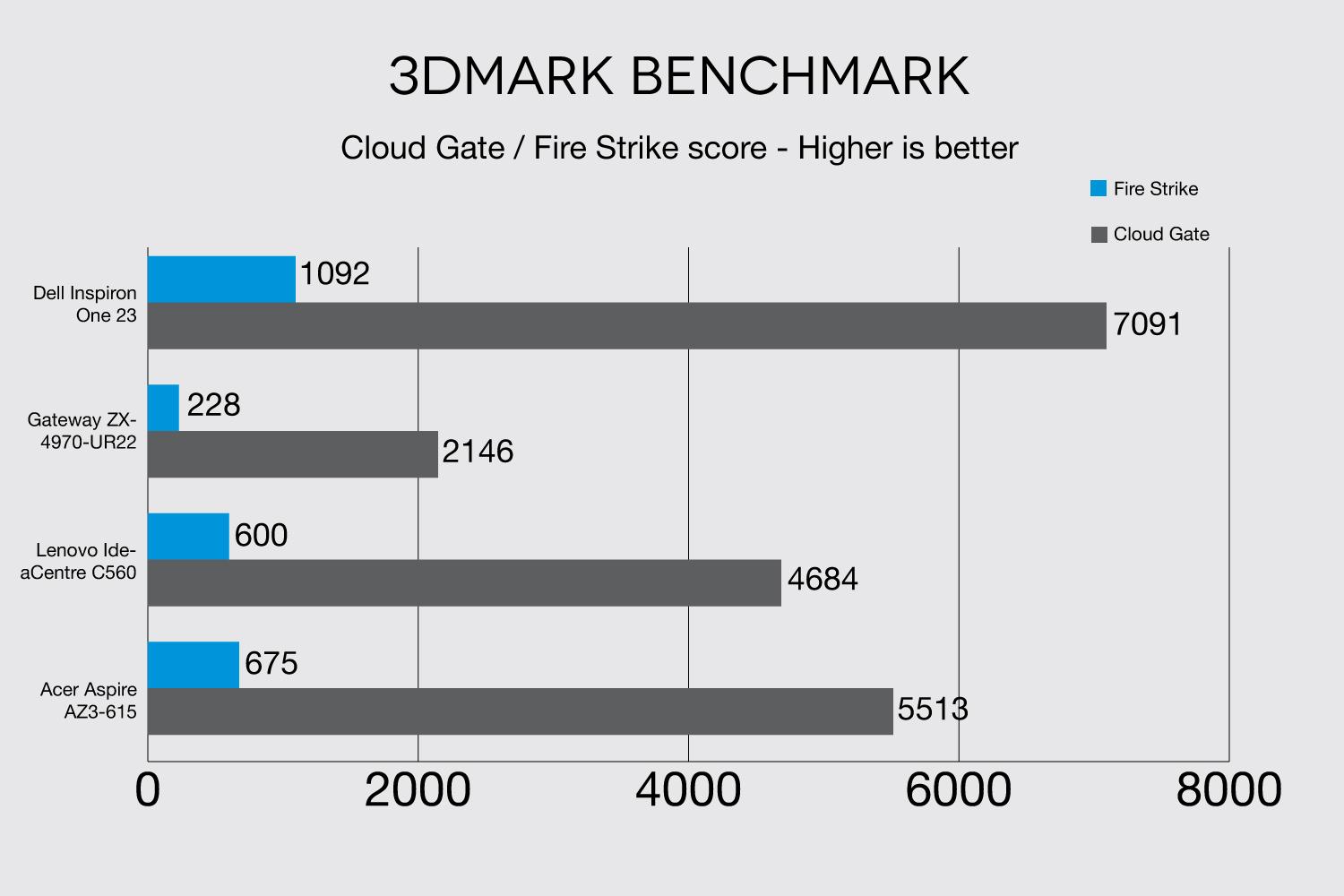
The story doesn’t change with 3DMark, either. The Acer AZ3-615 scores a strong 5,513 in the Cloud Gate benchmark, which compares well to the Lenovo C560’s score of 4,684, and is much better than the Gateway’s 2,146. The Dell, however, reaches 7,091, thanks to an AMD Radeon HD8690M graphics chip.
League of Legends benchmark test
To test real-world gaming, we fired up League of Legends, which is arguably the world’s most popular PC game. We recorded an average of 63 frames per second at 1080p resolution and Medium detail, with a maximum of 78, and a minimum of 61. Bumping detail up to Very High forced the average down to 35 FPS, with a maximum of 44, and a minimum of 26. Still, the game remained smooth enough to be enjoyable, proving that this Acer can handle some games. Don’t expect to play super-demanding titles on the AZ3-615 though.
Keeping quiet
We put the Acer through a variety of stress tests, including FurMark, which is an extremely demanding graphics test. No matter what we did though, the system’s fan refused to waver from its leisurely pace, and internal temperatures suggested that there was no reason for it to do so.
Fan noise never exceeds 35.1 decibels, which is a moderate level that’s noticeable in a quiet room, but can easily fade into the background. The Lenovo IdeaCentre C560 and Gateway ZX4970-UR22 are similarly quiet, but the Dell Inspiron One 23 puts out up to 44.7 dB, which is a significant increase over the quieter competition.
The Aspire AZ3-615’s power draw also fell into the expected range. With the display’s brightness set to max, we recorded 43 watts at idle, and up to 76 watts at load. Lenovo’s C560 draws only 39 watts at idle, but up to 83 watts at load, while Dell’s Inspiron One 23 needs only 73 watts at load. This a surprising figure, given its beefy hardware.
Conclusion
The Acer AZ3-615 is what a respectable mid-tier AIO should be. The display looks nice, there’s plenty of connectivity, and the processor is more than sufficient for most owners. While it doesn’t excel in any one area, this Acer provides a strong overall package, and does so at an affordable price.
Acer’s competitors include the Lenovo IdeaCentre C560, and the Dell Inspiron One 23. Dell’s option can provide very strong performance, as seen in our tests above, but it becomes very expensive when extravagantly equipped. Worse, its display is not as good as what we’ve come to expect from Dell.
That leaves the Lenovo, which is a valid pick. The C560 is almost identical to the Acer AZ3-615 in form and function. Choosing between the two may come down to which offers the better deal when you’re ready to buy. Don’t hesitate to pull the trigger on the AZ3-615 if it wins the price war. You won’t regret your decision.
Highs
- Affordable price
- Lots of connectivity
- Good display
- Speedy performance
Lows
- Extremely glossy screen
- No VESA mount