1. Home
  2. Audio / Video
  3. Mobile
  4. News

Urbanears' Stadion Bluetooth headset is sweatproof, stretchy, and stylish

Add as a preferred source on Google

Urbanears launched its newest earphones on Tuesday, the $99 Stadion, which joins the company’s “Active” lineup of workout-friendly headphones.

Similar to the other members of Urbanears’ Active line — the Reimers earbuds and the Hellas Bluetooth on-ear headphones — the Stadion is sweatproof and lightweight. However, it’s unique in that it’s the first Bluetooth earphone headset in the Active line, making for a small, simple design devoid of cords or distracting loose parts.

Recommended Videos

Urbanears appears to have engineered the Stadion with a secure fit in mind. The headband is made with flexible coils, and wraps around the back of the head to conform to the wearer’s head shape. The earbuds are equipped with Urbanears’ EarClick technology, which affixes the earbuds to your ears, further securing the headset in place so you won’t have to worry about any annoying jostling while getting in your morning jog or afternoon CrossFit session.
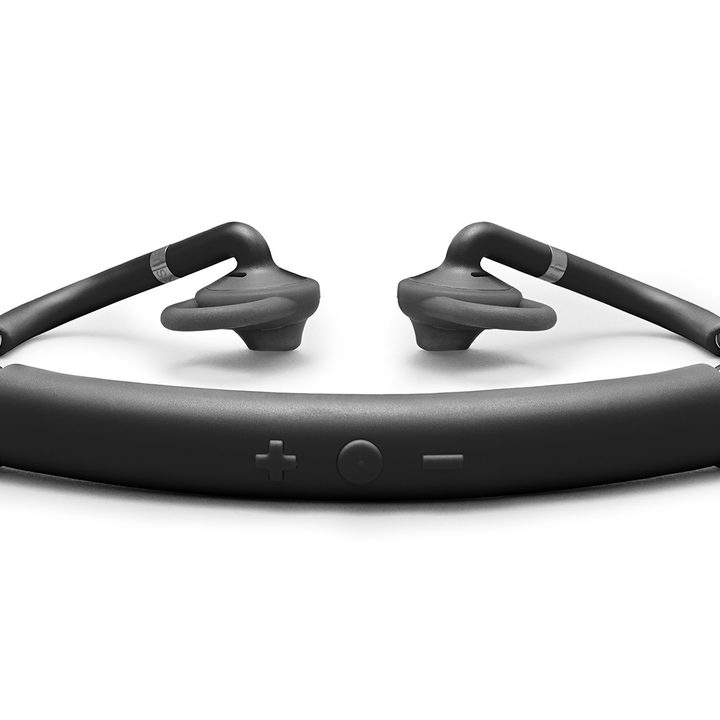
Image used with permission by copyright holder

Along with being stretchy and malleable, the Stadion’s headband features a three-button control scheme allowing you to skip songs, adjust volume, and accept incoming calls all from the back of the headband.

Urbanears claims users will get up to seven hours of playback on a single charge with the Stadion, making the headset a good potential pick for those long workouts or outdoor treks. Plus, built-in reflectors along the headset help keep you visible when exercising at night.

For those who require a set of earbuds that coordinates with their workout attire, the Stadion will be available in a handful of different color options, including the coral and gray “Rush,” blue and white “Team,” indigo and green “Trail,” and the black and gray “Black Belt.”

The Stadion headset is available on Urbanears’ website for $99.

Brendan Hesse
Former Staff Writer, Home Theater
Brendan has written about a wide swath of topics, including music, fitness and nutrition, and pop culture, but tech was…
Samsung’s Freestyle+ AI Smart Projector turns any wall into your next movie screen
This $1,200 Samsung projector uses AI to fix your picture automatically.
samsung-Freestyle-AI-Smart-Projector

Movie night no longer needs a blank white wall or a complicated projector setup. Samsung has launched the Freestyle+ AI Smart Projector for $1,200 in the US, and its biggest trick is making almost any surface work as your screen.

Whether you're projecting onto patterned wallpaper, a colored wall, or even a space with shelves and picture frames, the projector uses AI to automatically adjust the image so you can start watching with minimal effort. The portable projector can create a Full HD picture up to 100 inches, making it an easy companion for everything from backyard movies to bedroom binge sessions.

Read more
Apple Music just got pricier
The subscription fee has climbed for student, family, and individual plans in the US, UK, and the rest of Europe.
Apple Music App

Apple just raised the subscription fee for its eponymous music streaming service. For individual plans, the price has climbed by a dollar, and so has the affordable student tier. The fee for the family plan has gone up by $3, and it now costs $19.99 in the US. The benefits associated with each plan remain unchanged.

How much do I pay now?

Read more
Sonos owners are finally getting a less frustrating app, but the rollout comes with a catch
Improved navigation, speaker sorting, and new iOS volume controls are arriving gradually and must initially be enabled manually
Furniture, Electronics, Speaker

The Sonos app is getting a substantial usability overhaul. Familiar bottom tabs should make it easier to move around, while customizable speaker ordering could take some friction out of managing a multiroom system.

Sonos community manager ShaunFromSonos announced that the release may take up to two weeks to reach everyone. Once it arrives, users must switch on Enable Improved Navigation in the app’s settings to unlock the new layout and sorting tools.

Read more