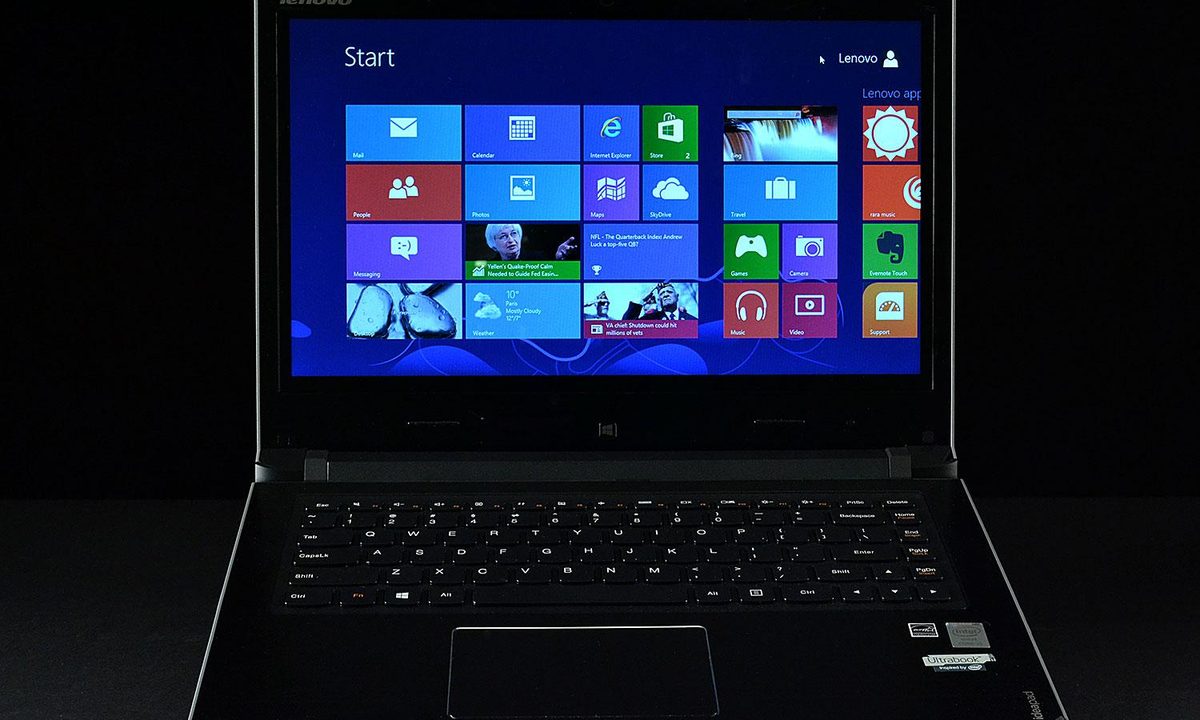
“Though powerful and reasonably portable, the Flex is held back by mundane build quality and an awful display.”
- 300-degree hinge make touch use convenient
- Solid performance
- Decent battery life
- Affordable
- Uninspiring build quality
- Annoying touchpad
- Low-contrast display
“Why you can trust Digital Trends – We have a 20-year history of testing, reviewing, and rating products, services and apps to help you make a sound buying decision. Find out more about how we test and score products.“
The proliferation of touchscreens has spurred all manners of new design, some of which haven’t made much sense. Sliders, for example, never earned much praise in our reviews due to their severely compromised keyboards and cramped (or non-existent) touchpads.
The Flex is an uninspiring but reliable entry-level notebook with a hinge that makes the most of the touchscreen.
Lenovo’s Yoga, which boasts a 360-degree hinge which can convert the notebook into a tablets, has proven to be one of the few unusual designs to work. But its $800 price tag, though less than most competitors, has kept the system out of reach for many consumers – even those who may be more interested in touch PCs that work like iPads. This led the company to develop the Flex, a cross between a small touchscreen all-in-one and a standard notebook PC.
This system’s party trick, as with the Yoga, is the hinge, but the Flex only flips 300 degrees. That means tablet use is out of the question, but it does enable easy touchscreen use on a table or other flat surface.
Losing tablet mode lightens the price, too; the Flex 14 starts at $569 and our upgraded review unit, which boasts 8GB of RAM and a Core i5-4200U processor, is just $669. This is about $200 less than the Yoga 13 and low enough to put the Flex well within the average consumer’s budget, but has more than the hinge been compromised?
Basic in black
Unlike some more expensive Lenovo products, which come in colors such as Clementine Orange and Glossy Red, the Flex 14 can only be had in black. While the top-end $889 model spices up the look with orange trim along the flanks, affordable models have simple gray plastic, which makes for an underwhelming first impression. Though not unattractive, there’s nothing to visually distinguish this laptop from other Lenovo models, nevermind competitors.


Not just the look lacks flair; quality is also a bit underwhelming. Though the plastics used to build the chassis feel reasonably study, and the display lid has a nice soft-touch finish, touching or tapping the palmrest often results in a hollow, disconcerting rattle. Panel gaps are quite obvious, too, and the display real estate strangely does not fill out the panel’s bezel; instead there’s a quarter-inch gap on each side. Functionally, these negatives are a non-issue, but they’re constant reminders of the Flex’s budget pricing.
Connectivity comes via three USB ports (one 3.0), HDMI, Ethernet, card reader and a combo headphone-microphone jack. Ports can be found on both sides and are generally well placed, but Lenovo has also placed the power and volume buttons on the right flank, an unusual location that can cause trouble for those who search for ports by touch rather than sight.
Are 300 degrees enough?
The Flex’s AccuType keyboard is one of the laptop’s best features, offering crisp key activation and a spacious layout despite the slim chassis. Touch typists should have no problem speeding along at more than 100 words per minute. A slightly truncated backspace key and enter key might cause a few mistakes at first, but adapting to this minor difference shouldn’t take much time.
Those who type in the dark may be disappointed to learn backlighting is not available, not even as an added-cost option. This is not a major problem for buyers shopping the entry-level $569 model, but it could prove a major negative for those who want an upgraded version. Backlit keyboards are common on competitors selling above $800.

Touchpad quality is a sore point, too. While reasonably responsive, normal navigation has a nasty habit of triggering unwanted gestures, such as multi-tasking or zoom. The integrated left and right mouse buttons feel loosely hinged, as well, and the touchpad sometimes shifts even when the button is not purposely activated.
Of course, the touchscreen can be a surprisingly decent alternative within the confines of Windows 8’s Modern UI. When used as a notebook the screen feels a bit too far away for easy handling, but flipping the device over with the 300-degree hinge solves that problem. Losing the ability to use it as a tablet is no doubt a negative, but the Flex’s reduced range of motion still adds value.
A troublesome sight
Display quality is one strength of the Yoga that the Flex unfortunately doesn’t inherit. The 1366 x 768, 14-inch panel managed a contrast ratio of just 80:1 in our tests and could render only 59 percent of the sRGB gamut. Viewing angles are poor, too, particularly on the vertical axis. Just the slightest shift in the display’s tilt can have a big impact on image quality. A maximum brightness of just over 200 lux is the only high point revealed in our benchmarks.
All of this adds up to washed-out, lifeless image quality common among entry-level laptops. And there’s another problem: screen door effect. This artifact, which is caused by a large gap between each pixel in the panel, makes the display look as if it’s being viewed through a screen door. Users with good vision will notice small black lines in the screen when viewing bright content.

The Flex’s speakers serve it better with loud, clear audio that is usually free of distortion. Heavy bass at maximum volume can overwhelm the midrange, however, particularly in action movies with explosions or constant gunfire. A pair of external speakers or headphones will be a major improvement, but the internal speakers can do in a pinch.
Midrange performance at a budget price
While the Core i5-4200U processor in our Flex review unit is nothing special, it’s a powerful processor for a budget system and lead the laptop to solid benchmark results. SiSoft Sandra’s Processor Arithmetic benchmark turned in a score of 38 GOPs while PCMark 8’s Creative test came to a score of 2,292. These results indicate steady performance from the Intel dual-core.
The PCMark 8 storage benchmark turned in a score of 4,841. Though not exceptional, this score is quite good for a laptop that sells below $800. Users should be warned, however, that entry-level variants come with a 500GB mechanical drive that probably won’t perform as well as the drive in our review unit.

Graphics performance proved to be a weakness, as 3DMark managed a Cloud Gate score of just 3,683 and a Fire Strike score of 503. These numbers are well below other laptops with fourth-gen Intel processors, maybe indicating that Lenovo is pushing too hard for efficiency. The laptop’s included Energy Manager software, meant to simplify power profiles, is more confusing than it is helpful and often restricts performance or features in ways difficult for the user to understand.
Good enough portability
The 4.4-pound Flex isn’t the lightest laptop available, but it’s not particularly cumbersome for a 14-inch model and is a svelte 0.85 inches thick. Most laptop bags will accommodate this laptop without issue and the soft-touch display lid provides a grippy surface, making the system easier to carry without a bag.
Unlike most modern notebooks, the Flex has a removable battery, though it’s only rated for 45 watt-hours. This means the system can manage just 8 hours and 41 minutes of endurance in our light-load test, a figure that’s reduced to 4 hours and 41 minutes by the Peacekeeper Web-browsing benchmark. These results would have been excellent a year ago; today, they’re just average. But we can hardly argue that almost 9 hours of life is inadequate.

Our watt-meter delivered predictable results, showing up to 11 watts of power consumption at idle and no more than 26 watts at load. These numbers are in the typical range for notebooks with a fourth-gen Intel processors.
Keeping it cool
Though hardly a giant, the Flex is relatively large by the standards of modern Ultrabooks, and that means there’s plenty of room inside of it for cooling. This leads to good results in our temperature tests, which show the system hovering around 80 degrees Fahrenheit at idle and warming to no more than 91.2 degrees at load. Most competitors put out more heat; Acer’s Aspire M5, for example, reaches 98.7 degrees at load.
And don’t worry that the cooling is made possible only by an aggressive fan. Our decibel meter recorded a maximum of 42.3 decibels at load, and the system’s idle noise did not register above ambient. Overall, the Flex is a good choice for buyers bothered by fan noise.
Conclusion
Lenovo’s Flex is a compromised laptop, but not because of the 300-degree hinge, which serves its purpose of making touch use more convenient. The problems are more traditional issues which have plagued budget laptops for years: display, touchpad, materials. In short, the Flex is affordable, but it feels cheap, and constantly reminds the user that they received what they paid for.
Performance and portability are high points, however, as the Flex provides strong results in both areas. Many competitors selling around $600 come up short in at least one of these two important areas. In some tests, like processor benchmarks, this laptop can keep pace with the Dell XPS 12, a system that costs almost twice as much.
The Flex, then, is an uninspiring but reliable entry-level touchscreen notebook that can handle the average user’s needs without trouble. Despite its flaws, we think it a bit better than the average budget notebook, though we recommend buyers check out Lenovo’s U-Series Ultrabooks or Acer’s Aspire M5, the current kings of budget touchscreen notebooks, before laying down cash for the Flex.
Highs
- 300-degree hinge make touch use convenient
- Solid performance
- Decent battery life
- Affordable
Lows
- Uninspiring build quality
- Annoying touchpad
- Low-contrast display