
“The Lenovo Y480 comes equipped with powerful hardware at a reasonable price, it offers decent audio quality and is equipped with a great keyboard. This is an all-rounder that does almost everything well.”
- Well-rounded and powerful
- Excellent keyboard
- Great audio
- Reasonably priced
- Sub-par display
- Vague touchpad
- Spotty build quality
- Small battery
“Why you can trust Digital Trends – We have a 20-year history of testing, reviewing, and rating products, services and apps to help you make a sound buying decision. Find out more about how we test and score products.“
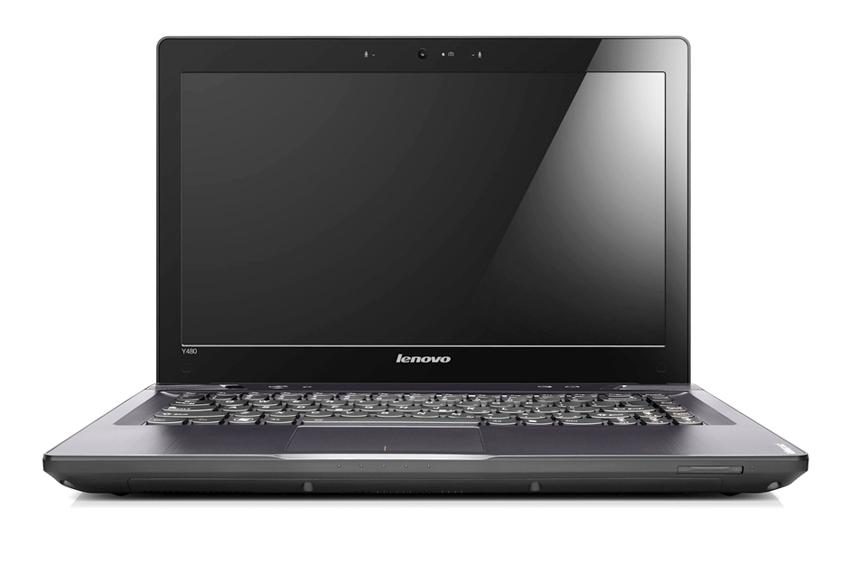
Forget thin. That’s not what the Lenovo Y480 is about. This laptop has a 14-inch display and compact dimensions, making it reasonably portable, but it’s not just about the grab-and-go. It’s about power.
As laptops become thinner the average consumer seems to remain apathetic. You’ll have to wander 18 spots down Amazon.com’s bestseller’s list before you come across a single Ultrabook and another 16 beyond that before seeing the next. In between them is a horde of larger, thicker laptops that are other cheaper, more powerful, or both. Like the Y480.
This 14-inch laptop arrived at our office with an impressive list of specifications. The third-generation Core i7-3610QM processor is paired with an Nvidia GT 640M LE graphics solution and a whopping 8GB of RAM. Pricing starts at $849.
Is that a worthwhile exchange? The hardware specifications seem promising, but there’s obviously more to a laptop than what’s printed by Lenovo’s marketing department. Let’s take a closer look.
Video review
Old-fashioned isn’t an insult
At first glance, it appears that the Y480 could have been built several years ago and then forgotten in some warehouse until an accountant at Lenovo wondered why they were paying so much for storage. Nothing about this laptop screams, or even whispers, “modern.”
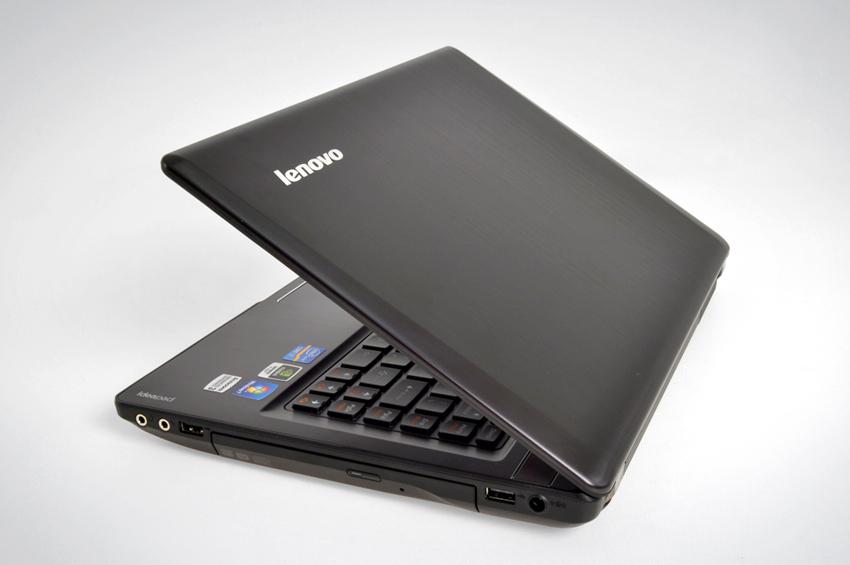
Is that a bad thing? Depends on your point of view. Sure, the Y480 may not look as hip as some other laptops, but it is attractive. Most of the laptop is matte, a fact that will excite foes of glossy plastic. There are also a few subtle touches that class up the laptop, such as a bit of chrome trim around the speakers and a subtle brushed-aluminum grain to the display lid.
Build quality doesn’t live up to the laptop’s thick exterior. Picking up the laptop by the side by the optical drive reveals chassis flex, and some squeaks escape from its guts if you handle the laptop roughly. There is some good news, however. The keyboard has virtually no flex, the display rarely wobbles and most panel gaps are tight.
Connectivity is decent for a small consumer laptop. There are two USB 2.0 ports, two USB 3.0 ports, separate headphone and microphone jacks, VGA and HDMI. Not a bad showing, though some new third-gen Intel Core laptops with similar pricing can offer more USB 3.0 ports.
Great keyboard
Lenovo is known for its keyboards because of its ThinkPad line of business laptops, but this expertise often seems to bleed over to the company’s consumer products as well. The Y480 is no exception. Individual keys have excellent travel and the layout is easy to become acquainted with. The only issue is size — some of the keys are rather small, making it easy to hit the “=” key when Backspace was the intended target. Most users will adjust for this after a few hours with the laptop.
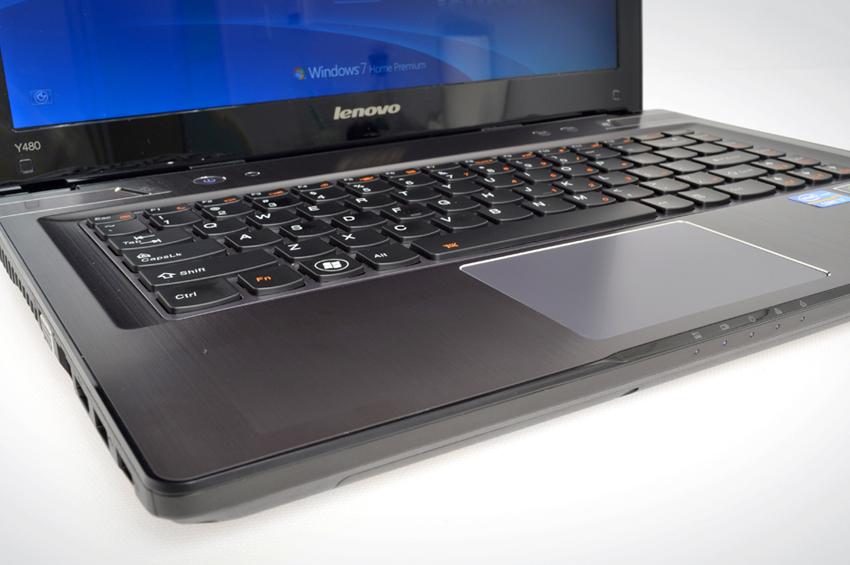 Backlighting is offered and can be controlled via hotkey, but there is only one brightness setting. The backlight also fails to light many of the keys evenly. Though this does not impact functionality it does cheapen the appearance of the laptop.
The user interface magic does not extend to the touchpad. We found its glossy surface too slick, which makes minor cursor adjustments more difficult. It’s also not a large touchpad, and it lacks physically separate left and right mouse buttons. Users have to depress the bottom section of the touchpad instead.
Displaying the elephant in the room
The Y480 is not cheap. It’s not meant to be. The hardware and the elegant exterior makes it clear that Lenovo wants this to be considered a premium laptop. Unfortunately, it’s saddled with a dollar-store display.
Let’s get the positives out of the way first. Although this is a glossy panel, it’s not so glossy as to be usable in bright light. This is no doubt partially due to the backlight, which is quite sunny when turned up to max. Perceived sharpness is acceptable despite a resolution of 1366 x 768.
This is marred by poor black-level performance. In dark scenes of movies and games, it’s clear that blacks are a ghostly gray at best and, to make matters worse, the brightness of the pixels at the edges of the display are slightly higher than those further in. Some combination of minor backlight bleed and poor viewing angles seems to be the culprit.
Such problems might be tolerable if colors were vibrant, but they’re not. We played Diablo 3, a game known for its exciting art design, and found that much of the game’s beauty is sapped away by this laptop’s sub-par display panel.
 At least audio quality is solid. The twin speakers are placed above the keyboard, which eliminates the possibility of obstruction and delivers sound directly to the user’s ears. There’s little distortion to be heard even during tracks with significant bass, and the speakers are loud at maximum volume. The Y480 is one of the few laptops that can offer sound on par with a $25 pair of desktop speakers, though anything with a subwoofer will defeat it.
Loud and cool
The Lenovo Y480 is a thick laptop, and usually such laptops stay cool and quiet. This model is packing a GT 640M LE graphics solution, however, which is a reasonably capable part. It also had a quad-core processor. Both have an impact on cooling.
At idle they’re not noticed, but once you start gaming or running a processor-intensive application you’re going to notice the extra watts being consumed. Heat pours out of the left side of the laptop and is easy to notice if you lay a hand in that area. A few spots on that side of the laptop can exceed 100 degrees Fahrenheit at maximum temp.
Thankfully, the hot air pouring out of the laptop means that the interior stays cool. The Y480’s keyboard never went north of 88 degrees Fahrenheit even after an hour of gaming.
So-so endurance
Though it has a 14-inch display and is rather small in width and depth, this isn’t an ultraportable by any measure. It’s a hybrid between an ultraportable and a mainstream multimedia laptop.
Still, the laptop seems to be set up for respectable endurance. The third-generation Intel quad is efficient and the Nvidia graphics solution includes Optimus, which means it can switch off when not needed. The results? A mundane Battery Eater score of 1 hour and 33 minutes and a so-so reader’s test score of 4 hours and 17 minutes.
The battery is the reason for the lackluster life. It’s a 48Wh unit, which is small for a laptop with a quad-core processor and discrete graphics. Even the most efficient hardware can only squeeze so much out of a limited battery.
Bloatware issues
Most companies, including Lenovo, seem to be favoring a reduction in bloatware over time. This made the numerous pre-installed apps on the Y480 a bit of a surprise.
The worst is no doubt McAfee antivirus. It constantly asks the user if they’d like to install the software and even includes an annoying site advisor that claims certain sites are dangerous. Some of them might be, but it triggered on some sites that we know are legitimate and consumed a portion of the browser window. Our patience ran out quickly and the software was promptly un-installed.
There’s also an array of Lenovo apps included, some of which are okay, some aren’t. We do wonder why manufacturers still insist on labeling things as simple as a webcam app with their own brand name. What’s the point? Does anyone open it and silently thank Lenovo for its efforts? We doubt it.
Faster than you think
Lenovo is pulling no punches where performance is concerned. Our review unit comes with a Core i7-3610QM processor and Nvidia GT 640M LE graphics solution as well as 8GB of RAM. As it turns out, this is a typical configuration instead of some high-end version most people won’t order.
These impressive specifications yield impressive benchmark scores. SiSoft Sandra Processor Arithmetic reached a combined score of 91.22, while 7-Zip reached a result of 18,572. Both of these scores are excellent for a laptop and in fact on par with or in excess of what has been achieved by some desktops we’ve previously reviewed.
PCMark 7 was less optimistic with its overall score of 2,592, which is average. The hard drive, which is a 5400 RPM mechanical unit built for high capacity rather than performance, was a serious drag on the laptop’s score.
This was quickly made up for with excellent gaming benchmark results – 10,646 in 3DMark 06 and P1,253 in 3DMark 11. Both of these are excellent for a multimedia laptop and indicate that gaming isn’t out of the question. We verified this by playing Diablo 3 for several hours. Most settings had to be throttled back to low or medium, but the game was smooth and enjoyable.
Conclusion
The Lenovo Y480 comes equipped with powerful hardware at a reasonable price, it offers decent audio quality and is equipped with a great keyboard. This is an all-rounder that does almost everything well.
But two issues that hold it back. One is the terrible display. Though adequately bright, it otherwise fails in all areas — view angles are poor, colors are dull and blacks are merely gray. Second is the touchpad, which is small, vague and generally a pain to use.
It’s unfortunate that these flaws mar an otherwise great laptop. If these issues were rectified, the Y480 would be easy to recommend, but as it stands the laptop is only suitable for people who aren’t looking to make the most of its gaming and multimedia capabilities.
Highs
- Well-rounded and powerful
- Excellent keyboard
- Great audio
- Reasonably priced
Lows
- Sub-par display
- Vague touchpad
- Spotty build quality
- Small battery