
  1. Home
  2. Mobile
  3. Legacy Archives

Google rolls out improved Chrome app for Android, iOS

Add as a preferred source on Google
chrome browser iphone
Image used with permission by copyright holder

Detailed within a post on the official Google Chrome Blog earlier today, Google has released two major updates to Chrome on the most popular mobile platforms. While both the Android and iOS versions of Chrome received a variety of bug fixes and security enhancements, the new Android version of Chrome includes a sizable speed boost and the iOS version has updates to search, social sharing and browsing Web history. Both versions of Chrome can be downloaded for free on Google Play or the App Store.
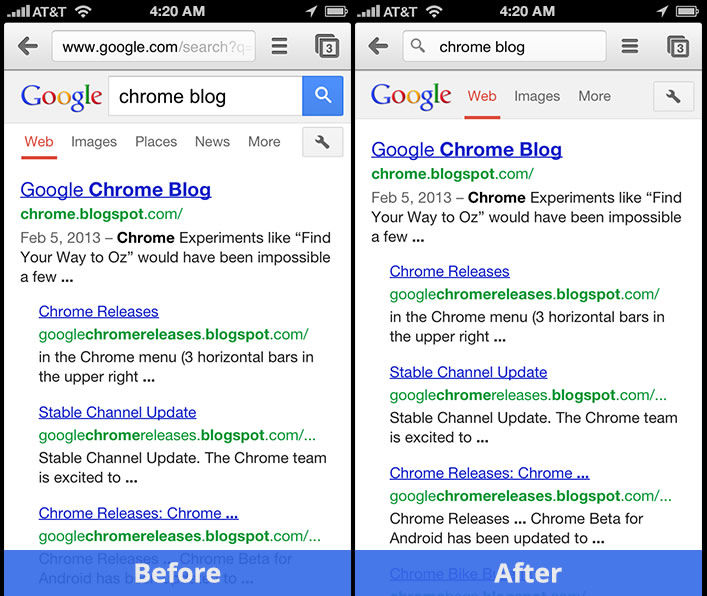
chrome for iosSpecifically, Chrome on Android has been shifted to the most recent version of the V8 Javascript engine. According to Google, this has improved performance within Google’s Octane bench-marking tool by 25 percent. For the end user, pages will load quicker within the browser and the experience will generally feel more responsive.

Recommended Videos

In addition, Google added support for more HTML5 features within the Android version of Chrome. As more sites upgrade to HTML5 on mobile, the Chrome browser will be able to handle those sites easily.

Launching approximately eight months ago for iPhone and iPad users, Google has attempted to garner a portion of users that utilize Apple’s Safari browser on a daily basis. Finally added to the mobile version, Google’s omnibox in the updated iOS version of Chrome allows the user to utilize the URL entry area for all search queries. This alteration also allows more content to appear on the screen when browsing a page.

Regarding social improvements, users can share any page over email as well as social networks like Facebook, Twitter and Google+. Safari offers similar sharing options, but does not include Google+ in the mix. Finally, Google has added a “press and hold” function to the back button. When that button is held down, Chrome brings up previous browsing history. This is an ideal feature when users want to quickly revisit a recently loaded page.

Mike Flacy
By day, I'm the content and social media manager for High-Def Digest, Steve's Digicams and The CheckOut on Ben's Bargains…
The best free VPNs for 2026
The best free VPNs still come with compromises, but a few offer enough privacy and flexibility to be genuinely useful.
Proton VPN UI

A virtual private network (VPN) encrypts your internet traffic and routes it through a server run by the VPN provider. Websites see the VPN server’s IP address instead of yours, and you can get around geo-blocks, censorship, and ISP throttling. The best VPN services are paid, but there are still a handful of free options that do the job well. 

Most free VPNs come with a hidden cost, because running servers isn’t cheap and a company that doesn’t charge you has to make its money somewhere else. Many do so by logging your browsing activity and selling it to advertisers, while others flood you with ads and track you across apps. 

Read more
The best Kindle in 2026: Here are the top Kindles for reading
From a pocket-friendly e-reader to a premium color notebook, Amazon has a Kindle for almost every kind of reader.
kindle colorsoft back converted

There's nothing quite like curling up with a good book on a cold evening. As much as I love the feel of a physical book, books take up a lot of space, and carrying more than one on a trip quickly becomes a chore. That's where e-readers come in, and the Amazon Kindle remains one of the best options.

Amazon just refreshed its Kindle lineup with thinner, lighter designs, a new flush-front display, and colors that wrap from front to back. Add the Kindle Scribe and the Kindle Scribe Colorsoft to the mix, and you have more choices than ever before.

Read more
The best Android apps in 2026: I spent months testing dozens that truly earn their keep
From smarter task management to custom home screens, these 20 apps give you good reasons to install something new on your Android phone
Electronics, Phone, Mobile Phone

A good Android app should earn its place on your phone. It might make an everyday task easier, handle something the built-in software can't, or let you change an experience that never quite worked for you.

These 20 apps cover everything from quick notes and password management to automation and local file sharing. Some are free, others charge for advanced features, and a few take some effort to figure out. The point isn't to install them all. It's to find the ones that make your phone work better for you.

Read more