
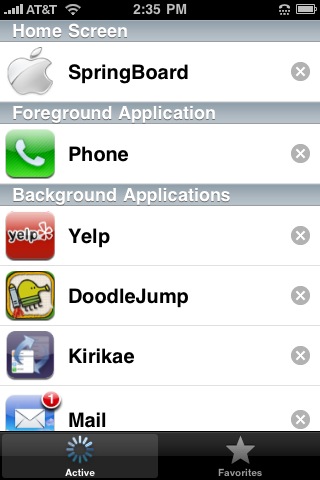
 The thorn in the iPhone’s side that has quietly hobbled it since day one could soon be plucked from its silver shell. New rumors allege that multitasking – a simple feature offered on a variety of other mobile operating systems from Windows Mobile 6.5 to Google Android – will finally arrive with iPhone OS 4.0.
According to AppleInsider, “people with a proven track record in predicting Apple’s technological advances” have spilled the beans on multitasking in a coming update, which will allow third-party apps to run simultaneously in the background.
The new task manager will call upon technology used in Mac OS X, but specifics have been withheld. No firm timeline has come to light, but the same sources indicate the update is still in the works and has a “way to go.”
The iPhone OS already supports preemptive multitasking, but Apple has restricted its use to only its own services, like the phone, SMS and iPod. This explains how users are able to talk on the phone or listen to music while they surf in Safari, but can’t run a third-party app like Pandora to pull down tunes at the same time.
The challenge for Apple engineers will be to unchain this currently locked functionality without compromising security, reliability, or making the interface more confusing. Despite the drawbacks, the iPhone’s unitasking approach to apps has also lent it an air of simplicity and ease that Apple risks losing with a sophisticated task manager.
Interestingly enough, jailbroken iPhones already have the ability to run multiple apps at once through third-party tools like Backgrounder and Kirikae. Their implementation allows users to hold down the home button from any app to “background” it, then double tap it quickly to see a task manager with different apps open.


