  1. Home
  2. Mobile
  3. Android
  4. Legacy Archives

Samsung Galaxy Note 3 shown in possible leaked pic

Add as a preferred source on Google
Galaxy Note 3
Image used with permission by copyright holder

Check out our review of the Samsung Galaxy Note 3 phablet.

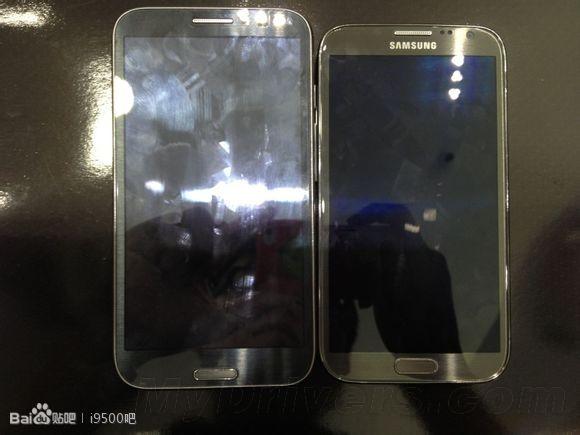
A Chinese website called MyDrivers has published a photo of what could be Samsung’s upcoming Galaxy Note 3. The jumbo-sized device is shown side-by-side with its predecessor, the Galaxy Note 2.

Recommended Videos

It’s also unveiled some potential specs – according to the site, the new Galaxy Note will run Android 4.2.2, and have a 6-inch full HD 1080p display, 3GB of RAM, and 32GB of internal storage, along with a microSD slot for transfering data. If the site is to be believed, have a eight-core Exynos 5410 Samsung Exynos Octa processor with the Cortex A15 cores clocked at 2.0GHz, and a Cortex A7 core at 1.7GHz, a big step up from the international Galaxy S4’s respective 1.6GHz and 1.2GHz processors.

This is all well and good, but we’re not entirely convinced by the pic. Photos are easily manipulated. As BGR reported earlier this month, the Note 3 is rumored to feature a flexible and shatter-proof plastic OLED display (as well as better build quality). If it’s indeed true that we’ll be seeing some sort of high-end plastic from the Galaxy Note 3, along with the product line’s first 1080p display, a higher susceptibility to smudges could be seen as a potentially major turn-off.

Lastly, while we’ve been reporting on these new, oversized “phablets” a good bit as of late, The Galaxy Note 3’s super-huge construction appears to border on impractical to hold. We’ve all got that 6’2” friend with the gargantuan hands who might be able to make use of a phone this big, but even in that case, where are they gonna put it when they’re walking around? Only the most accommodating of jean pocket will fit something this large.

The GN3 should be unveiled at the IFA Trade Show in September. Until then, we can sit and wonder if leaks like these are true.

Saul Berenbaum
Former Digital Trends Contributor
Saul Berenbaum has been writing film and gaming reviews since college. Recently, he contributed to HardcoreDroid. Now he…
Every iPhone release in chronological order: 2007-2026
From the very first iPhone right up to the cutting-edge iPhone Duo, Apple's handsets have come a long way!
The iPhone 5 and iPhone 15 Pro Max screens.

Since the first iteration of the iPhone, Apple’s smartphone has revolutionized the technology industry and has, in turn, made the Cupertino firm one of the most valuable companies in the world.

This is clearly evidenced by the sheer volume of iPhone sales since its initial launch in 2007; in 2024 alone, nearly a quarter of a billion units were sold, with lifetime sales reaching 3 billion.

Read more
The best iPhone apps in 2026
These are the iPhone apps worth installing in 2026, from better browsers and productivity tools to travel, photography, fitness, podcasts, and games.
ChatGPT Live on an iPhone

If you've just bought an iPhone, ChatGPT, Bitwarden, and Google Maps are three of the first apps we'd consider installing. After that, the right choices depend much more on what you actually use your phone for.

The 17 apps below made the cut because each solves a specific problem well enough to deserve space on your home screen. Some improve tools Apple already gives you. Others add something the iPhone doesn't really do on its own.

Read more
How to reset an iPad: soft restart, force restart, and factory reset
From a quick reboot to a full wipe, here's every reset trick your iPad actually needs.
iPad Pro on table

Even the best hardware from Apple isn't immune to glitches. iPhones, iPads, and MacBooks are known to run for years without issues, but every so often, your iPad needs a reset to get back on track.

The good news is that resetting an iPad is one of the easiest things you can do on any Apple device. It takes just a few minutes and doesn't require any tech expertise. That said, there are three very different types of resets, and mixing them up can cause more problems than it solves. You don't want to wipe your entire iPad when all you needed was a quick restart.

Read more