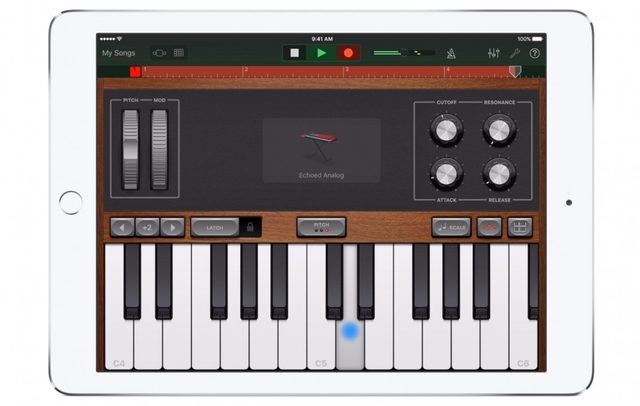
It’s been nearly three years since Apple made GarageBand partially free on iOS, and the Cupertino company has been shaping the music maker into a veritable creation suite ever since. It would appear its efforts have so far been successful — GarageBand’s masterful mix of easy-to-use features and flexible extensions has earned it endorsements from artists spanning Hans Zimmer to T-Pain — but starting today, the app’s evolving dramatically. In conjunction with the release of Music Memo, a new music recording tool for iPhone and iPad, Apple’s distributing a significant update to GarageBand that adds loop-based sampling, support for the iPhone 6S’s 3D Touch, and a metric ton more.
The updated GarageBand’s undoubted headliner, Live Loops, will be familiar to users of sampling apps such as Loopy and Loopr. The premise is simple: from a colored, tappable grid, you can toggle any number of samples to create looping tracks in real time. Apple’s made it easy to get the hang of — the Live Loops panel comes pre-loaded with thousands of sampled sounds and templates in genres including EDM, Hip Hop, Dubstep — but more advanced users can import custom creations and sounds and adjust effect settings such as filter and reverb. Better still, Live Loops’ syncing smarts normalizes both the time and pitch of each sample, ensuring that your (or anyone else’s) vocal experiments don’t clash too harshly with Apple’s pre-recorded bites.
GarageBand has also inherited Logic Pro X’s Drummer, nine virtual EDM and acoustic session drummers. It’s gained an automation curve editor for volume control, plus an improved EQ interface, better compatibility with third-party instrument apps, iCloud Drive integration, and support for up to 32 tracks. If you’re lucky enough to have a bass guitar with a compatible adapter lying around, you can plug it in to play through new software-based vintage and modern bass amps, too. Neat.
Related:
Also worth mentioning: GarageBand now takes advantage of the iPad Pro’s larger screen, squeezing more instruments and tracks into a single view on the monster tablet’s 12.9-inch display. And on the iPhone 6s and 6s Plus, keyboard sounds support “polyphonic” 3D Touch: when the feature’s enabled, you’ll feel haptic resistance as you press on the keys.
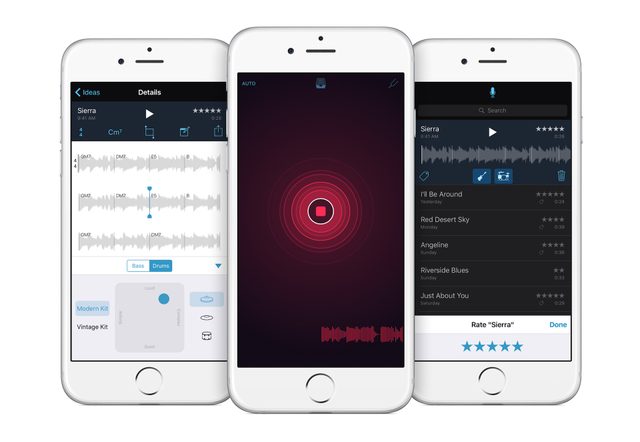
The revamped GarageBand’s complimented by Apple’s new, free recording app: Music Memo. At first glance, there doesn’t seem to be much to it — you tap a glowing blue button to start recording and then begin singing or playing your heart out. The magic’s in the processing, though: finish recording and Music Memo automatically analyzes the track, recording the tempo, transcribing the notes on a digital notepad, charting chord changes, and even identifying any instruments playing the background. From there, Music Memo lets you attach lyrics or additional instrument tracks, add notes and ratings, and share the sample with friends or collaborators via e-mail, messaging, and iCloud. Tracks are saved as uncompressed audio in formats that, as you’d expect, play nicely with non-linear audio editors such as GarageBand. It’s barebones, but that seems to be the point: bringing down the barrier to music creation’s flow.
GarageBand and the new MusicMemo are rolling out simultaneously. The former’s available for free to existing users, or $4.99 to new users.