Smartphones today generally have excellent camera systems, whether you’re considering the latest Galaxy S25 Ultra or the iPhone 16. However, even a perfect photo may sometimes need a little extra flair. This added sparkle can be achieved through simple color filters, artificial background blur, or by adjusting an image’s levels and other advanced features. Now that we’re in the age of AI, it can also involve creative tools that allow you to place yourself in a medieval scene or swap faces with a friend.
With the abundance of photo editing tools available, it can be overwhelming to choose the right one. To help, we’ve compiled a list of the best photo-editing apps for both Android and iOS. These range from straightforward yet powerful editing suites to AI-driven generators and face-swapping applications.
Google Snapseed


If you want a good, simple photo editor with lots of powerful tools and don’t want to pay for it, then Google Snapseed is what you need. Available on both iOS and Android, Snapseed is a lightweight but powerful photo editor that can be as quick and easy or as advanced and deep as you need it to be. Styles applies a series of filters that will be familiar to anyone who’s ever been near Instagram, but Tools is where you’ll find the real meat of the app.
Here, you can explore the more advanced tools, like a healing brush, curve editing, and even the ability to change a head’s angle in 3D space. It’s a powerful piece of kit, and while you may have expected it to have been superseded by Google’s Magic Editor, there are still more than a few reasons to keep Snapseed around — even if you have access to Google’s AI tools.
Google Play Store Apple App Store
Adobe Photoshop Express Photo Editor


When photo editing is mentioned, there’s generally one name you think of: Photoshop. While the best Photoshop experience is always going to be on a computer, the Adobe Photoshop app on Android and iOS is undoubtedly extremely good. All the usual tools and features are here, and if you’ve used Photoshop at all, it’s all going to be quite familiar.
Recently, Adobe has added a bunch of retouching tools to the app, including the ability to morph your facial features, smooth skin, and use the healing brush to remove blemishes. There’s a premium subscription for $10 a month if you want to edit without watermarks and get access to all the tools, so it loses some points for that paywall. But, if you’re happy to pay or are already subscribed to Photoshop on the computer, then this is an excellent app to download.
Google Play Store Apple App Store
Adobe Lightroom Photo Editor


Lightroom is the next step up from Photoshop, and it’s the app you download if you want to really dive deep into your editing process. Not only does it have a powerful and capable camera built into the app, but it’s also one of the few apps that can process and edit RAW format images, making it invaluable for professionals and knowledgeable amateurs alike. Recently, Adobe has been piling the AI smarts into it, including automatic tweaks, easy selections, and retouches. Like Photoshop, you’ll need a subscription to get the most out of it, but those subscriptions start from just $2 a month.
Google Play Store Apple App Store
Ultralight — Photo Editor


One for Apple addicts only, Ultralight is an all-in-one option that can edit photos and videos alike and comes with all the usual features and tools. Ease of use is a big focus in Ultralight, and Uova Oy has worked hard to make sure anyone can dive in and use as many tools as possible without having to Google for how-to guides. Like other options here, there’s (unfortunately) a limit to the usefulness of the free version, and access to all the options is locked behind a $5 per month subscription.
Photoleap by Lightricks


This one’s for those of you who want to make extensive edits to your pictures but don’t want to put any work in. After all, why should you do it when AI will do it instead? Throw any image into Photoleap, and it has a mode to play with it. Change a landscape shot into a neo-noir or medieval setting, face swap with a friend, or turn them into an anime character.
There are plenty of options to pick from here, but you’ll only get the most out of it with a $5/month subscription. Annoyingly, some toolsets are also locked behind a separate paywall. Free accounts are limited to 15 generations an hour, which isn’t that many when you start playing, and many filters are locked behind a paywall, too. It’s a lot of fun, though.
Google Play Store Apple App Store
Apple Photos

The Apple Photos app is a popular tool for managing and editing photos on Apple devices like iPhones, iPads, and Macs. Its main advantage is seamless integration with iCloud, allowing easy access to your photo library across devices. The app features an intuitive interface and offers editing tools for brightness, contrast, saturation, and selective adjustments. Its AI capabilities automatically organize photos into albums, while the Memories feature creates video montages from your media.
However, it has some drawbacks, such as limited iCloud storage, which can be costly, and mainly focuses on Apple devices, lacking support for other platforms. The editing tools may not satisfy serious photographers who need advanced features like layers. Relying heavily on iCloud also complicates offline access to photos.
Overall, Apple Photos is a solid choice for casual users invested in the Apple ecosystem, though those needing advanced editing or cross-platform compatibility may consider other options.
ToonApp: AI Cartoon Art Editor


Another AI-powered app, this one is streamlined more into selfies than other images, but it’s just as good. There are many different cartoon styles on offer here, including Pokemon, so there’s plenty to play around with. The key is the app insists on using between six and eight selfies to power its dataset, so it’s not just layering a filter over a single photo. The downside is, as with most of these apps, is the subscription fee. You might struggle to get any generation done without agreeing to a free trial, as we did, and it’ll keep throwing up that $5 per month subscription window again and again if you try to pass it. But a three-day free trial is long enough to figure out if you like it or not.
Google Play Store Apple App Store
Polarr: Photo Filters & Editor


Another solid face-editing app, Polarr shines with its easily understood interface and tools. Within minutes, we were able to throw in a selfie, ratchet all the face editing settings to maximum, and add a lightning background that would have made us the envy of anyone on a 00s-era message board. We had some fun making this one a bit silly, but the editing tools are impressive and fast to use. While there’s a subscription fee here again, it’s not too expensive, with the Lite option coming in at just $4.
Google Play Store Apple App Store
VSCO: Photo & Video Editor


Back into something a little more serious now. VSCO has been a mainstay of these lists since editing apps became a thing, and it feels wrong to not be an auto-include at this stage. It has a powerful suite of photo and video editing tools, a montage creator, and a built-in community, thanks to the Discover tab. Share your creations with other VSCO users, and check out what they’ve been creating as an inspiration for yourself. There’s a cost for all of this, though, as VSCO comes in at a hefty $8 each month. However, it might be worth it for you, and you get a seven-day free trial to find out.
Google Play Store Apple App Store
Layout from Instagram


Photo editing doesn’t just include heavy-duty editing software, AI generators, and filters, as it can also include rearranging pictures to fit specific shapes, formats, and layouts. Layout from Instagram is a simple and lightweight app that does exactly what its name suggests: It lets you arrange photos into a specific layout, perfect for sharing highlights on any social media app. It’s a must-download if you’re a fan of Instagram and want to upgrade your submissions from just being single shots and dive a little deeper than the tools offered by the standard Instagram app.
Google Play Store Apple App Store
Google Photos
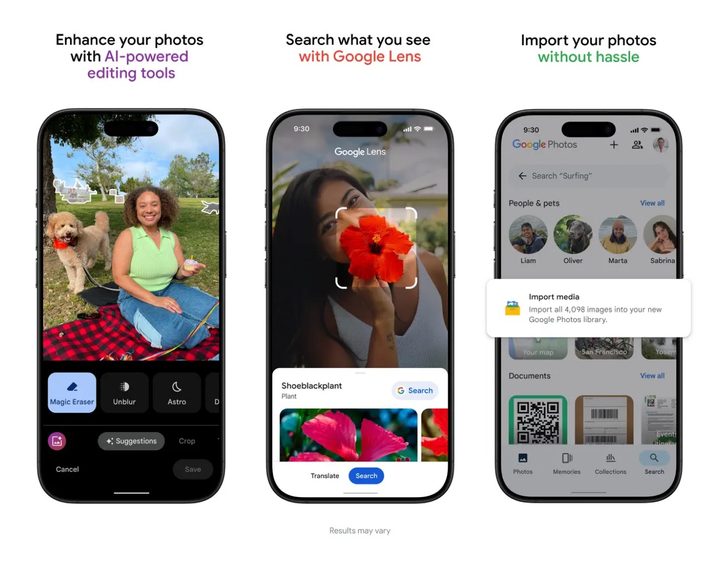
Google Photos is a versatile and widely used service for storing and sharing photos and videos. Thanks to Google’s AI technology, it stands out due to its strong focus on automated organization and powerful search features. One of its key strengths is cross-platform availability, making it accessible on Android, iOS, and web browsers.
Users appreciate the convenience of backing up their photos and videos, which helps free up storage on their devices. Google Photos also offers a variety of editing tools, automatic creations like animations and collages, and easy sharing options.
However, it’s important to note that while a base amount of free storage is available, exceeding that limit requires a Google One subscription. Additionally, some users have raised concerns about privacy and data usage, a common issue with many Google services. Overall, Google Photos provides a robust and user-friendly experience for managing and enjoying digital memories.
Reface: Face Swap AI Photo


Face swap apps have been around for years, and while their straight-up editing tools are a bit thin on the ground, that’s not the draw here. Add around six pictures of yourself, and you can swap your face with a number of different pictures. You can also use the AI Lab feature to insert yourself into a number of different time periods or fantasy settings. You can get a number of features for free, but the monetization is particularly aggressive here, and you have to wait a few seconds every time you open the app to dismiss the screen asking you to pay for a subscription, which starts from $7 a month.