It turns out Messenger isn’t the only app Facebook is hell-bent on getting its users to adopt. The social network is applying the same forceful approach it used in regards to its chat app to its Moments photo-uploading tool.
A number of users have voiced their anger and frustration at Facebook after receiving notifications, and even emails, alerting them that their synced photos will be deleted unless they download and install the Moments app.
The controversial tactic has worked wonders for Facebook, with Moments currently sitting atop the Apple App Store chart. We also know how well the strategy worked out for Messenger, which now boasts 900 million users and counting.
The move could have some damaging effects on Facebook’s reputation, in the short-term at least. Alongside the social media outrage, it has also caused a fair bit of confusion, with panic-stricken users fearing that all their Facebook images are at risk.
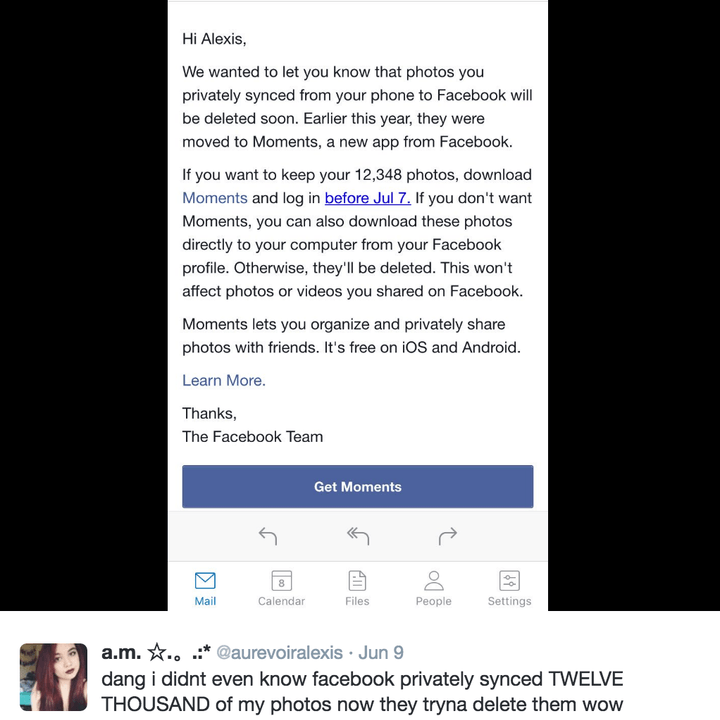
That’s not the case. Facebook has given users a deadline of July 7 to move to the Moments app or risk losing their “synced” photos, reports TechCrunch. The only problem is that some people may have synced their images years ago and forgotten all about it. If you’re worried that you may be affected by the changes, you can identify the selected photos by checking your Facebook albums. Synced photos will be stored in an album titled “Synced” within the Facebook app, and “Synced from Phone” on the web.
If you decide that the synced photos are of importance, you can either download a zip file of the images on to your computer, or install Moments in order to keep them on Facebook. If, however, you decide that they are irrelevant, then you can choose to ignore the app altogether.
Keep in mind that the photo-sync feature is only available on Moments; Facebook deleted the option from its flagship platform in December. If you’ve never used photo-sync on Facebook or Moments, you’ll probably be wondering what all the fuss is about. Photo-sync is a feature that allows users to upload, and backup, their smartphone photos on to the social network. The images are stored in a private album for future editing and sharing purposes.
Another integral Moments feature is its AI facial-recognition system, which it uses to identify the people in your images and when they were taken, allowing it to suggest who you should then share your photos with. Once you send an image to someone, they will be notified via Facebook Messenger, allowing them to log in to Moments and contribute their own images from the same event. The app also received a recent update that allows users to upload videos alongside images.
Moments shot to number one on the Apple App Store charts a few days ago and hasn’t budged from the top spot since. It looks like Facebook has its next blockbuster app on its hands, but at what cost?