
The more functionality we pack into our smartphones, the more power they need to run. It’s been over a year since J.D. Power surprised no one by revealing that poor battery life has the biggest impact on consumer satisfaction. Running out of juice is still the number one annoyance for smartphone owners. We’re not much closer to long lasting smartphone batteries, because we’re still reliant on the same old technology.
How do you make that battery last? What are the essential tips for saving smartphone battery life that will see you through the day? We’ve already looked at how to maximize your iPhone’s battery life, but in this article we’ll run through some general tips that will work for any smartphone. Then, we’ll take a look at advanced tips, accessories, and apps that could help.
Basic battery saving tips or “turn it off”
Obviously, the No. 1 battery saving tip for your smartphone, is to turn it off. If you’re in a dead zone, or you need to conserve some battery for later, then you should definitely just turn it off. All of the basic battery saving tips you’ll ever see for smartphones are related to this idea. Maybe you can’t (or don’t want to) turn the device off. In that case, you should turn off some of the functions.
Also, make sure you don’t have Wi-Fi, Bluetooth, GPS, or anything else on when you aren’t using it. Don’t allow push notifications for email updates. Don’t connect to a 4G LTE network when 3G will do. Turn your screen brightness and volume down. Turn vibrations off. Don’t use widgets or animated wallpapers. Whatever you do, don’t play games or watch video.
Of course, no one really wants to hear this. We remember having mobile phones that handled calls and texts and nothing else. The battery life was amazing, comparatively speaking, but who wants to shell out hundreds of dollars for a phone that just enables calls and texts? What’s the point in having a smartphone if you can’t enjoy the features?
What makes sense for you?
It is easy to make battery savings without missing out on the features you love. A lot of people never switch from defaults, even if they find them annoying, but they really should. Turning off vibration and sound feedback for typing is a good example. You may also find that you don’t really need to know every time a vague acquaintance posts something on Facebook or in a Google+ group that you’re part of. A lot of apps have push notifications on by default and they eat a huge amount of battery juice. They can also constantly distract you with inconsequential nonsense.
Location tracking is another feature that is often left on, even although the smartphone owner is not using it. Watch out for apps that want to know your location. If you’re not actually using the smartphone for navigation right now, then there’s very little benefit to allowing location tracking.
It doesn’t have to be a major chore. Many smartphones come with quick settings menus that allow you to turn off features with a tap when you don’t need them. If yours doesn’t, then you’ll be able to find an app that offers this functionality. Windows Phone actually has a built-in Battery saver feature which you’ll find in Settings.
Managing your screen
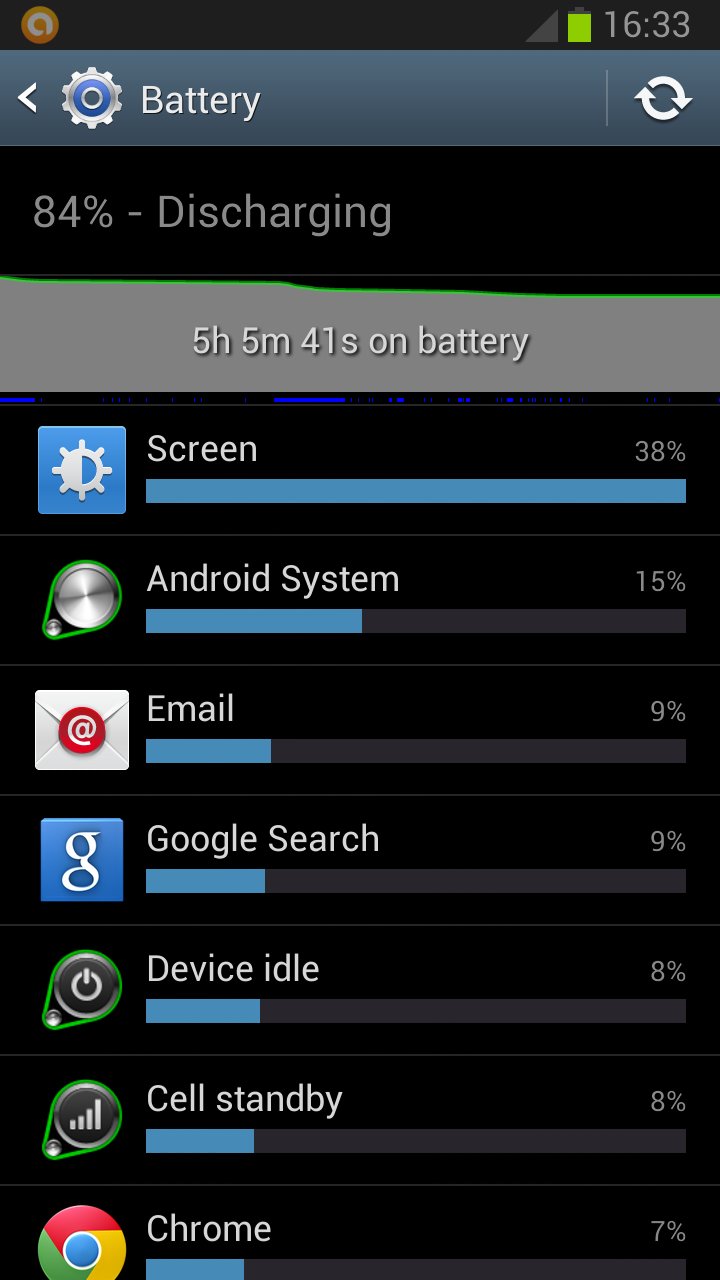
As smartphone screens get bigger, the display is responsible for eating more and more of the battery life. On Android you can go into Settings > Battery, or Settings > About phone > Battery use and see exactly what ate your battery. Invariably, your screen will be top of the list.
We’ve already mentioned reducing the brightness level. That will have an impact. You can also decrease the screen timeout. You’ll find it in Settings > Display. Make it as low as you possibly can before you find it terribly frustrating that your screen keeps turning itself off. On Windows Phone you’ll find the option in Settings > Lock + wallpaper > Screen times out after. On BB10 it’s Settings > Display > Screen Lock Timeout.
If you have an AMOLED screen, then you can save battery by using a dark background. The technology turns off pixels when they are black, so if you have predominantly black wallpaper, then you can actually save a lot of juice.
Advanced tips for saving juice
Keep your apps up to date. Developers often release updates for apps and games that offer improved optimization and this can have a big impact on battery life. If you discover a battery hog, then consider removing it. Don’t use task killer apps.
Keep your smartphone as cool as possible. Sitting in direct sunlight on the dashboard of your car will actually drain the battery faster.
Different batteries respond to different charging schedules and they will all eventually degrade. Most smartphones have lithium-ion batteries in them. One thing that many people do which can degrade the battery’s health is to leave it plugged in after it is fully charged. If you’re going to charge your phone overnight, then try to use a charger that shuts off once the battery is full. It’s also best not to let your battery fully discharge too often. Once a month is handy to ensure that calibration is correct (so your phone can tell you accurately how much battery life is left), but in general you want to charge it before it drops too low.
Rooting on Android
One thing worth mentioning briefly is the options that rooting opens up for Android owners intent on improving battery life. It definitely falls under the advanced category, but you can underclock your CPU and freeze annoying bloatware apps. Check out how to root your Android for more on that.
Battery saving apps
You’ll find various battery saving apps on all the major platforms. Some of the best options can help you identify what is eating your battery and allow you to save juice without having to dig into individual features and do a lot of manual tweaking.
The most popular option for Android is Juice Defender. It’s completely free and you can choose preset profiles, so there’s no need to get your hands dirty, unless you want to. Android gives apps more power to influence your battery drain than other platforms, but you can still use apps on other platforms to gain an insight and find more tips.
On iOS, the free Battery Doctor app provides useful insights and reminders. For Windows Phone 8, there’s a popular app called Battery, which displays how much battery life you have left and gives you access to quick settings. Battery Lover is a very similar app for BlackBerry 10.
Battery accessories
If you have a device with a removable battery, then you can always buy a spare battery and carry it around with you for emergencies. For some smartphones you can even buy bigger batteries with replacement back covers that accommodate the extra size, but you will inevitably be adding bulk to your device.
You might consider getting a case with a built-in battery. These are specifically designed for certain models, which means that you’ll find plenty for the iPhone, but you might struggle to find one for a less popular phone. For example, Mophie is a popular brand for the iPhone. You’ll also find a good option from PowerSkin for the Z10 in our best BlackBerry Z10 cases roundup. Seidio offer extended battery cases for quite a few smartphone models.
 Chargers that fit the lighter socket in your car can be snapped up cheaply. They’re ideal for extending your smartphone battery when you’re on the road, especially if you use your smartphone for navigation.
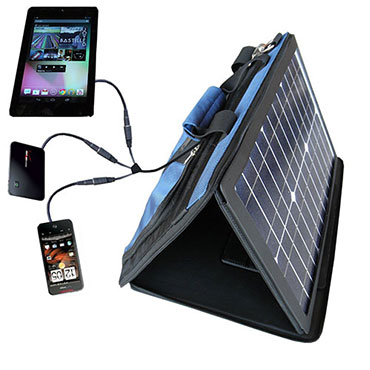
There are various other accessories worth considering, from pocket batteries, like the Kensington Pocket Battery, to larger solar chargers, like the SunVolt Portable Solar Power Station.
More smartphone battery saving tips
That’s all folks, but we’re always on the lookout for more tips to save smartphone battery life, so post a comment and share if you have a good suggestion. We’d also love to hear about any power-saving accessories you might have discovered that work well for you.


