
  1. Home
  2. Tablets
  3. Mobile
  4. Legacy Archives

Browse Facebook Timelines from your iPad with this StumbleUpon-like app

Add as a preferred source on Google

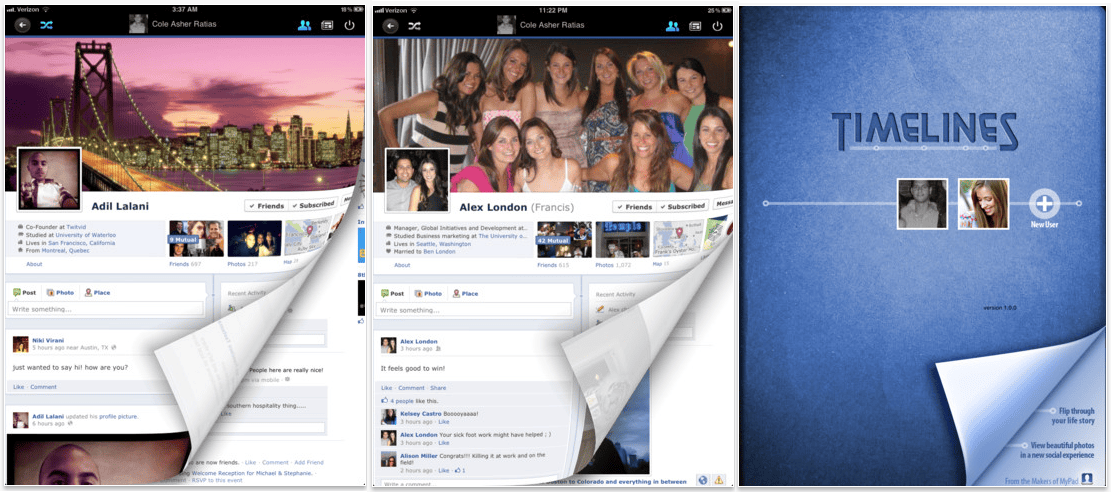
timeline appWhile we’re still waiting for the official launch of Facebook’s Timeline, the folks over at Loytr who brought you the unofficial iPad app, MyPad for Facebook, have already come up with an ingenious way to access the new profile formats.

The app, called Timelines for Facebook, combines elements of Tumblr and StumbleUpon to browse through the visual-heavy Timelines. You can view your friends’ Timelines either alphabetically or randomly, giving you distinct, visual access to their carefully-curated lives.

Recommended Videos

Of course, you’re only going to see Timeline from those who have activated the app (which you can do here). The update is a massive change for the profile page, and Facebook is taking incremental, careful steps to ensure that the user backlash is contained as much as possible.

This “stumbling” process has become a popular feature for browser-type social networks, like Tumblr or About.me, which will allow you to click your way through random profiles. It seems like this would naturally lend itself to Timeline, so instead of returning to your Friends list to see these profiles you could basically auto-browse them. It’s also the only way to access Timeline on the iPad, which is fitting for the company that brought Facebook to the iPad to begin with.

Timeline hasn’t hit the iPhone yet either, although there’s already been confirmation that it’s in the works. 

Molly McHugh
Former Social Media/Web Editor
Before coming to Digital Trends, Molly worked as a freelance writer, occasional photographer, and general technical lackey…
The iPhone Duo taught the iPad a much-needed lesson in multitasking. iPadOS 27.2 makes Split View less of a chore.
A small iPad tweak that fixes a big daily annoyance.
Electronics, Mobile Phone, Phone

It’s funny when a brand-new phone teaches an old tablet a lesson. That’s exactly what the iPhone Duo seems to have done for the iPad. I’m genuinely glad somebody at Apple was paying attention, as it was overdue.

iPadOS 27.2 makes setting up side-by-side apps on an iPad much easier, and it is an iPad multitasker’s dream come true if you ask me.

Read more
Affinity’s all-in-one creative app is finally here for iPad, and it costs nothing
You can now sketch, edit photos, and create vector artwork without switching between different apps.
Affinity UI on iPad

Canva has finally released the new Affinity app for iPad, nearly a year after it brought the redesigned creative suite to Mac and Windows. To go with it, the company has also introduced a bunch of new tools that take advantage of Apple Pencil and the iPad's touchscreen. And the good news is that the app is free, at least for the core creative tools.

As we reported last week, Affinity already offered separate Photo, Designer, and Publisher apps for iPad. The new version brings all those capabilities into a single app, allowing users to work on illustrations, photos, vectors, and page layouts without switching between different apps.

Read more
The iPad is finally getting the Affinity app creatives have been asking for
Affinity brings photo editing, vector design, page layout, and sketching together in one free iPad app.
Affinity UI on iPad

Affinity’s new all-in-one creative app is finally coming to the iPad, nearly a year after Canva launched the redesigned desktop version for Mac and Windows. Creatives have been asking for the iPad release ever since, especially because files created in the new Affinity app cannot be opened in the older V2 iPad apps.

Affinity already has Photo, Designer, and Publisher apps on iPad, but the new release combines those tools into the same unified app that Canva launched on desktop last year.

Read more