

“Samsung almost nails it with the Ativ Q, a super thin convertible tablet/laptop that successfully combines Android and Windows 8, but it's slightly too heavy and big (13-inch screen) to use as a tablet.”
- Haswell chip is powerful
- Insanely high-res screen
- Convertible hybrid design (4 modes)
- Keyboard works great
- Great battery life (supposedly)
- Too heavy to hold like a tablet (3lbs)
- Android stutters sometimes
- Stylus support is inconsistent
“Why you can trust Digital Trends – We have a 20-year history of testing, reviewing, and rating products, services and apps to help you make a sound buying decision. Find out more about how we test and score products.“
Samsung almost nails it with the Ativ Q, a super thin convertible tablet/laptop that successfully combines Android and Windows 8, but it’s slightly too heavy and big (13-inch screen) to use as a tablet.
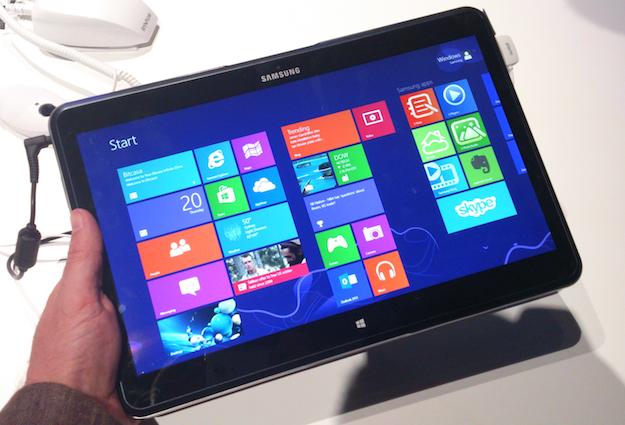
Samsung has announced the Ativ Q, a multi-function, dual OS tablet/laptop. A device that wants to be everything to everyone, like the Asus Transformer Book Trio, which launched earlier this month. However, there is an important difference between them.
The Ativ Q is a convertible tablet with four distinct modes: a tablet mode, an standing screen for watching video, an odd floating horizontal screen, and a laptop-like configuration which makes use of the built-in keyboard. What’s more, it runs both Windows 8 – the full version – and Android 4.2.2. However, unlike other systems, the Ativ Q doesn’t need to be restarted to switch between operating systems, as it is all done at the tap of a button.

Where Asus’s Transformer Book has dual CPU’s – one to power each operating system – the Ativ Q uses one, a new Intel Haswell Core i5 chip. In the short time we had to test out Windows 8, it performed well, with silky smooth scrolling and speedily opened apps. While Microsoft’s OS was pleasurable to use, Android stuttered slightly, and it never felt as polished as Windows.
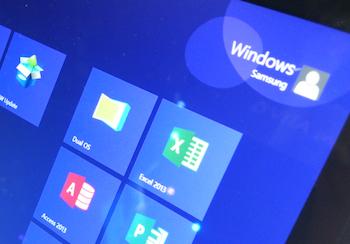 That said, the switch between operating systems is instantaneous, and is just as fast when you’re switching between open programs. There’s a Live Tile marked “Dual OS” that initiates the change to Android, and a press of the Windows softkey below the screen takes you back again. It really is seamless. Plus, Android apps can be pinned to the Windows home screens, so Gmail, Maps, or whatever else is only a button press away, no matter which OS you’re using. Tiny niggles aside, the Ativ Q really does offer the best of both worlds, all in one versatile machine.
The tablet has a 13.3-inch display and boasts an astonishing 3200 x 1800 pixel QHD+ resolution, giving it an impressive 275ppi pixel density. Needless to say, the right images look incredible, and Windows 8 really shines on this beautiful screen. Android didn’t look so good though, especially when playing games. Angry Birds was used to demo the Android OS, and its non-HD resolution was painfully obvious.
With the screen laid flat, the Ativ Q is a very big and heavy tablet. At 1.29kg (about 3lbs) it’s almost identical in weight to the 13-inch MacBook Air, but it is slightly slimmer at 13.9mm. There’s no denying it’s a heavy device though, and holding it in one hand – as one would with most tablets – is a real test of your wrists. It just isn’t comfortable for long. It’s sturdy though, and as Samsung has fashioned the chassis from metal, it should be as tough as it is hefty.
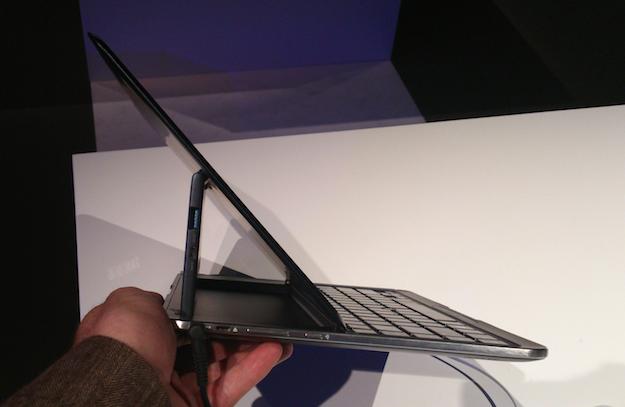
 A laptop-like gap below the screen lets you pull it out from the keyboard, and it hinges back to either sit at an angle for typing, or flat like a raised table. The mechanism feels solid, and it holds the screen perfectly still when it’s, “floating” allowing easy use of the included stylus. Samsung loves its styluses, but this one isn’t its best, as it’s much too small. A screen this large needs a lengthy prodding device, and not the weedy 3-inch stylus included. It works with both operating systems, but inconsistently so. The stylus couldn’t swipe through Windows 8’s Start screen, but it could when using Android. The stylus did project a neat, laser-like dot onto the screen though, making it easy to track its movement, or point something out to an observer.
The built-in keyboard is excellent, and the action of the keys is as good as any top-end laptop. Like a throwback to days gone by, there is a trackpad controller in the center of it, which causes a mouse pointer to appear on screen when stroked. However, it felt sluggish and imprecise in our quick test, and was annoying to use. Ultimately, it was easier to just reach for the touchscreen.
Right now, the main drawback we can see with the Ativ Q is its weight. Anyone used to an iPad, or worse, a Nexus 7, will really notice the extra weight it carries. Samsung has stayed quiet on the price too, and we fear it could become drawback number two (and release date). Otherwise, we loved the integration of Android, Windows 8’s smooth performance, the pleasant keyboard, and the Ativ Q’s overall versatility; making it one to watch in the near future.


