After a long, long wait, Oculus VR finally launched the Touch controllers for its Oculus Rift headset. If you’re not sure what the fuss is all about, we’ve put together all the details surrounding what you need to use the peripherals, what they can do, where to get them, and what games support them at launch and shortly thereafter.
What does the Touch do and how much is it?
The Touch controller allows Oculus Rift owners to interact with the virtual environment more naturally than a game controller. Each controller is wireless and uniquely shaped to fit within the hand like a strange, futuristic gun. There are several buttons and a thumbstick on the flat portion and the handle provides a trigger and a thumb button. Pew pew.
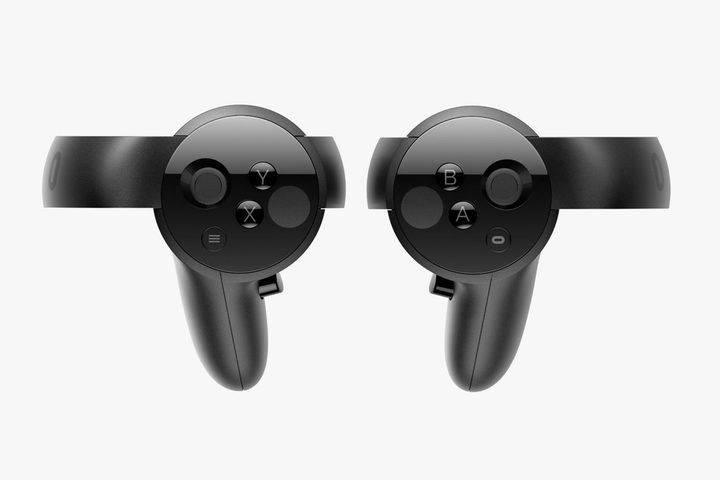
The Touch controller ships in pairs, so you don’t have to worry about having to purchase individual units. The controllers come packed with a sensor that is used to track their motions in real space. If customers want a room-scale experience, they can purchase a stand-alone sensor for an extra $80 by clicking the “Add to Cart” button on the main page or by adding it to the shopping cart.
For customers just starting out on their VR adventure, Oculus VR offers an $800 bundle that includes the Oculus Rift headset ($600 on its own), two Oculus Touch controllers, and two sensors. However, for customers who already own the Rift headset (which ships with one sensor), the Touch controller pair and bundled sensor costs $200. With the extra stand-alone sensor thrown in (totaling three in the overall setup), beginners are looking at $880. All products can be purchased through the Oculus website and at participating online and offline retailers.
Where can the Touch controllers be tested before making a purchase?
There are more than 500 retailers in the United States, Canada, France, Germany, and the United Kingdom now offering demos featuring the Oculus Touch controllers. Oculus VR doesn’t provide a detailed list of locations but instead offers a search tool here to find a location near you. However, Best Buy and Microsoft’s brick-and-mortar stores seem to be the only physical locations so far serving up Oculus Touch demos in the United States.
How does the Touch work with the Rift?
To pair the controllers to the Oculus Rift, make sure the headset is connected to the PC. After that, launch the Oculus app, click on the menu icon in the upper-right corner of the screen, and select ‘Settings’ in the drop-down menu. After that, click ‘Devices’ and select ‘Add Left Touch Controller’ in the ‘Configure Rift’ section, and follow the instructions to pair the device and update the firmware. Once done, the ‘Left Touch Paired’ screen will appear. Perform the same setup process with the right controller.
The Rift headset connects to a PC using a single USB port and HDMI port, while its accompanying sensor uses another USB port. The minimum requirements call for two USB 2.0 ports and one USB 3.0 ports, but the recommended requirements state all Rift hardware should be connected over USB 3.0. To use Oculus Touch, you’ll also need a fourth USB port, to connect the additional Constellation sensor.
Can the Rift and Touch Controllers support room-scale gameplay?
Room-scale will be possible by adding a third sensor. You need this extra sensor because one is already dedicated to the Rift headset and one is tracking the controllers. Each sensor can track a 5-by-11-foot area, so users might want to set up a triangular configuration to perform room-scale tracking. Of course, the more sensors you throw in, the better the Oculus system will track your every move.
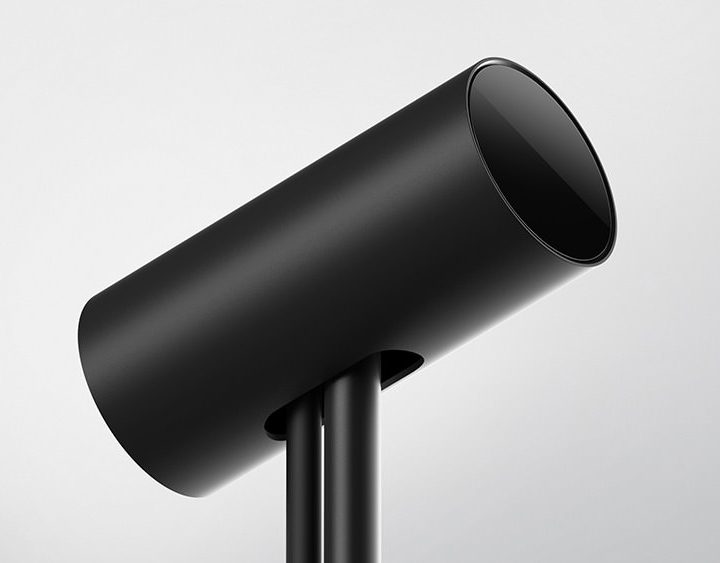
Take note that as users play in virtual space, they will move around and in different directions in the physical space. The Touch Controllers need to face a sensor in order to work, which is another reason why Rift owners will want to invest in a third sensor if they plan on room-scale experiences.
What do you need to run the Oculus Rift and Touch Controllers?
Below are the minimum and recommended hardware specifications for the Oculus Rift. Remember, the Touch sensor requires a USB port, as well as additional sensors for room-scale coverage.
| Minimum | Reccomended | |
| Processor | Intel Core i3-6100 or AMD FX4350 |
Intel Core i5-4590 or AMD equivalent |
| Graphics card | Nvidia GTX 960 or AMD Radeon RX 470 |
Nvidia GTX 970 or AMD Radeon R9 290 |
| Video output | HDMI 1.3 | HDMI 1.3 |
| System memory | 8GB or more | 8GB or more |
| Operating system | Windows 8 | Windows 7 SP1 64-bit |
| Ports | 1x USB 3.0, 2x USB 2.0 | 3x USB 3.0, 1x USB 2.0 |
What games support Touch Controllers at launch?
There are 54 Touch-enabled games available now. Check them out below.
Additionally, Oculus VR now serves up a “Launch Bundle” for $90 that includes five games pulled from the list above, knocking 25 percent off the price if all five were purchased separately. This bundle includes The Climb, Superhot VR, Kingspray, Space Pirate Trainer, and I Expect You To Die. The bundle can be purchased by heading here.
Previously, customers who pre-ordered the Touch controller bundle received The Unspoken and VR Sports Challenge for free. Unfortunately, they are not part of the retail package. However, there are a few titles that can be used with the Oculus Touch controllers for free including Dead and Buried, Medium, Quill, and a demo for the upcoming game Robo Recall.
Now here is an additional list of Touch-enabled games that will arrive in 2017:
| Arktika.1 | Bullet Train | Dragon Front |
| Giant Cop: Justice Above All | Killing Floor: Incursion | Landfall |
| Lone Echo | Luna | Moon Strike |
| Nimbus Nights | Robo Recall | Rock Band VR |
| Wilson’s Heart |
What do reviewers think about the Oculus Touch controllers?
Overall, the reviews are mostly positive. The general opinion is that the Touch controllers finally complete the Oculus Rift experience and puts the platform on equal ground with the HTC Vive setup. Even more, Rift owners will finally be able to purchase and play games on Steam that were originally only playable on the HTC Vive due to motion-based input. Simply put, Oculus Rift owners really need to invest in the Touch controllers for the full VR experience Palmer Luckey and Oculus VR originally set out to create.
Here are a few quotes:
“If you count yourself among those unenthused or still waiting for virtual reality’s must-play experience, the Oculus’ Touch controllers and the games designed for them are unlikely to get you to jump onboard.” – Game Informer
“The Oculus Touch controller isn’t the ideal hand-tracking solution for VR. That kind of perfection requires a camera that can accurately and quickly detect a hand’s position without any handheld device, or maybe simply a lightweight glove. For now, though, the Touch is a new high water mark in comfort, marred only by issues with the camera.” – ArsTechnica
“Touch isn’t perfect, but unless you’re against a little physical exertion, it’s a must-buy for every Rift owner. It’s a necessary part of the package as far as I’m concerned and feels like the missing piece of the puzzle.” – GameSpot
“Oculus Touch is easily the other shoe Rift owners have been waiting to see drop. Why it’s taken Oculus this long to bring Touch to market is anyone’s guess.” – Time
“The Oculus Rift now offers a great combination of controls and apps for next-level VR and some room tracking, but it offers a less expansive experience than the Vive.” – CNET
“If you have a Rift, you need to get the Touch controllers. If you’re on the fence about which VR platform to buy, the dual compatibility may help sway you.” – Polygon
Updated on 12-06-2016 by Kevin Parrish: Updates information regarding the launch, game information, pricing, and reviewer opinions.