

“At $35, it’s a cheap thrill for kids or 3D enthusiasts – but don’t expect to be blown away by the My3D’s build quality or app selection.”
- Inexpensive
- Compatible with many iOS devices
- Teleport L.A. app shows promise for this kind of technology
- Flimsy build
- Lack of apps
- Even kids will outgrow it quickly
- No stand for hands-free viewing
- Kids toy that requires expensive, fragile hardware
“Why you can trust Digital Trends – We have a 20-year history of testing, reviewing, and rating products, services and apps to help you make a sound buying decision. Find out more about how we test and score products.“
The Hasbro My3D is a cute idea – and that’s about as far as it gets. The toy offers the retro appeal of a View-Master by turning your iPhone or iPod into a 3D viewer, and comes with a collection of apps to experiment with. While young users will likely be amazed by it, the wonder is sure to wear off. That said, it’s an inexpensive option for distracting kids no longer placated by two-dimensional entertainment options.
Features and design
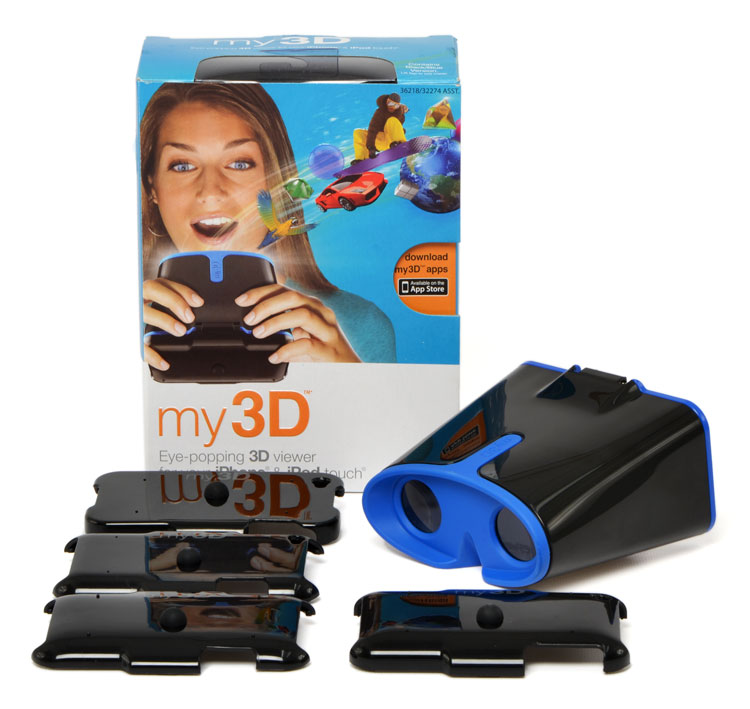
Right off the bat, the Hasbro My3D feels like a cheap toy. For good reason: It is, after all, a modern take on the View-Master. The View-Master used to be the cheap toy in a previous life, and kept kids entertained with 3D images of tourist destinations and beloved cartoons. For some reason, we remember this device feeling sturdier and less likely to snap in two – which could very well be due to the fact that we were under the age of 10.
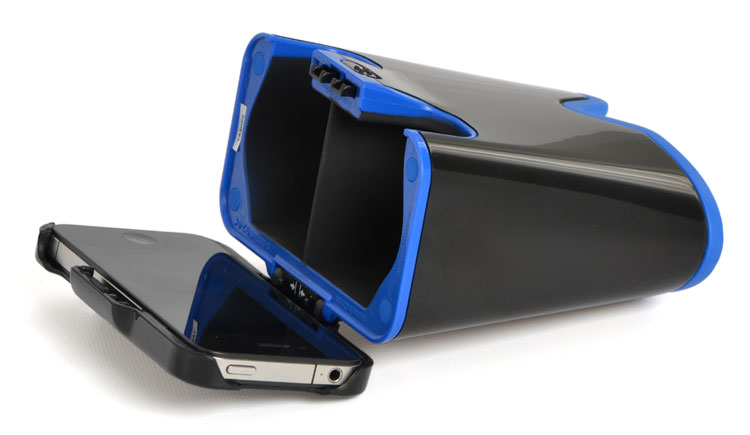
 That said, there are a few glaring problems with the My3D. The mechanism for attaching your iPhone to the device was not built with average-sized hands in mind. To hook it up to the base of the My3D is simple enough; simply slide the grip-equipped switch and connect the appropriate side of the included iPhone case. The top hook-up is as easy to finagle. You’ll see two small arrows indicating you should push the two levers in, which will hook into the two slots on the iPhone case once lined up. Problem is, holding those incredibly tiny levers gets in the way of pushing the case into the appropriate space. The only way to do it is to the press the levers in with one hand and with the other attach the case from the top. Once you get it in place, you release the levers, hooking the iPhone and case into place. It’s a small hardware oversight, but in generally the attachment feels flimsy, not something we’re thrilled about when it comes to securing such expensive equipment.
The case itself is easy enough to maneuver. We wish it would hold the iPhone when not attached to the other half of the My3D, but that’s a minor issue, seeing as there are mere seconds between sliding your iPhone in the case and hooking said case to the rest of the My3D. It leaves all ports open so you can attach ear buds and a charger if desired.
One feature we do appreciate about the My3D is the variety of iOS devices it’s compatible with. It’s unfortunate but true that the iPod touch has become something of a cast off in the wake of iPhone saturation, but My3D extends is usefulness and works the second-, third-, and fourth-generation models of the PMP. It’s also compatible with the iPhone 3G, iPhone 3GS, and iPhone 4. The device is available in white and black.
 There are currently a handful of apps available (Hasbro’s site lists seven). Most are games, but there is also a “My3D Presents…” app that takes you through the initial setup and use process, as well as “My3D Teleport L.A.” app that offers a 360 degree, 3D tour of the cities’ various hubs. Most apps are free, but some cost as much as $4.99.
Use and presentation
Right away, you should know that the majority of the content available for the My3D will appeal to kids under 10. The games are mind-numbingly simple (although sure to entertain youngsters) and the available trailers to watch in 3D include Kung Fu Panda, Smurfs, and Rio. So as long as you’re purchasing the My3D with the intention of handing it (and your iOS device) off to keep kids quiet during a road trip or similar situation, you’re fine. The Teleport L.A. app offered some mildly impressive 3D visuals and kept our interest longer than the others. We could see a line of location-exploration based apps like this finding a niche audience. A 360 degree, 3D way to check out vacation destinations or future apartments also seem like popular uses – but probably aren’t enough to tempt many adults into purchasing a My3D.
 It may not need to be said, but the My3D is not a hands-free toy. Younger, disaster-prone children will probably want to use two.
Slots in the My3D let you insert your thumbs to control the games and other apps, although hitting the touchscreen at just the right angle can be challenging.
Conclusion
Hasbro deserves credit for being the first to turn the iPhone and iPod touch into a 3D device. Not only that, but it does so relatively inexpensively and simply. But there are plenty of problems, the most glaring one being that this device is clearly being geared toward kids. We don’t know about you, but allowing children extended use of an iPhone makes us nervous. It seems like the benefit of the toy is to keep children distracted or entertained, but provided it’s housing an iOS device you actually care about, you’re going to want to employ some supervision.
At $35, it’s a cheap thrill for kids or 3D enthusiasts – but don’t expect to be blown away by the My3D’s build quality or app selection. If you’re really interested in handheld 3D experiences, you should go big or go home and hold out for the likes of the Nintendo 3DS. Honestly, your kids would probably be amused by an iOS device on its own.
Highs:
- Inexpensive
- Compatible with many iOS devices
- Teleport L.A. app shows promise for this kind of technology
Lows:
- Flimsy build
- Lack of apps
- Even kids will outgrow it quickly
- No stand for hands-free viewing
- Kids toy that requires expensive, fragile hardware


