

“Logitech’s least expensive universal remote lacks frills, but piles on value for basic home theater users.”
- Cheapie McCheap
- Easy setup
- LCD "wakes up" upon pickup
- Comfortable layout
- Not rechargeable
- No RF features
- 5-device limit
- Not compatible with Bluetooth-based products
“Why you can trust Digital Trends – We have a 20-year history of testing, reviewing, and rating products, services and apps to help you make a sound buying decision. Find out more about how we test and score products.“
 Introduction
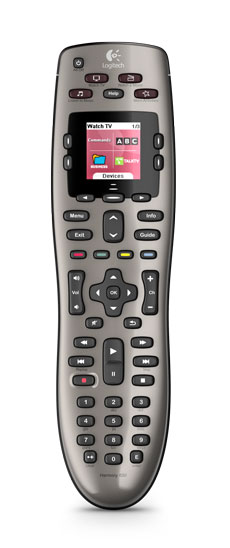
Logitech has cranked out quite a crew of Harmony remotes over the years. All seem to handle well, control a decent amount of devices, and are unbelievably easy to program. So how can you pick which one is right for you? Well, if you’re on a budget, the $99 Harmony 650 would be the obvious choice.
Design
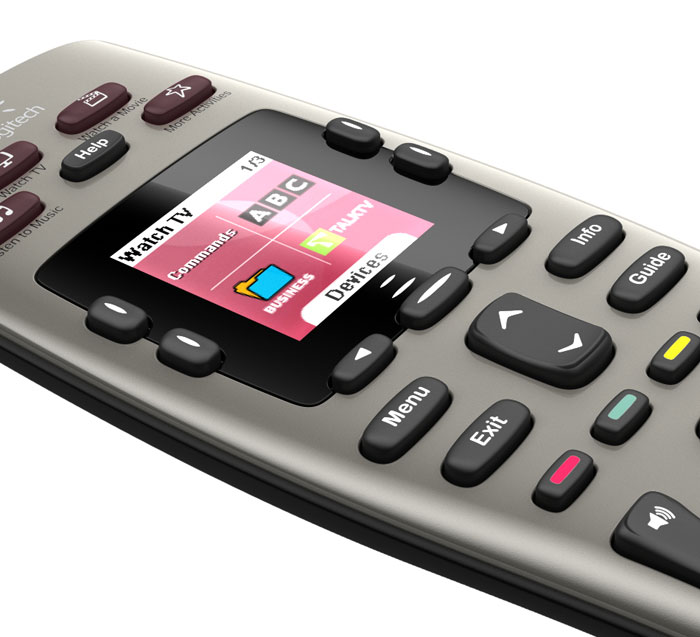
That’s not to say that the 650 feels cheap by any means. It has the standard rectangular remote shape, but is sturdy enough to go a few rounds under your couch cushions. Buttons are laid out nicely and respond well to a soft touch. Being a bit of a discount model, the 650 skips RF and there’s no touchscreen. It does have a small color LCD, which is nothing to brag about, but adds a little flash to favorite channels and commands.
One other noticeable feature: This baby takes batteries. Many other Harmony units offer docking stations. However, the lower cost means you’ll have to keep a stash of AAs around the house.
Programmability
Logitech says to set aside 45 minutes to set up the remote. It may seem long, but it’s pretty on-target—and actually flies by. Upon entering the two included AA batteries, the LCD instructs you to choose language and then head on over to Harmony’s website. As with all Harmony remotes, you will need a computer and web access for programming.
Our PC immediately recognized the remote. However, it would have been nice if the website had popped up, so we didn’t have to look it up (it’s www.logitech.com/myharmony, if you want to cheat).
Choose your OS and download the software. Installation took just under 5 minutes on our Vista-enabled laptop. Once launched, the software asks if you want to look for updates. You’ll also need to create an account, which is just a user name, password and security question in case you forget both. From there, add your name, an email address, and country of residence.
Now that the introductions are out of the way, we can get down to the business of adding components. We connected the remote via the included USB, clicked Next, and got—a timed-out session. If memory serves, this has happened to us before with other Harmony units. However, we easily logged back in and were adding devices in under a minute.
 Although this might seem like the most daunting task, Logitech could not make it easier. Devices are added through a series of pull-down menus for Device, Manufacturer and Model. This is where you might take up the most time, running around to check what those model numbers actually are. It shouldn’t take too long, though, as the 650 only controls five devices total. We went with the obvious: our Olevia HDTV, Dish Network HD DVR, Pioneer Receiver, Samsung Blu-ray Player, and Philips DVD Recorder. Logitech hasn’t caught up with an entry for Blu-ray, but it can be added as a DVD player and get the same result. Other goodies that can be put under the Harmony’s control include lighting and climate systems, media center PCs, DAT decks, and more. It also has a spot for gaming consoles—just not our Nintendo Wii or PS3, which need Bluetooth, not infrared.
Next, you’ll be asked to set up Activities, which group select functions under one button-press. For instance, to Watch a DVD, we chose the Samsung Blu-ray player for the DVD, our Pioneer receiver for volume control, and the TV’s HDMI input as our source selection. Once completed all of the setup, the remote should sync. However, we got—yes, another timed-out session message. We were fooled once, twice, and then we opted to just be remembered on the computer.
Once everything was inputed, we were flipping channels and firing up the TV without a glitch. As with any new remote, there may be a small learning curve. However, Logitech could not make this thing any easier, thanks to a simple, easy-to-understand button layout.
Conclusion
It’s hard to hate the Harmony. It’s even harder to hate the Harmony for under $100. Surprisingly at that price, the 650 still has the functionality of pricier controllers, but it’s limited to only five devices. For many, that’s just about right—or at least a nice way to ditch five random remotes. If you’re looking to shave a few extra bucks off the price, the 600 is Logitech’s monochrome model.
Highs:
- Cheapie McCheap
- Easy setup
- LCD “wakes up” upon pickup
- Comfortable layout
Lows:
- Not rechargeable
- No RF features
- 5-device limit
- Not compatible with Bluetooth-based products


