

“Sony maintains the reputation of its Elevated Standard line with the BDP-S1700ES Blu-ray player, which offers premium features and feel.”
- 3D capable
- Plays SACDs
- Extensive access to network media
- Improved start-up time
- Limited Netflix interface
- Limited purchasing options
“Why you can trust Digital Trends – We have a 20-year history of testing, reviewing, and rating products, services and apps to help you make a sound buying decision. Find out more about how we test and score products.“
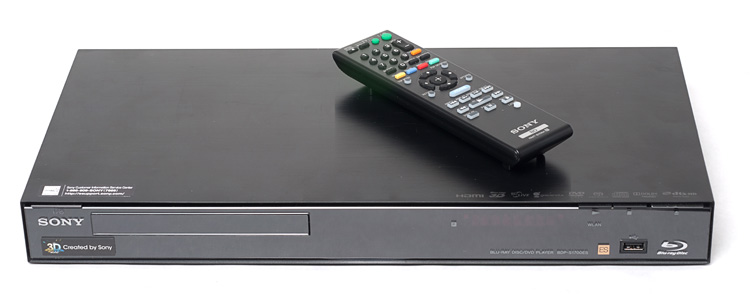 Sony’s ES (Elevated Standard) line of electronics has long been praised for their superior build quality and excellent picture and sound. The brand stands above Sony’s standard consumer line in both price and proposed performance, and due to changes recently implemented by Sony, is now available exclusively through specialty dealers and installers. That’s right: Sony ES is no longer available online. Here, we review the new BDP-S1700ES and consider whether this new Blu-Ray player warrants going a little out of your way to purchase.
Out of the Box
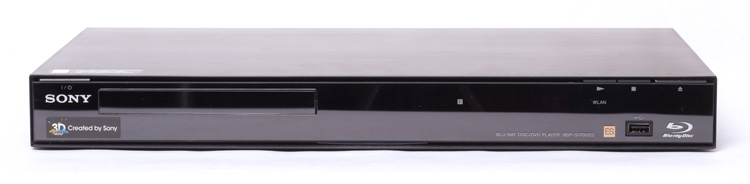
The all-black BDP-S1700ES shares the clean, stealthy look of its standard-line cousins. The power, play, stop and eject buttons are all located at the top of the front face and are exceptionally low profile, thus blending in with the trim of the façade. The lower right hand corner sports a USB input. Unlike some other Sony Blu-Ray disc players, there is no flip-down panel concealing the disc tray. Instead, the S1700ES incorporates a well-hidden, flush-mounted disc tray door that flips down when opened.
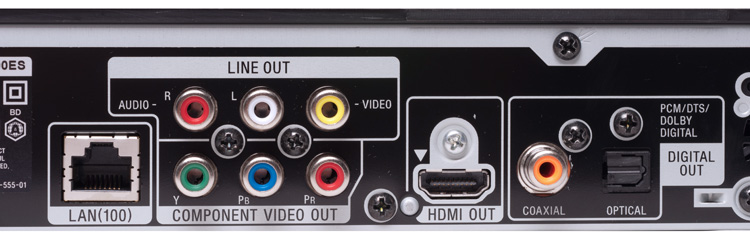 On the back of the unit we found one HDMI output, one component video output, A/V out, coax and optical digital audio outputs, an Ethernet jack, IR port and another USB input.
As is the case with most Blu-Ray players, the BDP-S1700ES comes with few accessories; plan on purchasing an HDMI cable for the best connection to your HDTV or A/V receiver. If your TV or receiver doesn’t support HDMI, you’ll need a set of component video cables for an HD picture and a digital audio cable for surround sound. In the box with the BDP-S1700ES we found a remote control, batteries for the remote, a user manual and the typically cheap “throw away” A/V cables.
Features and Design
The BDP-S1700ES supports full 1080p HD and 3D video output via its HDMI 1.4 connection, and is capable of passing on the latest Dolby Digital and DTS surround formats to your A/V receiver. The S1700ES lacks analog 5.1 audio jacks, but does offer standard DTS mixes via digital optical or coaxial connections for those with older A/V receivers. SACD enthusiasts (there are still a few of us out there!) may appreciate the player’s ability to play back SACDs with either a DSD stream or PCM via HDMI.
The S1700ES offers a built in wireless internet adapter as well as an Ethernet port for a wired Internet connection. When connected to the Internet, the BDP-S1700ES offers access to a huge array of network media sources. There are far too many to mention them all here, but you can expect the usual suspects such as Netflix, YouTube, Pandora and Amazon On Demand. There are also some notable new additions: We were pleased to notice Hulu Plus is now available, as is access to shared Windows files on a network. We were able to access photos, music and some video from three of the PCs that were connected to our wireless router.
 The BDP-S1700ES is one of a handful of Sony products that allows control of the device via an iPhone or Android app. Once you have installed the free app on your phone, you must navigate to the player’s setup menu, register the app and will be ready to go in seconds. The app has a simplified remote, full remote, setup screen and a Now Playing option that provides art and other information for movies and music. If an iPhone app isn’t your thing, the player can also be controlled via HDMI by capable Sony Televisions, keeping your remote drawer or basket just a little less cluttered.
While we did note that this ES Blu-Ray player was slightly heavier and seemed to have a more rugged chassis than most budget players, we didn’t get the same sense of premium build quality that we’ve enjoyed with previous iterations of ES electronics. The disc tray, for instance, is on par with most inexpensive Blu-Ray players and lacks the solid feel that we’ve come to expect from Sony’s Elevated Standard brand. That said, we know performance is driven by the components that we can’t see, so we kept an open mind as we sat down to evaluate its performance.
Performance
To evaluate the BDP-S1700ES, we connected it to a Marantz SR6005 receiver, Toshiba 62-inch DLP display and a 7.2-channel set of Aperion Audio speakers and subwoofers. We fed the Sony a diverse selection of both Blu-Ray and standard DVD versions of the same title, a handful of SACDs and, of course, spent some time exploring the vast array of Internet content that the S1700ES made available.
Because of its comprehensive list of features and customizable settings, the BDP-S1700ES may take a bit of your time to set up. We started out by setting up a wireless Internet connection and updating the BDP-S1700ES firmware. Once that was done, we set up our Netflix, Pandora and YouTube accounts. Doing this required frequent access to a computer for enabling devices and verifying accounts, but once settings are made, they are saved to internal memory and will remain saved even if the unit goes unplugged for extended periods of time.
As we powered up the S1700ES, we noticed that, even with its “quickstart” feature disabled, its boot and load time were considerably faster than most units we’ve tested to date. We felt like we spent less time waiting for movies to load than we did sitting through the unavoidable previews.
 The S1700ES’s video performance with Blu-ray titles was as excellent, as we expected it would be. More impressive, however, was the player’s DVD up-scaling prowess. When compared to our Samsung and LG players, the Sony’s picture quality when playing back DVD content was brighter and sharper with better overall color accuracy.
We then set about testing SACD playback. Here, we ran into a problem with what we thought was signal dropout between the S1700ES and the Marantz SR6005. As it turns out, whenever our display was turned on, our Marantz seemed to have a difficult time resolving the audio stream from the S1700ES, perhaps due to intercommunication amongst the HDMI components clogging up the pipeline. Frankly, we haven’t had sufficient time to determine where the problem lay, but at this time have no reason to believe that there was any trouble with the signal coming from the S1700ES. When we do figure it out, we’ll be sure to update this review. In the meantime, we are pleased to report that SACD playback sounded excellent. On multi-channel recordings, we sensed a very cohesive relationship amongst all channels that produced a very seamless soundstage. While not as airy as some of the analog SACD players we’ve tested, the S1700ES clearly did an excellent job of converting the DSD stream to PCM and passing it on to our receiver, a nice bonus in a Blu-ray player.
Finally, we spent some time playing back video content from Netflix and YouTube as well as some music streams from our Pandora account. YouTube video quality was surprisingly clean when blown up to fill our display, and Netflix video quality was also very stable. Our disappointment came when we discovered that the Netflix interface hasn’t enjoyed any improvement. The user is still limited to viewing only their Instant Queue. There are no options for searching or browsing titles and so, for now, the Xbox 360 and even the Wii remain superior in regards to a Netflix interface.
We enjoyed using the iPhone remote app more than we’d anticipated. The simplified remote screen allows finger swiping, which made navigating the S1700ES’s extensive menus easier. Since the iPhone app uses the local network to control the player, it was effective at controlling the unit even when we had no line of sight to the player. The ability to view movie and music art was entertaining but not exactly useful.
Conclusion
The BDP-S1700ES offers a built-in wireless adapter, 3D capability, excellent DVD up-scaling, SACD playback and easy access to a wealth of internet TV and movie content. With a bundle of features like that, we can see how this model can justify its $400 price point; however, lack of availability via Internet shopping channels may end up limiting it’s popularity.
Highs:
- 3D capable
- Plays SACDs
- Extensive access to network media
- Improved start-up time
Lows:
- Limited Netflix interface
- Limited purchasing options


