Creating and managing a website can be quite an undertaking. Whether you’re promoting a brand, advertising services, or keeping a recipe blog, there are a number of factors that contribute to the overall success of your new domain.
If you’re new to site design, you’ll probably want to hire a site developer or sign up for a template curator like Squarespace. You’ll also want to have some kind of strategy for promoting your site across social media platforms and the web as a whole. Then, of course, there’s the all-powerful SEO ranking. In order to rank well on Google, your site should be relevant, highly operational, informative, and engaging. And let’s not forget your site’s Alexa Rank.
Wait, Alexa Rank? What could that be? If Amazon comes to mind when you hear the phrase “Alexa,” you’re actually not far off. Developed by Amazon’s Alexa team (separate from the smart assistant developers), a site’s overall Alexa Rank is a number that reflects how popular a particular website is.
UPDATE: Recently, Amazon announced that it will be retiring Alexa.com and the global competitive analysis tool on May 1, 2022. At that time all active subscriptions will cease to exist and both the tool and the website will no longer be available.
Here’s a guide on what goes into an Alexa Rank and how you can use yours to improve your website.
How does your site stack up?

An Alexa Rank is a global metric that is collected through various third-party browser extensions and built-in Alexa site trackers. Combining an analysis of web traffic and site engagement over a three month span, an Alexa Rank between 1 and 100,000 is assigned, with the lowest rankings representing highest site popularity. Generally speaking, any Alexa Rank under 30,000 falls under top-tier popularity. Currently, Google.com holds the highest Alexa Rank of all.
When building a site, an Alexa Rank is not only valuable for you but also your competition. Being able to see exactly how your site’s pages stack up to the Alexa Rank of similar content can help you improve problem areas of your site in a number of ways (more on that later). On the flip side of the token, if parts of your site rank high on Alexa, you’ll be able to pinpoint exactly what is working for your site overall.
How do you find an Alexa Rank?
Finding out a page’s Alexa Rank couldn’t be easier. Simply head over to Alexa.com and plug your site info into the onscreen analysis tool. Once submitted, you’ll be brought to a full analysis page that will provide you with the entered page’s Alexa Rank, along with a number of other useful metrics that you can use. These include top keywords by traffic, similar sites by audience overlap, overall search traffic of the page, bounce rate, and more.
How do you improve your Alexa Rank?
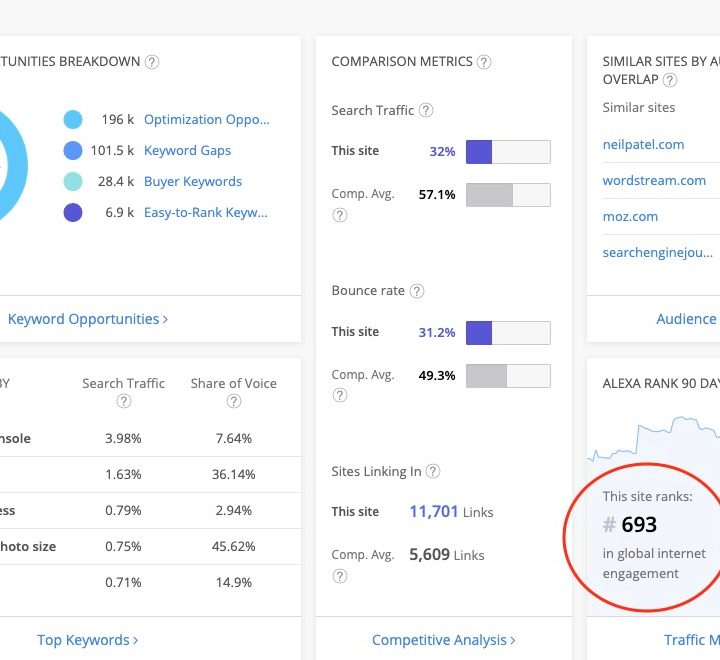
What if your site scores low (30,000 or above) for its Alexa Rank? Not to worry. There are a number of modifications you can make to your webpages to boost their Alexa Rank, which will inevitably bolster your site’s overall SEO, too.
Right off the bat, low-ranking sites will want to place an emphasis on overall content. You want to be posting high-quality, well-informed content to your site as frequently as possible. The better your post quality, the more your site visitors are going to want to stay and read (reducing overall bounce rate). If you’re producing top-tier content, your site visitors are also more likely to share and promote your content, helping to draw in more traffic.
Additionally, low-ranking sites will also want to focus on producing quality metadata. This is everything from page titles to meta descriptions that appear in SEO search results. The more that a search engine (and your site’s viewership) know about your content before clicking in, the more attention your site will receive.
Accruing inbound links is another way to improve your Alexa Rank. Simply put, the more high-quality sites that are directly linking to your site, the better. Ideally, you’ll want the inbound-linking sites to have a higher Alexa Rank (and higher SEO ranking) than your own domain.
If you really want to drill down, you can even sign up for paid Alexa programs that will give you an even better understanding of your site’s performance. Plans start at $150 for individuals and $300 for full-on agencies. Paid tools include content research, SEO analysis, keyword research, audience analysis, and more.
Is an Alexa Rank as good as other tools?
Any analytic insight that you can gain into your site’s performance is valuable. That being said, it’s important to cast a wide net when it comes to overall site relevancy. Tools like Google Analytics and Open Web Analytics offer a wide array of benefits, including live traffic data for your site, heatmaps (see what parts of your pages visitors are clicking on), and more.
Social media engagement is also important. A good practice is to pinpoint the platforms your target audience is using and aim for your marketing and other social media content to be published on those platforms.
Unfortunately, an Alexa Rank can be manipulated with a simple Java plugin that opens several pages from a single site, thereby artificially increasing web traffic to that page. So while an Alexa Rank provides a great jumping-off point for site developers and managers, using a wide host of analytics tool and social media platforms is the best way to understand your site and improve it.