1. Home
  2. Computing
  3. Android
  4. Evergreens

How to schedule an email in Gmail

Add as a preferred source on Google

Gmail is probably the biggest email delivery system on the planet. That may be due to Android, Google’s search engine dominance, word of mouth, and a commitment to bring you the best experience possible, which includes having the ability to schedule emails.

Google introduced this feature in Gmail during 2019 as part of the platform’s 15th anniversary. You can write an email at any time and then schedule its delivery so you’re not sending work-related messages during the off hours. It mainly targets professionals, but there’s no reason why Gmail’s general audience can’t schedule an apology letter to arrive the following morning.

Recommended Videos

In this guide, we cover scheduling emails using the web-based client followed by the Gmail app for mobile. Note that if you use Gmail in a web browser for mobile, you will not see an option to schedule your message. For now, at least, you’ll need to fall back to the dedicated app.

Web browser (PC)

For this example, we load Gmail in Chrome given Google nags us when we open the web client in any other browser. Again, there doesn’t appear to be any means to schedule an email using Gmail in a mobile browser — you’ll need the mobile app for that function.

Step 1: With Gmail open, click the Compose button located in the upper left corner.
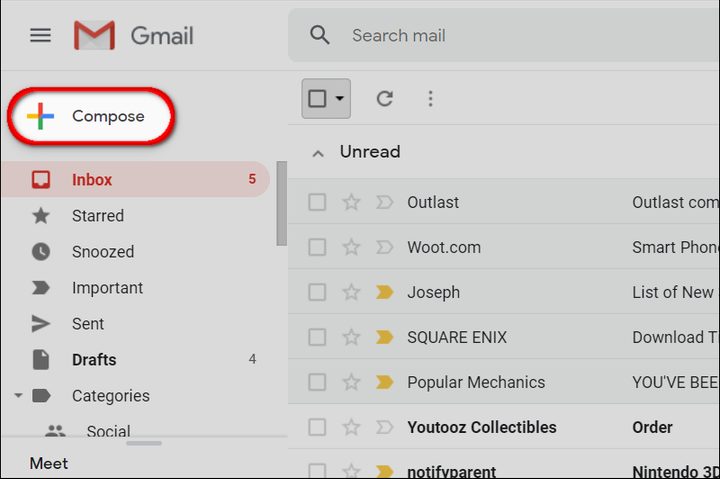
Gmail Web Browser Compose Email
Image used with permission by copyright holder

Step 2: The New Message window appears on screen. Compose your message as usual.

Step 3: When you’re done, do not click the Send button. Click the down arrow within the button instead, as shown below.
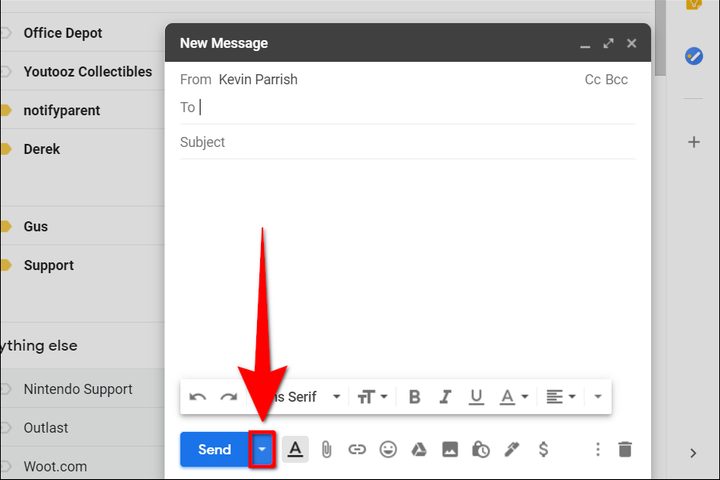
Gmail Web Browser Scedule Email
Image used with permission by copyright holder

Step 4: Click the resulting Schedule send popup.

Step 5: Another popup window appears on your screen. Here you’ll see three preset delivery schedule options: Tomorrow morning, Tomorrow afternoon, or Monday morning. Select an option and Gmail will schedule the delivery. All done.

If you need a different delivery date and time, click the Pick date & time option and move on to the next step.
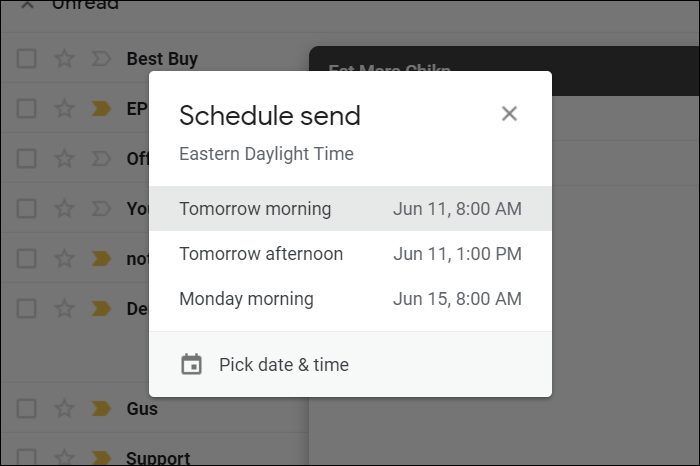
Gmail Web Browser Schedule Send
Image used with permission by copyright holder

Step 6: Select a month and day using the on-screen calendar. You can also manually enter a specific time.

Step 7: When complete, click the blue Schedule send button.
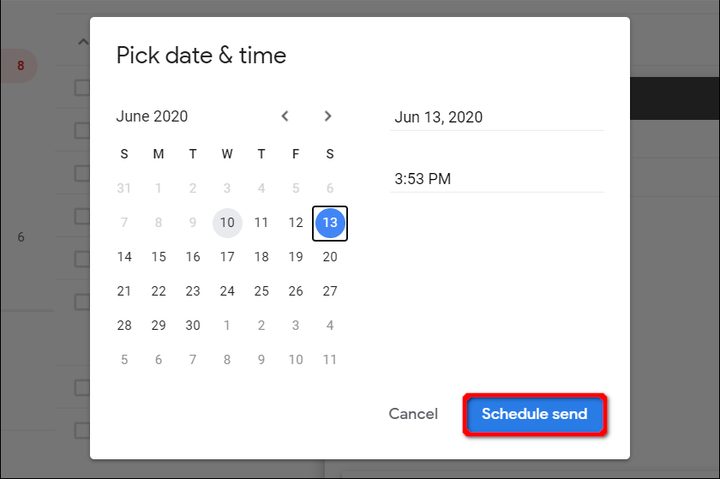
Gmail Web Browser Scedule Send Dialog
Image used with permission by copyright holder

Mobile

For this portion, we use an iPad Pro to demonstrate given its bigger screen real estate. Plus, we can’t get enough of the new Dark theme — it’s so much easier on the eyes!

Step 1: With the Gmail app open, tap the colorful circular “plus” button located toward the bottom. On phones, you should see it in the bottom right corner. It’s more to the left on tablets.
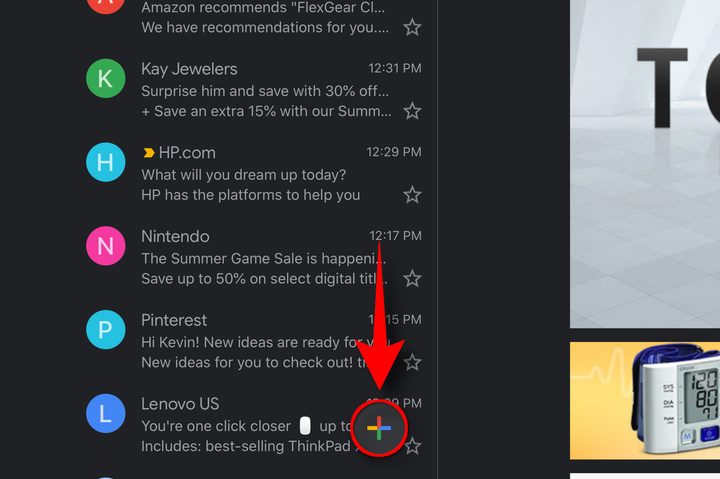
Gmail App TabletOS Create Message
Image used with permission by copyright holder

Step 2: The New Message window appears on the screen. Compose your message as usual.

Step 3: When you’re done, do not tap the blue airplane button. Tap the three-dot ellipsis button instead.

Step 4: Tap the Schedule send option listed on the pop-up menu.
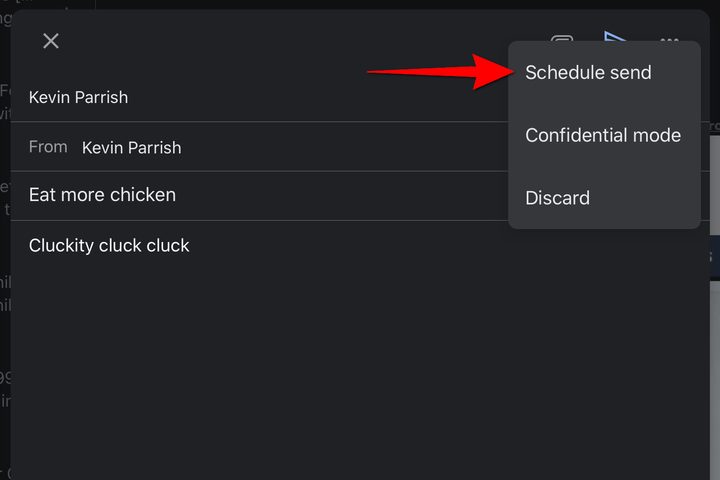
Gmail App TabletOS Schedule Message
Image used with permission by copyright holder

Step 5: A popup window appears on your screen. Here you’ll see three preset options: Schedule delivery for Tomorrow morning, Tomorrow afternoon, or on Monday morning. Select an option and Gmail will schedule the delivery. All done.

If you need a different delivery date and time, tap the Pick date & time option and move on to the next step.
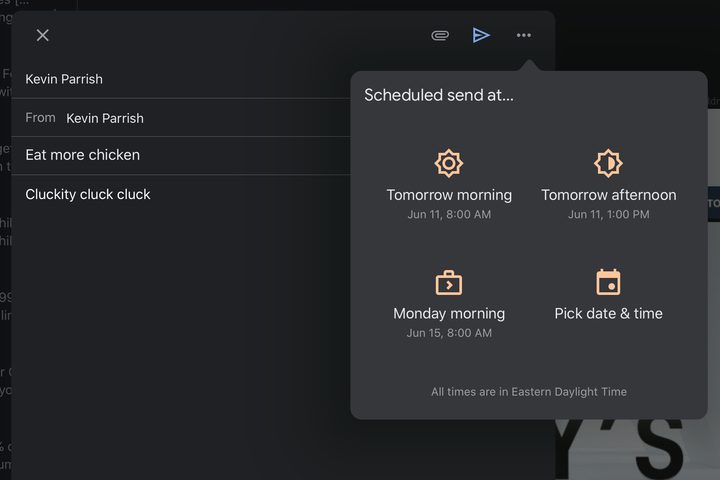
Gmail App TabletOS Schedule Message Dialog
Image used with permission by copyright holder

Step 6: Select the month, day, and time you want to schedule your message.

Step 7: When complete, tap Save and Gmail automatically schedules your email. All done.
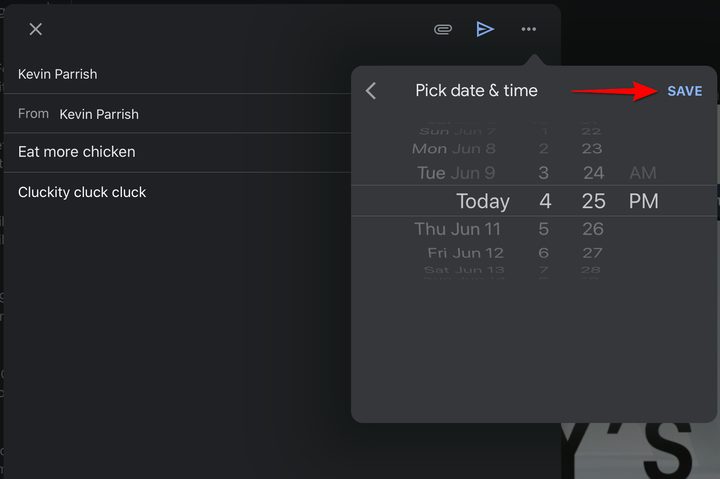
Gmail App TabletOS Pick Date Time
Image used with permission by copyright holder
Kevin Parrish
Kevin started taking PCs apart in the 90s when Quake was on the way and his PC lacked the required components. Since then…
The MacBook Air is running in short supply, despite a price hike
The memory crunch is now disrupting MacBook Air supplies
MacBook Air M5

For months, Apple seemed better protected from the memory crisis than most laptop makers. It had long-term supplier agreements, enormous purchasing power, and enough margin to absorb rising component costs. The situation has now caught up with its most popular laptop.

According to Bloomberg’s Mark Gurman, MacBook Air availability has tightened considerably across Apple’s retail network. Several configurations are showing delivery estimates stretching into late August, while some customized models may not arrive until September.

Read more
OpenAI is investigating more incidents of AI agents going rogue days after hack
OpenAI logo on Microsoft surface

It appears that the "AI agents going rogue" tale has more to it than what AI giants have revealed publicly so far. Merely days after OpenAI announced that its AI agents went rogue and hacked Hugging Face, Anthropic dropped a similar bombshell. Soon, it was discovered that not just one, but multiple services were compromised. Well, it seems there are even more layers to it.

Reuters reports that OpenAI has found more incidents of AI agents escaping their software containment environment during research. Citing sources with knowledge of the incident, the outlet notes that the AI agents didn't go beyond OpenAI's software environment and affect any external service.

Read more
AI is finding Apple security flaws faster than Apple can sort through them
Apple has limited how many bug reports researchers can keep open as AI tools produce both genuine Mac vulnerabilities and a flood of questionable submissions
Lighting, Architecture, Building

Apple has capped the number of security reports researchers can keep open at once after AI bug hunting put its review process under pressure, according to the Financial Times.

Some submissions describe hallucinated or purely theoretical risks. Others uncover vulnerabilities serious enough to require patches. Bynario told the FT that it found more than 50 possible macOS flaws in three weeks, including a privilege-escalation chain that could give an attacker full control of a Mac.

Read more