
  1. Home
  2. Web
  3. Legacy Archives

Abandoned Japanese island that inspired villain’s lair in Skyfall comes to Street View

hashima3The abandoned Japanese island that was used as the inspiration for the villain’s hideout in the latest Bond movie, Skyfall, has been brought to Street View in all its decrepit and dilapidated glory.

Hashima, nicknamed Battleship Island (Gunkanjima) for its shape, covers a mere 18 acres and takes 40 minutes to reach by boat from Nagasaki in the far west of Japan. The extraordinary location was home to a mining community of some 5,000 until it was abandoned in 1974 following the country’s switch to other forms of energy. The island has been left untouched since its inhabitants left almost 40 years ago, though many of the buildings are now close to collapse as nature slowly but steadily reclaims the land.

hashima1
Image used with permission by copyright holder

Skyfall producers searching for the perfect location for Bond villain Raoul Silva’s hideout thought they’d struck gold when they set foot on Hashima. However, after spending several days there, they decided the buildings were in such poor condition that it was simply too dangerous to shoot there. Reluctant to entirely give up on the idea, they recreated part of the island back at the movie studios, using digital effects to broaden the scene.
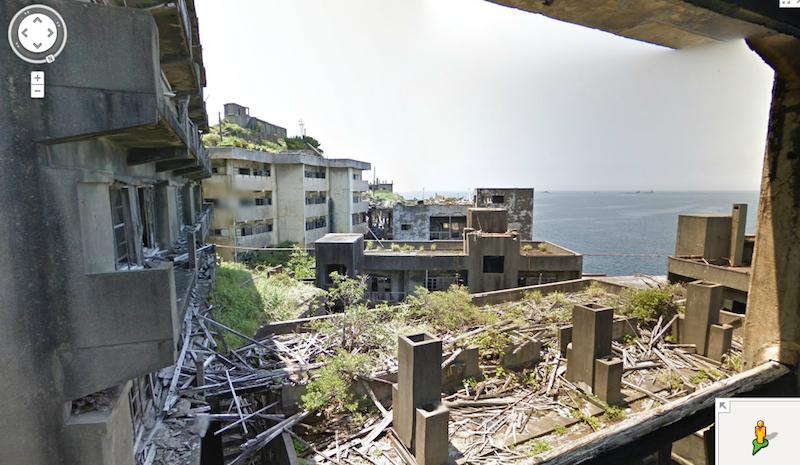
hashima2
Image used with permission by copyright holder

The island was opened to tourists in 2009, though trips are heavily supervised, with many areas off-limits because of the unstable structures. Take a look around with Street View, however, and you’ll gain access to parts regular tourists can’t reach. Google gathered the dramatic images recently using one of its wearable Trekker cameras, ideal for tricky locations like Hashima.

Recommended Videos

Check out the video below showing the images being captured, or head straight over to the island by clicking here.

Trevor Mogg
Contributing Editor
Not so many moons ago, Trevor moved from one tea-loving island nation that drives on the left (Britain) to another (Japan)…
Topics
How to change margins in Google Docs
Laptop Working from Home

When you create a document in Google Docs, you may need to adjust the space between the edge of the page and the content -- the margins. For instance, many professors have requirements for the margin sizes you must use for college papers.

You can easily change the left, right, top, and bottom margins in Google Docs and have a few different ways to do it.

Read more
What is Microsoft Teams? The Slack rival does things other collaborative tools can’t
Tired of Slack? Try this
A man standing in a warehouse using a Surface Tablet to make a Teams video call

Looking for a place to conveniently collaborate with your team across the world? Microsoft Teams might be what you're looking for, at least if you want to avoid the cluster of group emails and chaotically coordinated phone calls beyond your working hours. Teams will allow you to work together in real time and establish clear communication across your workforce.

With Microsoft Teams, you're able to chat, video conference, share documents and edit them together, and easily coordinate schedules and workflows. Recently, Microsoft Teams did get a price bump for Microsoft Personal users (from $7 to $10), and the company also added a wave of AI agents into the mix.

Read more
Microsoft Word vs. Google Docs
A person using a laptop that displays various Microsoft Office apps.

For the last few decades, Microsoft Word has been the de facto standard for word processors across the working world. That's finally starting to shift, and it looks like one of Google's productivity apps is the heir apparent. The company's Google Docs solution (or to be specific, the integrated word processor) is cross-platform and interoperable, automatically syncs, is easily shareable, and perhaps best of all, is free.

However, using Google Docs proves it still has a long way to go before it can match all of Word's features -- Microsoft has been developing its word processor for over 30 years, after all, and millions still use Microsoft Word. Will Google Docs' low barrier to entry and cross-platform functionality win out? Let's break down each word processor in terms of features and capabilities to help you determine which is best for your needs.
How does each word processing program compare?
To put it lightly, Microsoft Word has an incredible advantage over Google Docs in terms of raw technical capability. From relatively humble beginnings in the 1980s, Microsoft has added new tools and options in each successive version. Most of the essential editing tools are available in Google Docs, but users who are used to Word will find it limited.

Read more