  1. Home
  2. Web
  3. Legacy Archives

How to turn off Twitter’s enlarged photo previews … on your phone

Add as a preferred source on Google

If you’ve logged into Twitter, you’ve probably noticed that photos are taking up a lot more of the stream than before. Twitter has indeed rolled out a new feature that bumps up the size of shared Vine and photo content previews (for a variety of reasons that basically come back to making money) and they now take up a considerable amount of space. 

With the new feature comes plenty of complaints: Photos are taking up too much room, feeds move slower, users don’t want to see such a large preview of every Twitter-loaded pic and Vine video that hits their feeds.

Recommended Videos

Well, you’re in luck – or half in luck. When it comes to the Web, you’re stuck with the new photo-heavy Twitter, but there’s a very easy fix for the mobile app. Android and iOS users who’ve updated Twitter now have the plus sized images version. But you can roll things back by simply hopping into settings (hit “me,” and then the gear icon), and under “general,” toggling Image Previews to off. 
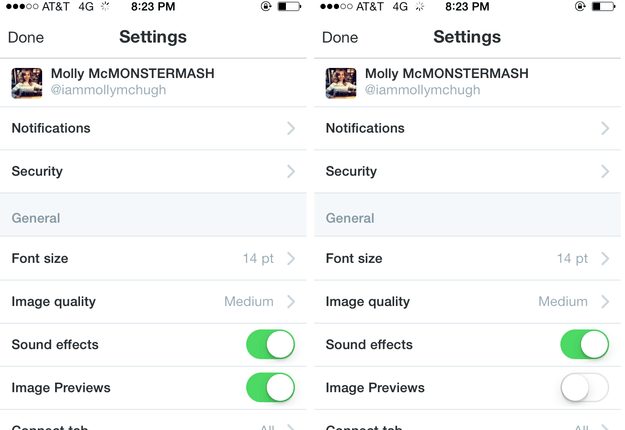
twitter preview images on and off
Image used with permission by copyright holder

Now, if you haven’t updated your app and don’t feel especially motivated to, don’t! You’ll be giant preview-proof. 

That’s it; now you can look at Twitter – at least, on your phone – in relative peace. Know that turning this off turns off all previews, though, so don’t be surprised when your stream becomes text-heavy.

Molly McHugh
Former Social Media/Web Editor
Before coming to Digital Trends, Molly worked as a freelance writer, occasional photographer, and general technical lackey…
Topics
How to clear your browser cache in Chrome, Edge, Firefox, Safari, or Opera
A cluttered cache can slow you down and break websites, so here's how to clear it in every major browser in just a few seconds.
How to delete browser cache

A stocked computer cache may be convenient for logging into and out of go-to sites in seconds flat, but a major buildup of these tracking codes could significantly impact your PC’s performance. If you’ve noticed that your PC has been running rather slow of late, or you’re using a new browser and don’t know how to clear its cache, we’ve got you covered with the following guide.

Read more
How to find archived emails in Gmail and return them to your inbox
Archived emails in Gmail are easier to find than you think—once you know where Google hides them
Gmail icon on a screen.

If you’re looking to clean up your Gmail inbox, but you don’t want to delete anything permanently, then choosing the archive option is your best bet. Whenever you archive an email, it is removed from your inbox folder while still remaining accessible. Here’s how to access any emails you have archived previously, as well as how to move such messages back to your regular inbox for fast access.

Read more
Is there a Walmart Plus free trial? Get a month of free delivery
A Walmart sign on the outside of a store.

For regular Walmart shoppers, signing up for Walmart Plus is a no-brainer. It's basically Walmart's version of Amazon Prime, with subscribers unlocking free shipping on most orders, early access to discounts and new product drops (like Nintendo Switch 2 restocks), the best grocery delivery, and more. If you're always taking advantage of Walmart's bargains for the best smart home devices or the best tech products in general, but you're still not sure if you'll be able to maximize the benefits of Walmart Plus, we highly recommend claiming the free trial to the service, and we've got everything you need to know about it right here.

START YOUR FREE TRIAL

Read more