  1. Home
  2. Phones
  3. Mobile
  4. News

Android O’s revamped notifications will anticipate your every need

Add as a preferred source on Google

Buzzing alerts and annoying vibrations are the bane of any smartphone user’s existence, but Google’s addressing the problem in the next version of Android. At Google’s 2017 I/O developer conference in Mountain View, California, the company laid out a vision for notifications that reorder intelligently and automatically, based on priority.

New to Android O is notification snoozing. After dragging a notification to the right-hand side of the notification shade, a clock-shaped icon appears — tapping on it brings up a list of time increments. Tapping one schedules  the alert to appear later.

Recommended Videos

Android O implements “attention-based sorting” — in essence, new hierarchies of alerts that Android collates by importance. It’s divided into four major categories: Major Ongoing, People to People, General, and By the Way.
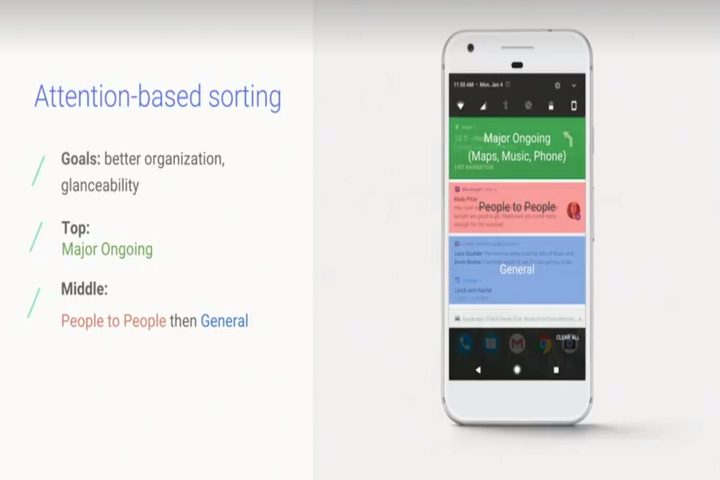
Image used with permission by copyright holder
  • Major Ongoing notifications, the highest-ranked notifications, are for high-priority tasks like turn-by-turn navigation and music playback controls.
  • People-to-People notifications include alerts from messaging apps. They’re ranked more highly than others, and they expand up to to three lines of text — giving you a preview of emails, texts, and other messages.
  • By the Way notifications show a single line of text that can be expanded with a tap — like a weather or traffic alert. They don’t appear on the lockscreen.
  • General notifications is a catchall for notifications that don’t fit into the other three categories.

The new notifications framework dovetails with another new Android O feature: Channels. They’re custom categories of notifications from specific apps that include a set of behaviors, like vibrating or triggering a ringtone.

Google used an airline app as an example. One of the app’s channel might include flight updates and fare alerts, while another, separate channel might show rewards points reminders.

In Android O, you can swipe to see the name of the channel in the notification pane, and switch off the ones you want. Alternatively, you can hop into a notifications settings screen that shows the app’s name, a shortcut to the app’s storage settings, a toggle that blocks all of the app’s channels, and a list of the app’s channels.
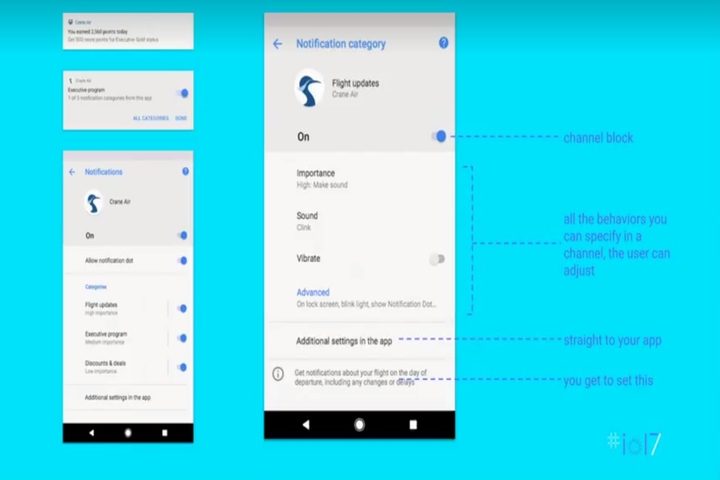
Image used with permission by copyright holder

Beyond notification categories and channels, Android O makes it easier to see which alerts need your attention. Animated dots over app icons indicate new messages, emails, or other content. And developers can color notifications manually (otherwise the background changes based on app content — music controls show album artwork, for example).

The onus is on developers to implement all these features, of course, but Google’s doing its part to spur them along. Starting with Android O, notifications and notification channels will become mandatory — developers who target the latest software development kit must tap into the new systems.

Kyle Wiggers
Kyle Wiggers is a writer, Web designer, and podcaster with an acute interest in all things tech. When not reviewing gadgets…
Samsung’s next tracker may look better while becoming harder to actually attach
Samsung may redesign the SmartTag right into an AirTag annoyance
Samsung Galaxy SmartTag 2 in Black and White variants

Samsung appears ready to redesign its Galaxy SmartTag again. This time, the makeover could come at the expense of one of the SmartTag 2’s most practical advantages. SamMobile's latest report has shared the supposed design of the upcoming Galaxy SmartTag 3.

The smart tracker can be seen with a compact squircle-shaped body that resembles Samsung's recent One UI icons and the shape used around newer Galaxy Watch displays. In comparison, the current SmartTag 2 looks a lot different, with a longer pill-shaped body dominated by a big integrated loop at one end. The leaked SmartTag 3 diagram does away with that loop entirely.

Read more
Tecno shows off a bezel-less concept phone that looks achingly breathtaking
Tecno's bezel-free phone could be revealed at IFA 2026 in September.
Tecno camon bezel free concept phone.

Say what you will about bezel-less phones, how bad they are for typing, and how they are a glorified ergonomics nightmare, but you can't deny their charm. For over a decade, smartphone makers have made numerous attempts to reduce or eliminate those black borders. The likes of Vivo went with a sloping screen, while others like the ill-fated Essential and Xiaomi just kept trimming the sides. Apple and Samsung followed in their footsteps, but neither of them has tried anything too audacious lately.

Tecno, it seems, wants to go bezel-less without any tricks. The brand just released a short teaser video showing its "next-gen bezelless concept phone." It's a concept phone, so keep that designation in mind. The brand hasn't said when this phone will be officially showcased, or launched, but IFA 2026 is our best bet. As for the device itself, it just looks stunning, and rumors also suggest that the bezel race will be white hot in 2027.

Read more
Shopping for back-to-school? I’d recommend these GaN chargers for saving space and packing more power
From a $9 spare to a $56 desk hub, these chargers cut down on cable clutter so that you can focus on your studies, not how cluttered your desk looks.
Best GaN chargers in 2026 for back to school shopping.

Between a phone, a laptop, a tablet, and perhaps a pair of wireless earbuds that require charging every day or every few days, most students are packing multiple chargers for move-in day. Those big, heavy bricks take up valuable backpack space that could otherwise be free for carrying more items. 

However, GaN chargers fix that problem in two ways. First, they deliver the same amount of power from a much smaller body, thanks to gallium nitride transistors. Furthermore, if you're willing to spend a little more upfront, you can get a high-capacity, multi-device charger capable of powering your entire digital ecosystem from a single wall outlet, something that could be very useful for a dorm room.

Read more