If you have the right tools, jump-starting a car is an easy, three-minute process that can save you a tremendous amount of money. We’ve put together a step-by-step guide that will get you started — literally and figuratively.
Causes of dead batteries
It’s rare for a car that’s driven regularly to have a dead battery; it’s more common when cars sit for long periods of time. But older batteries have a harder time holding a charge, meaning they can go flat unexpectedly. Leaving the engine off with power-consuming accessories (like the radio) on can also drain the battery in record time.
Step 1: Get a set of jumper cables
Make sure to carry a set of jumper cables in your car at all times, just in case you end up needing them. Any set will do the job, but we suggest looking for cables gauge 4 to 6 in size, with a length of 10 to 20 feet. Cables of that size should be durable enough to work reliably, and a relatively long length gives you an added degree of flexibility in case you can’t park another car right next to the one being jumped. You don’t want cables that are too long, though, as the extra distance electricity has to travel may decrease the strength of the charge.
Portable jump-starters work, too, but the batteries that power them must be kept charged in order for them to work.
Step 2: Find a power source
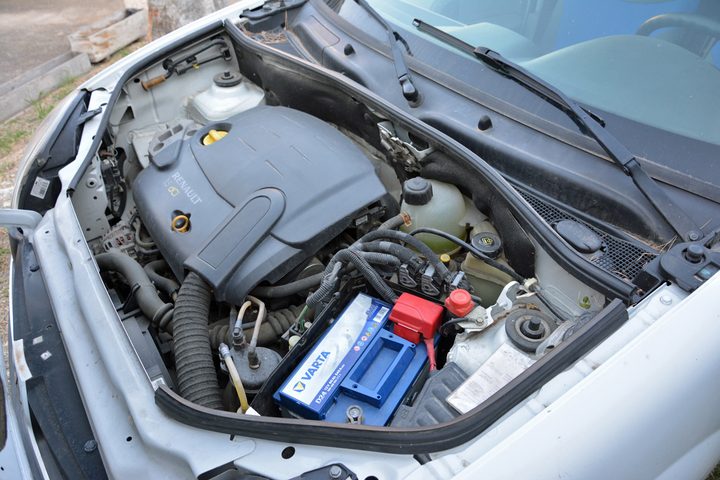
You’ll need to park the running vehicle close enough to the one being jumped for the cables to reach from battery to battery, so identify where the battery is located in each vehicle. Batteries are usually mounted in the engine compartment, toward the front, but that isn’t always the case. They may be hidden under plastic covers, which need to be removed before jumping, located in the trunk or beneath the rear seat. Familiarizing yourself with all of this beforehand will help save time when you actually need to jump a car.
Step 3: Connect the jumper cables

Once the running vehicle is maneuvered into position, shut it off and open both hoods.
When handling jumper cables, make sure to keep the red (positive) and black (negative) clamps from touching each other. Once electricity starts flowing through the cables, this will create sparks and could lead to a short circuit in one or both of the vehicles. Having one person at each end of the cables can make the whole process easier.
The clamps connect to battery terminals, which are exposed metal nodes with wires connected to them. Before connecting the cables, make sure to brush away any dirt or grime to ensure a good connection. Confirm which terminal is positive (+) and which one is negative (–). You’ll normally find each symbol on the battery itself, next to the terminal. Sometimes the positive is under a red cover. Ask for help when in doubt; it will save you a potentially costly repair bill.
Found them? Good. Connect one of the red clamps to the positive terminal of the dead battery. Then, connect the other red clamp to the positive terminal of the live battery. Next, connect a black clamp to the negative terminal of the live battery. Instead of connecting the second black to the negative terminal on the dead battery, find an unpainted metal surface on the vehicle and connect it to that instead. This will make jumping safer.
Step 4: Fire it up

Once the cables are connected, immediately attempt to turn the car on. You’ll grasp the situation at once if the dead car turns on. The battery might need an extra charge if the dead car doesn’t start right away, so let the other car run for a few minutes before giving up hope. If you try again after this and the engine still doesn’t ignite, then the battery may be defective. There could also be other factors to consider.
It all comes down to perseverance, patience, and determination when you need to revive your dead car. Once you attach the jumper cables to each vehicle, you’ll need to turn the key in the ignition to start the working car. Most of the time, this is the only thing you need to do. However, there are situations where the other vehicle does not start right away. Let the working car run for a few minutes and then give it another shot. Your car will likely start after this second try. If it does not start, you should probably assume that there is something wrong with your battery. It can be easy to lose hope at this point but don’t worry. If your car does eventually start, keep it running and remove the cables. Be careful that the clamps do not touch each other if any part of the cable is touching the battery. To disconnect the clamps, you’ll need to do the same thing you did to connect them but in reverse order. Remove the black clamp attached to the car that wasn’t working, then remove the red clamp.
Keep your car running after your cables are disconnected. Drive your vehicle around for at least 15 minutes, as this will give your car the chance to recover the battery’s charge. Make sure to keep your cables stored in your car in case you need to use them again. If you need to jump your car almost every day and know your battery is in good shape, you could have an alternator problem.
We created a handy guide if you’re interested in learning more about your car, especially the reasons why your check engine light is on. Check it out.