“Why you can trust Digital Trends – We have a 20-year history of testing, reviewing, and rating products, services and apps to help you make a sound buying decision. Find out more about how we test and score products.“

Trying out the original HoloLens for the first time was a mind-bending experience. At a time when you typically needed to use most virtual reality headsets with a computer or a laptop, Microsoft’s vision of AR felt distinctly futuristic.
The company is back again with the HoloLens 2. Originally announced at Mobile World Congress, the second generation headset is officially available for customers to purchase starting at $3,500.
At that price, it is not something that you’ll be able to buy yourself. Instead, the headset is designed for enterprise and what Microsoft has long called the “first-line workers.” That’s the people who are always out and about, and not at their desks. That’s not me — but after using the HoloLens 2, I’m beginning to wish it was.
Comfortable, even with glasses

When I was first handed the HoloLens 2, the first thing I noticed was its new design. Microsoft put a lot of thought into it, primarily in three distinct ways: ergonomics, immersion, and what Microsoft calls “time to value.”
I’ll begin with ergonomics. As I reached out and put the HoloLens 2 on my head, it felt natural, not unlike putting on the baseball cap I’m so accustomed to wearing. I rested it on my head and twisted a dial on the back, and HoloLens came to meet my face. Thanks to its padded brow pad and padded back, it was a snug, comfortable fit. I was able to keep my glasses on, and the HoloLens 2 slipped right over them. This wasn’t possible with the original HoloLens.

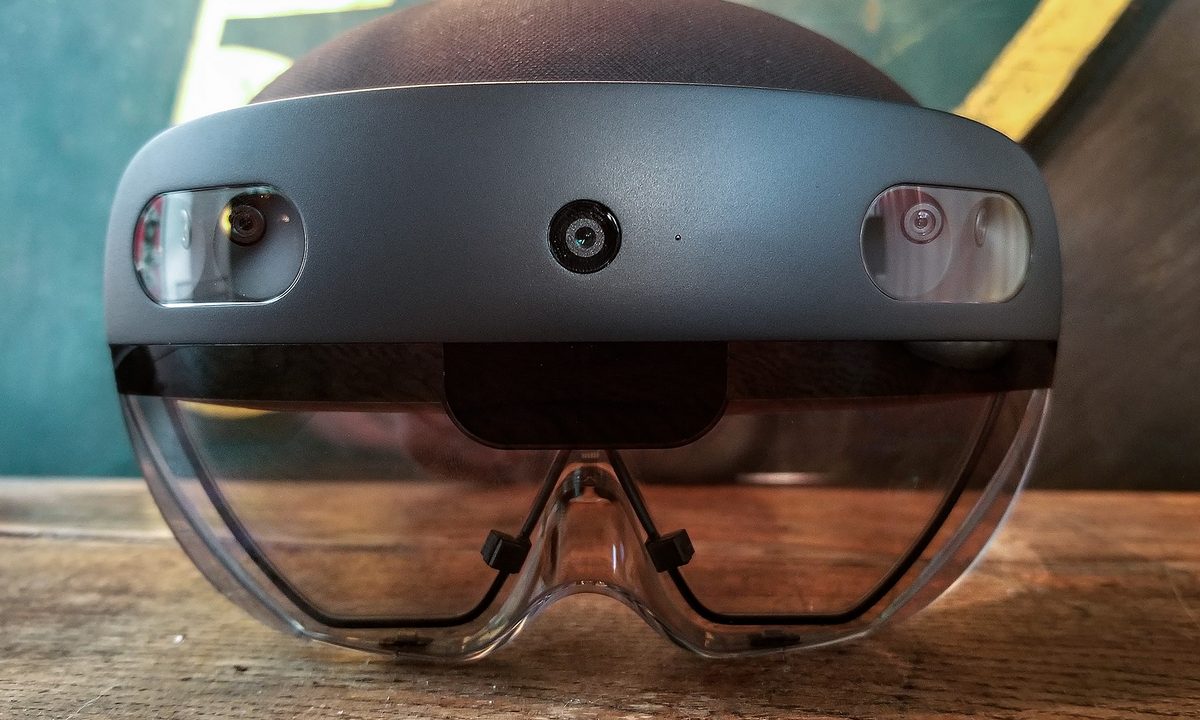
The headset is made of carbon fiber, and the weight feels more balanced, which is important for a device that rests on your head. The cameras and microphones sit in the front of the headset, while the battery and holographic processing unit (HPU) sit in the back.
That means the hardware never intruded on the mixed reality experience itself, which is what matters.
Digital meets physical
Unlike VR or AR, Mixed Reality is a bringing together of the digital and the real world together and experiencing them in three dimensions. That’s what makes HoloLens 2 so unique.
This was something already present in the original HoloLens, so I was curious how exactly the HoloLens 2 would take that to another level.
Well, the headset itself features two times the field of the view compared to the original HoloLens. There’s also fully articulated Hand Tracking, as well as Windows Hello and Eye Tracking. The headset can even map your hands and create a 3D model in the real world.
After some calibration, I was ready to boot up the intro demo. I turned my head and saw a 3D model of a wind farm sitting on the table in the room. I grabbed inside of it with two hands and made it bigger and smaller. I rotated it, moving it around the room. I didn’t even have to learn how to do this. It was as natural as clicking a mouse on my computer, but I was ready for more.
Words can’t do justice to how real everything felt.
I then clicked my way into a second application called HoloLens Playground. The application opened up on a desk, right in the room with me. The hologram appeared as a 3D physical object, and as I approached it, I tapped a play button with just my finger. I even sat down in a chair, and the holograms remained on the table, as if it was really there.
I stepped all the way across the room up to 30 meters, and the holograms still showed up for me on the same table I was looking at when I calibrated the headset. Words can’t do justice to how real everything felt.
Windows 10, but for headsets
You’re likely familiar with the way Windows 10 works. Tap the start button and see your apps. The same thing applied to HoloLens. To switch into some of the other apps and experiences available with HoloLens 2, Microsoft asked me to hold up one hand and look at the inside of my wrist.
When I did, the same start menu button Windows 10 appeared on my wrist. I tapped it with my other hand, and a start menu appeared in the real world, in front of me. I then scrolled the list of apps with my fingers, all on top of the real world.
I turned my attention back to the HoloLens Playground app, and as I launched it a hummingbird showed up in front of me. A near-exact 3D version of my hands temporarily appeared in the virtual world and the headset begun tracking my movements so that the bird followed my every move. I held out my hands and it followed me through the room. I was amazed.

The second part of in HoloLens Playground involved my other natural inputs. As I rolled my head around, I was able to see some diamond shapes in the room. I shouted “pop!” and HoloLens was able to realize I wanted the diamonds to pop. As I repeated it, the diamonds magically disappeared.
Lastly, I fired up Graffiti 3D by launching it from the start menu. I was even able to pin it to a nearby wall in the room in front of me. I dragged my fingers and a 3D neon shape followed me every movement across the room. When I finished, I panned it around, resized it and dropped it on the table behind me, again, all in the real world.
Microsoft tells me that this experience is powered by two things. The holographic processing unit, or HPU 2.0, handles all the holographic aspects of this experience and powers the sensors and the cameras for the holograms. The Snapdragon 850 SoC meanwhile, handles the computing aspect, and loading apps. The underlying layer is Windows 10 Holographic, a version of Windows 10 designed for the HoloLens 2.
Not for home, great for business
At the end of the day, as cool as these experiences all, it’s not for your average consumer. Microsoft says it is designed for enterprise. There are a few use cases, including remote assistance, training & task guidance, collaborative visualization, and contextual data access. Two of its partners are putting all of this to work with apps or services, which is where “Time to Value” comes back in.
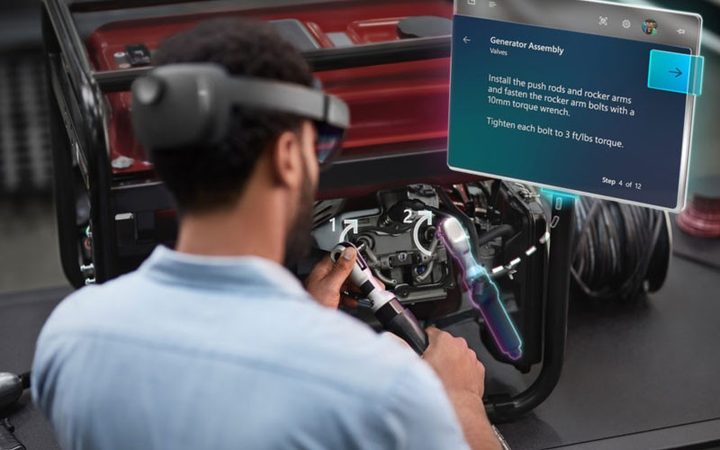
I experienced both of these offerings on HoloLens 2. Spatial is a computing platform for HoloLens 2 which can change the way you collaborate, communicate, and share content in the workplace. Essentially, it lets you communicate with virtual holographic versions of your coworkers wearing the HoloLens 2 headset.
You also can see a virtual wall of photos, and PDFs right on the space in front of you in the real world. It’s a pretty mind-bending experience, as while wearing HoloLens 2, someone sitting in an office far away from me, suddenly appeared in front of me. I even gave her a virtual high five.
The boundaries between the physical and digital world completely disappeared.
Then there’s Natuzzi. The furniture company is transforming the future of retail. I saw demos of how you can build creations in the real world and place them in the room as life-sized objects. It’s something that can really change the way retail business is done.
Take a few photos of your room, send the photo into Natuzzi, have them convert it over into Mixed Reality, and then experience it right in the store. The boundaries between the physical and digital world completely disappeared.
Headsets like the HoloLens 2 are only a preview of the power of AR and mixed reality. But it’s enough to keep me excited for when this technology goes mainstream.