  1. Home
  2. Apple
  3. News

Siri and Google Assistant say they now support Black Lives Matter

Add as a preferred source on Google

Voice assistants now explain and show their support for the Black Lives Matter movement when you ask questions like “Do Black lives matter?” or “Do all lives matter?”

Apple’s Siri and Google’s Assistant both share support for the movement, according to CNBC.

Recommended Videos

If you ask Siri, “Hey Siri, do Black lives matter?” she says, “Yes, Black lives matter,” followed by a link to BlackLivesMatter.com. Asking Google Assistant the same question gives you the answer: “Black lives matter. Black people deserve the same freedoms afforded to everyone in this country, and recognizing the injustice they face is the step towards fixing it.”

Microsoft’s Cortana responds to “Do Black lives matter?” with “Yes. And Black Lives Matter is an important movement that’s shaping a national conversation about racism.”

These prompts follow weeks-long, worldwide protests sparked by the killings of George Floyd and Breonna Taylor by police officers.
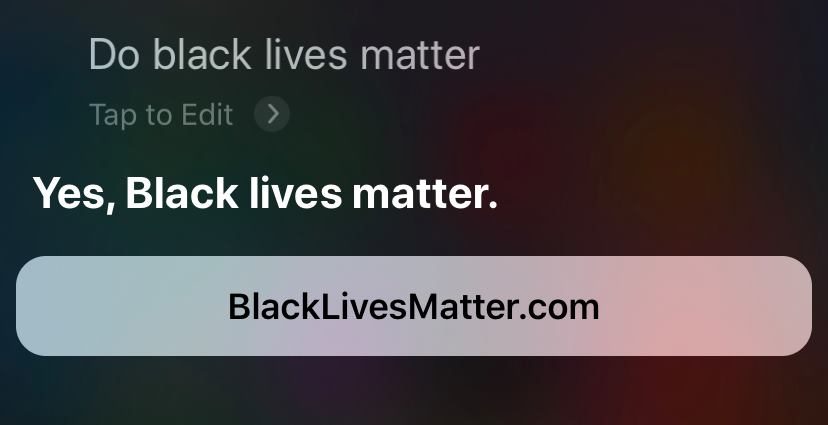
Image used with permission by copyright holder

The Black Lives Matter movement has gained traction and support over the last week, but not without the “all lives matter” rebuttal.

The voice assistants have a response to that, though. When asked that question, Siri says, “‘All lives matter’ is often used in response to the phrase ‘Black lives matter,’ but it does not represent the same concerns. To learn more about the Black Lives Matter human rights movement, visit BlackLivesMatter.com.”

Google’s response to “all lives matter” is “Saying ‘Black lives matter’ doesn’t mean that all lives don’t. It means Black lives are at risk in ways others are not.”

Asking “Do all lives matter?” to Cortana prompts a Wikipedia entry about the slogan that’s now associated with the criticism of the Black Lives Matter movement. 

If you ask Amazon Alexa these questions, you will pretty much get the same answer for both. 

“Black lives matter. I think people deserve the be treated with fairness, dignity, and respect,” and, “I think everyone deserves to be treated with fairness, dignity, and respect,” Alexa says as a response. 

CNBC reports that Apple and Google’s updates were made within the last week, and Microsoft’s responses have reportedly been included for several years. Digital Trends reached out to Amazon to find out when their voice assistant answers were updated to respond to those questions. We will update this story when we hear back. 

Allison Matyus
Former Digital Trends Contributor
Allison Matyus is a general news reporter at Digital Trends. She covers any and all tech news, including issues around social…
How to change the default apps on a Mac
Apple's default apps are great, until they're not. Here's how to swap them out in seconds.
change default apps on Mac featured image

One of my favorite things about macOS is that it comes with default apps to handle your everyday tasks. You get Safari to browse the web, the Mail app to handle your emails, and the Preview app to open and view photos and PDFs.

But what if you want to use a third-party app you prefer over the default app? Thankfully, Apple makes it easy to change the default apps on your Mac. So, whether you want to use Google Chrome or Outlook, here’s how you can set them as the default on your Mac. 

Read more
What is WhatsApp? How to use the app, tips, tricks, and more
From setting it up to mastering hidden features, here is your complete guide to WhatsApp.
WhatsApp app store listing open on iPhone

There's no shortage of messaging apps out there. The past decade has given us more options than we know what to do with, largely because smartphones demanded something better than plain old SMS.

Both the App Store and the Play Store are packed with apps that promise to revolutionize the way we communicate. Most of them didn't make it. The truth is, a messaging app is only as good as the number of people using it, and most apps never cross that threshold.

Read more
How to restore deleted or missing contacts on your iPhone
Lost your iPhone contacts? Here's how to get them back in minutes!
iPhone in hand showing restore contacts page

At some point, we all stopped memorizing phone numbers. It happened gradually, and now most of us can barely recall two or three phone numbers off the top of our heads. So when your iPhone contacts vanish, whether after a software update or an accidental delete, it can feel like a minor crisis.

Thankfully, if you act fast, you can easily restore deleted contacts on your iPhone. So, before you start texting people asking for their numbers again, try these methods to get your contacts back. These methods will work on all latest iPhone models.

Read more