If you’re one of the lucky gamers or creative professionals who defied the impossible and managed to snag one of the limited inventory of Nvidia’s GeForce RTX 3080 flagship graphics card when they dropped, you may have found yourself in for a bit of a roller coaster ride with the new GPU. Gamers have reported instability problems with the card since shortly after the launch that cause the GPU to crash.
Since those reports have emerged, technology sites and industry insiders have offered differing hypotheses on what the issue could be, with both software and hardware being potential culprits. Nvidia has responded and released an updated GeForce driver. Here’s what we know, and what you can do right now to prevent crashes from happening if you are the proud owner of an RTX 3080.
The problem

When the GPU crashes, gamers report that they are seeing a black screen or flickering in the middle of their monitor, obscuring games or other applications. Gamers who have experienced GPU crashing issues noted a few conditions — the GPU was active and running during a game or application, the GPU clock speed exceeded 2,010 MHz, and the crash would result in monitor flicking, screen instability, or even a black screen.
The issue appears to be widespread, affecting not only Nvidia’s Founders Edition card, but also custom designs from partners, including the MSI GeForce RTX 3080 Ventus 3X OC, EVGA GeForce RTX 3080 XC3, Gigabyte GeForce RTX 3080 Gaming Trio X, Gigabyte GeForce 3080 Gaming OC, and Zotac GeForce RTX 3080 Trinity, according to German publication ComputerBase. Reportedly, users experiencing the crashing issue have abided by Nvidia’s recommendations of using a power supply unit (PSU) that’s rated at 750 watts or higher.
Is it hardware or software?
Right now, there are two possible theories on why crashing may occur. It’s unclear if the crashing issue is the result of faulty components or a driver-related issue. The former will require more work to address, as additional testing — and a potential recall — will be needed. But if it’s a software issue, then Nvidia, Microsoft, and its board partners could potentially release a software fix or driver update to rectify any lingering problems. Nvidia has already released a driver update, though it’s not yet clear if it completely resolves the problem.
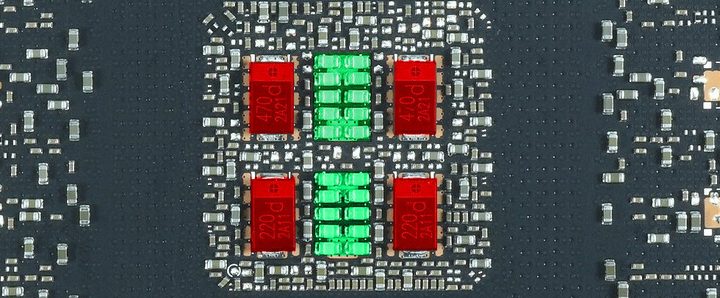
Those who believe the issue may stem from faulty hardware have narrowed it down to the use of a specific capacitor that could be a factor in the crashes. Nvidia’s own specifications allow for either multilayer ceramic chip capacitors (MLCCs) or conductive polymer tantalum solid capacitors (POSCAPs) to be used. Nvidia’s Founder Edition GPUs utilize the MLCCs, while many custom boards rely on the POSCAPs. These capacitors help to filter voltage, and they each have their advantages and disadvantages.
It’s unclear if the crashing issue is the result of faulty components or a driver-related issue.
Because there was a correlation between the number of crashes with Zotac’s Trinity GPU — and given Zotac’s reliance on POSCAPs — Igorslab posited that the crash could be due to the type of capacitor used. Many of the affected custom cards experienced crashing issues, and the theory is that these cards are clocked higher than Nvidia’s Founders Edition version. Anecdotal evidence from gamers online suggests that downclocking the custom RTX 3080 GPUs by as little as 100 MHz could help resolve the issue.
Further contributing to the theory is GPU manufacturer EVGA, which released a statement highlighting that capacitor failure was a reason why its RTX 3080 GPU designs were delayed at launch.
“During our mass production QC testing, we discovered a full six POSCAPs solution cannot pass the real-world applications testing,” EVGA wrote in a forum post on its own website, according to a report on Tom’s Hardware. “It took almost a week of [reserach and development] effort to find the cause and reduce the POSCAPs to four and add 20 MLCC caps prior to shipping production boards. This is why the EVGA GeForce RTX 3080 FTW3 series was delayed at launch.”
The company further admitted that some reviewers were sent preproduction units with the faulty capacitors, and the company is trying to replicate any real-world issues in a potential hardware fix. Production units with the more expensive capacitors were problem-free, EVGA stated. “EVGA GeForce RTX 3080 XC3 series with 5 POSCAPs + 10 MLCC solution is matched with the XC3 spec without issues.”
Despite the manufacturer’s optimism about its XC3 GPU, users posted that they, too, experienced crashing. One user experienced crashing in games such as Divinity Original Sin II, Metro Exodus, Doom Eternal, Kingdom Come: Deliverance, and Endless Space.
Crashes have also been experienced by owners of Asus’ TUF RTX 3080 and Nvidia’s Founder Edition, both of which use MLCCs, which could suggest that hardware may not be a large contributing factor.
For its part, Nvidia had distanced itself from the hardware theory. The company noted that it has worked closely with all of its partners to ensure that all components work properly.
“Regarding partner board designs, our partners regularly customize their designs and we work closely with them in the process,” the company stated in a blog post. “The appropriate number of POSCAP vs. MLCC groupings can vary depending on the design and is not necessarily indicative of quality.”
Nvidia’s statement contradicts that of partner EVGA in hinting that the issue could be software-driven, and that an updated driver will be the solution.
What you can do now to mitigate crashing

The most immediate thing you can do is update your driver, which can go a long way to addressing stability and fixing any bugs. Nvidia recently released a new GeForce driver, so you’ll want to download and install it on your system.
Other potential solutions that have worked for some users include reducing the clock speed by 50 to 100 MHz , or trying to under-volt the GPU. The latter solution is only possible through MSI Afterburner 4.6.3 Beta 2, according to Wccftech.
And if crashing could be a culprit of conflicting drivers, using Guru 3D’s Driver Uninstaller utility to find all the installed drivers on your device and uninstall old ones can be a potential solution.
Finally, if you’d rather not go through the growing pains of a new GPU release, you can always return your RTX 3080 until early adopters, board designers, and Nvidia can thoroughly investigate and resolve any lingering problems. Nvidia’s online store offers a 30-day return policy. If you purchased your RTX 3080 elsewhere, you’ll have to check with the specific retailer about its return policy. If you purchased your GPU with a credit card, you may also be covered by extended warranties, purchase protection, or extended return windows depending on the terms from the card network or the issuing bank.
However, if you must have the latest and greatest GPU in town today, you can also research the type of capacitors used on the card of your choice before buying. Opting for a card that purely uses MLCCs or a combination of MLCCs and POSCAPs over a design that relies entirely on POSCAPs may help alleviate any crashing issues. According to PC Gamer, GPU manufacturers Galax, Gainward, and Inno3D have stated that they are not using POSCAP in their designs.