1. Home
  2. Phones
  3. Computing
  4. Mobile
  5. Web
  6. Evergreens

How to block channels on YouTube

Add as a preferred source on Google

Whether you post public YouTube videos for fun or profit, interactions with everyday netizens — especially trolls — are an inevitable part of the process. Unfortunately, some commenters seem to have nothing better to do with their time than post offensive and derogatory comments, so consider blocking their channel rather than continuing to feed the trolls.

By blocking someone’s channel, you effectively remove their ability to comment on videos that you have posted publicly, which will limit their ability to be a jerk. Truly dedicated malefactors can always create another account, but at least you won’t have to hear any smack talk for a while. Read on to learn how to block channels on YouTube on your PC and mobile devices with a few simple steps.

Recommended Videos

How to block channels on YouTube: PC

In order to block a YouTube channel, you will need to be logged in to your YouTube account. You’ll need the username of the account you want to block. You can get that by clicking on the name of the offending user, entering keywords into YouTube’s search bar and filters.

Step 1: Search YouTube for the username of the account you want to block.

Step 2: Select the channel’s icon, then click About in the channel toolbar.
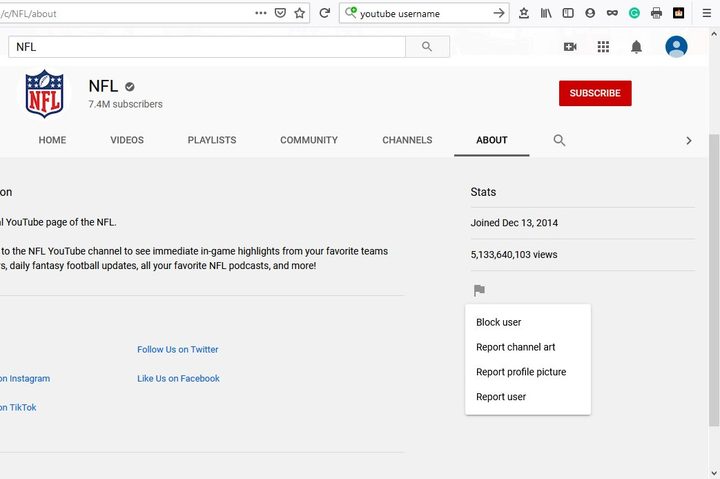
Image of YouTube Block Channel Button
Daniel Martin/Screenshot

Step 3: Click the Report User resembling a grey flag and select Block User from the list that appears.

Step 4: Select Submit on the confirmation box to block the user’s channel from commenting on your public videos.
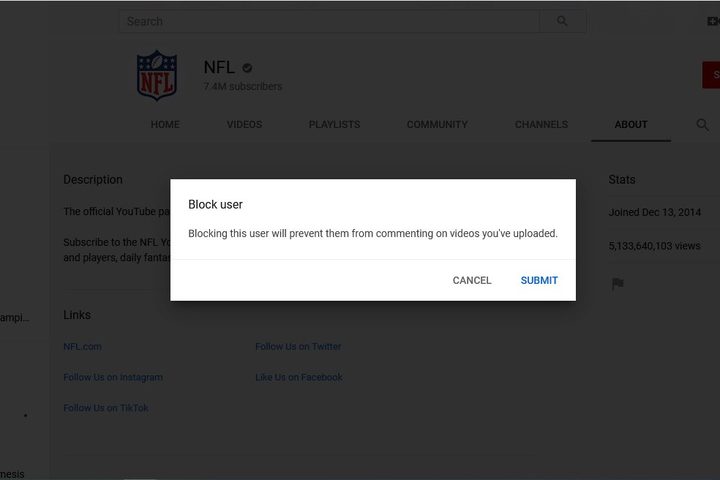
Image of YouTube Block User Submit Button
Daniel Martin/Screenshot

How to block channels on YouTube: iOS and Android

Step 1: Open the YouTube app on your smartphone or mobile device, tap the search icon, and enter the name of the channel you want to block.
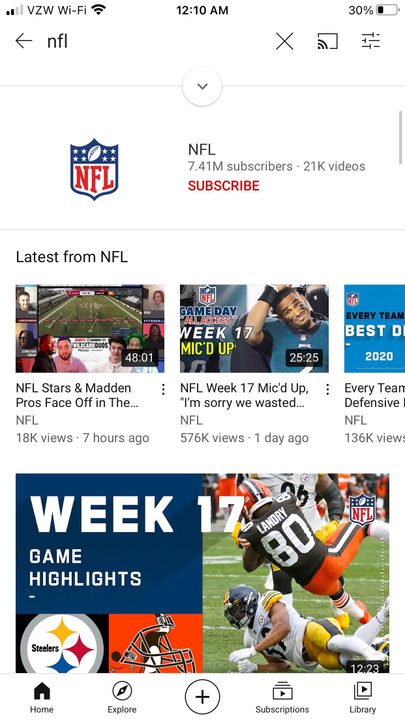
Image of YouTube Channel Search Results
Daniel Martin/Screenshot

Step 2: Tap the account to view their main page, then select the three vertical dots in the upper right corner of your screen.
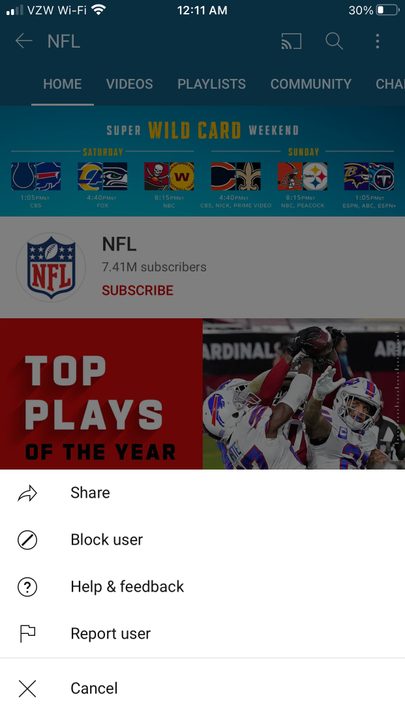
Image of YouTube Block User Button
Daniel Martin/Screenshot

Step 3: Tap Block User and then Block to confirm your decision.

You’re all set! That particular troll will be unable to talk smack about your videos (at least until they make their next burner account).

Want any more tips on how to manage your YouTube account? Check out our guides on how to change your YouTube name, and how to delete your account for good.

Daniel Martin
Former Digital Trends Contributor
Daniel Martin is a technology expert, freelance writer, and researcher with more than a decade of experience. After earning a…
Made by Google August 2026: Everything we expect from the Pixel 11 launch event
Tensor G6. Gemini Intelligence. Higher prices. Google's biggest hardware event in years lands August 12, and here's what every major leak tells us to expect.
Google Pixel 10 Pro in the official silicon case

The next three months will define the future of the smartphone market across the globe. As three of the most important handset makers gear up to unveil the next generation of foldables and flagships, the memory crisis is worsening with each passing quarter, pushing up phone prices across every segment.

We have Samsung going live on July 22, 2026, with its latest foldables, followed by Apple’s new CEO, John Ternus, revealing the iPhone 18 Pro and the first foldable iPhone in September (like they do every year). However, the middle month — August — is when Google finally hosts its “Made by Google” launch event, a hardware-focused event that will unveil the Pixel 11 series. 

Read more
WhatsApp is creating its own cloud backup alternative for iPhone users
WhatsApp is building a backup service with 2GB free and paid plans up to 1TB.
Two phones on a table next to each other. One is showing the WhatsApp logo, and the other is running the WhatsApp application.

If your iCloud storage is constantly running low, WhatsApp might have a fix coming. Code spotted in the WhatsApp beta for iOS by WABetaInfo reveals that Meta is building its own first-party cloud backup service for iPhone users.

For the first time, you would be able to store your WhatsApp chat history on WhatsApp's own servers instead of iCloud. The feature is still in development and not yet available to beta testers, with no official release date announced.

Read more
Your iPhone could soon flag malicious iMessages before they do any damage
iOS 26.6 will warn you when an iMessage looks suspicious and let you report it to Apple.
imessage-alerts

Apple appears to be adding another layer of protection to iMessage against scams and cyberattacks. Code discovered in iOS 26.6 beta 5 reveals a feature called Malicious Message Detected.

It pops up a warning when your iPhone identifies a potentially dangerous incoming message. The feature was first spotted by X user, who shared a mockup of the alert.

Read more