
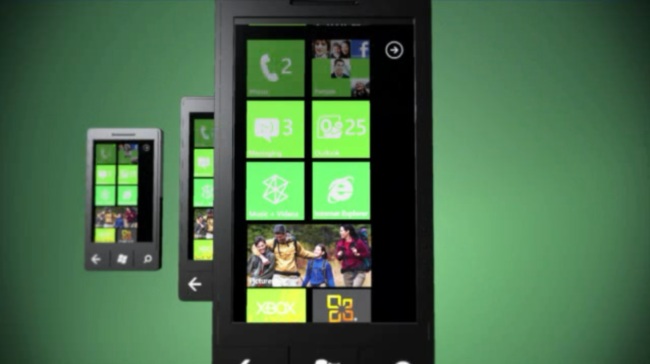
At its Mix 11 conference today, Microsoft finally began opening up, and apologizing, about Windows Phone. While the event is mainly aimed at application developers, the Redmond company gave us a glimpse into some of the features coming this autumn in the Windows Phone 7 “Mango” update. Angry Birds, better language support, better app discovery, augmented reality, actual multitasking, and a new way to deep link into apps were among many new features shown.
Apologizing for botched updates
Microsoft’s head of Windows Phone, Joe Belfiore, began addressing and apologizing for the botched release of the first Windows Update, currently rolling out to customers. Belfiore admitted that Microsoft made some major errors when it issued its first test update and the promised “NoDo” update in March. Most of these were very small and were related to odd manufacturing defects and processes that are unique to phones. Sever Microsoft paused the update, but the problems have caused carriers like AT&T to extensively test the update before releasing it. Future updates, he believes, will be issued more timely and without these problems. Belfiore angered some users in March when he claimed that the update was out; many users still have not received the update, which was originally promised in the beginning of 2011. The Mango update will be out before the end of 2011, he cautiously asserted.
Live Agents (Deep linking for your phone)
 The coolest new feature Microsoft showed off today was the ability to create a Live Tile (shortcut) not just to an app, but to a single page or feature within that app. This feature is great. As an example, Belfiore went into the Amazon shopping app for WP7. He doesn’t like having to open up the app and go through menus to get to the barcode scanner, however. So right in the menu was an option to pin that exact app page (the scanner) as a Live Tile on the Windows Phone homescreen.
Another example shown was the Qantas (airline) app. The app let you pin actual flights straight to your homescreen. Live Tiles and apps have even greater access to phone features now. As your flight gets closer, the Live Tile might turn from green to red. Since it knows the time and your location, it initiates an alarm to tell you that you really should get going and if you’re running late, it even offers up alternative flights. It would, of course, notify you if your flight is delayed as well. Turn-by-turn directions are also available. How useful.
Multitasking and battery management
The Mango update will enable actual multitasking on Windows Phone, which was demonstrated again here today. Belfiore easily flipped between apps on a dedicated “multitasking” screen. The process is much like moving between a bunch of albums in iTunes “Cover Flow” mode, switching between screens on a Palm Pre, or multitasking on the new BlackBerry PlayBook. It seems to work fairly well.
After going over multitasking, Belfiore took Google to task over its battery life issues, asserting that because Android allows developers to run background code whenever they want and do whatever they want, many Android users have to manage their tasks and their battery life suffers. Windows Phone is taking a different approach with its Live Agents.
“What we’re going to describe today [are] background agents that you write as a part of your app that we schedule, in a battery friendly way–sometimes periodically, running for a short period of time when the user’s on battery–giving you events, like when the user plugs into power and has Wi-Fi, so you [the developer] can go feast on that data and that power. And we let these things update tiles and do things in the background and we call these Live Agents. They are our attempt to balance those two problems of letting you run code in the background, but make sure that the user has a highly predictable battery experience where they don’t have to actively, personally manage running processes.”
More Windows Phone features coming this fall
Angry Birds, Podcasts, Spotify coming: Angry Birds is coming on May 25, Spotify is coming soon, and podcast support will be added to the music hub with the Mango update.

More languages, more countries: Windows Phone will soon support 16 more languages. The number of countries where people can create and buy apps is growing substantially as well. By the end of the year, people from 35 (up from 16) countries will be able to purchase apps on the Windows Marketplace. App creation will rise from 30 countries to 38.
Better app discovery: Belfiore laid out new ways to find apps. Long app lists will now be searchable and have a quick jump that lets you select a letter and hot jump to that part of the alphabetical apps list. In addition, searching for apps on your phone will automatically search the marketplace as well. Marketplace results will be displayed under your local results. This is a feature that has long been a part of Microsoft’s standard Zune software.
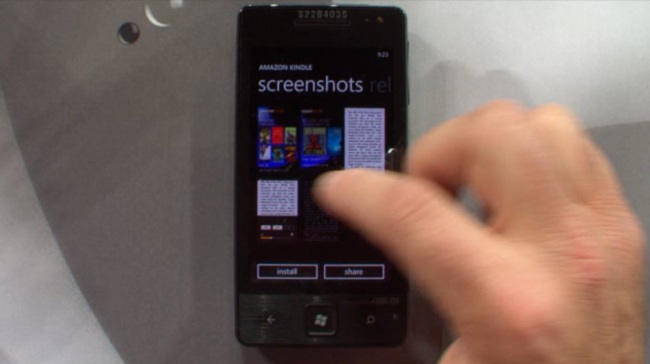
An improved Marketplace: The Marketplace now shows title, publisher, price, and rating for apps right in the listing (a feature other app stores already have). However, once you have chosen an app, the Windows Marketplace has pivoting screens (swiping to the left or right) that show you full screen views of screenshots, user reviews, product details and related apps. (Bing instant search result pages have similar extra info pivots.) Installing is now a one click process for free apps.
Augmented reality: Microsoft is issuing a new tool that automatically helps developers calculate the complicated math required to use both the phone’s internal digital compass and gyroscope technology together. It should enable smaller developers to create motion-rich apps. Added access to the camera was announced as well, which should allow developers to better integrate augmented reality experiences into their apps. Belfiore even showed off a Twitter app that showed who in the audience was tweeting.
Conclusion
While many of these enhancements are needed to catch up, or keep up, with Android and iOS, it is clear that, as it has done with Internet Explorer, Microsoft is no longer afraid to be a leader in innovation and features for smartphones. Microsoft is focusing on its mission to make smartphones easier to use, and for that we have to hand it to them. Perhaps Windows Phone may actually be a top contender in the next few years.



