Windows 11’s latest preview build introduces a new feature for its voice control application, as well as confirming that a redesigned look for the operating system’s Task Manager is in the works.
Microsoft’s preview builds for Windows 11 usually deliver general improvements and fixes. The most recent 22538 build, however, has brought with it a rather notable change.
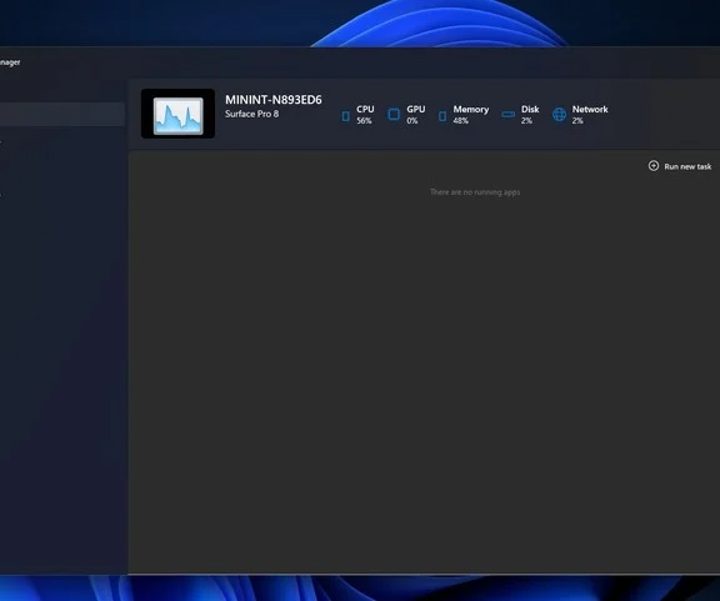
As spotted by Windows Central, a redesigned Task Manager app was uncovered in the latest preview build available for Insider members. Its user interface refresh updates the mainstay program with a modern look.
The redesign has not been announced by Microsoft yet, which is understandable as the app is not currently in a completely functional state. Still, the new design features a dark mode and Mica blur effects. Furthermore, the tabs situated at the top of the program have been replaced by a sidebar instead. These changes clearly illustrate Microsoft’s intention to make the Task Manager look more like other redesigned aspects of Windows 11.
Microsoft has been applying new looks for certain legacy applications lately. Most recently, a redesigned Notepad was released, introducing changes like rounded corners that mirror the general aesthetic look of Windows 11. In regard to the Task Manager, as The Verge notes, it has remained immune to any noteworthy changes for nearly a decade. The last major modifications were made in Windows 8.
Task Manager has of course been an integral and useful part of Windows as it allows users to monitor general statistics such as the CPU and GPU load for applications. As well as operating as a system monitor, the app offers a straightforward method to close an unresponsive or frozen program.
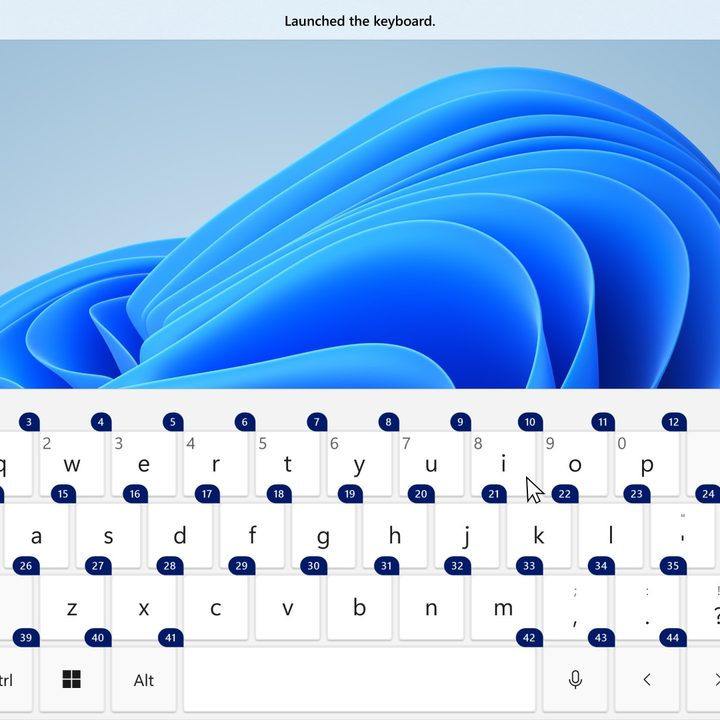
Elsewhere, preview build 22538 enhances the voice access feature introduced in December. In addition to controlling a Windows 11 system exclusively with one’s voice, users can now use the touch keyboard with voice access capabilities. You’ll be able to spell out words, input numbers, and enter punctuation marks by using the corresponding numbers attached to each input command with just your voice.
Microsoft is also rolling out Speech Packs downloads from the Microsoft Store. This will improve device-based speech recognition by providing “a better performance of transcription.”
Microsoft has certainly been busy since releasing Windows 11 in October 2021. It has largely focused on refining its operating system with its preview program, which allows it to trial changes and new features before it reaches the masses. One major change that recently materialized is certain options from its famed Control Panel being moved to the Settings app.
Moving forward, Microsoft stressed that Windows 11 performance will be an area of focus for the company in 2022. As for Windows 11 Sun Valley 2 (version 22H2), the operating system’s first major update is expected to be ready for release by the summer.