  1. Home
  2. Computing
  3. News

These clever features paved the way for Universal Control

Add as a preferred source on Google

Universal Control is one of the best things about Apple’s ecosystem. It allows you to seamlessly use two or more Apple products with a single input device, whether that means dragging files across devices or typing on both with one keyboard. It works like magic, but as a recent interview suggests, Apple was secretly laying the groundwork for years.

Speaking to AppStories, Apple’s Vivek Bhardwaj described how Universal Control is a natural progression of some other key Apple features, including AirDrop, Handoff, and Sidecar. These tools were the “building blocks” of Universal Control, said Bhardwaj, providing a foundation for Apple to extend their capabilities.
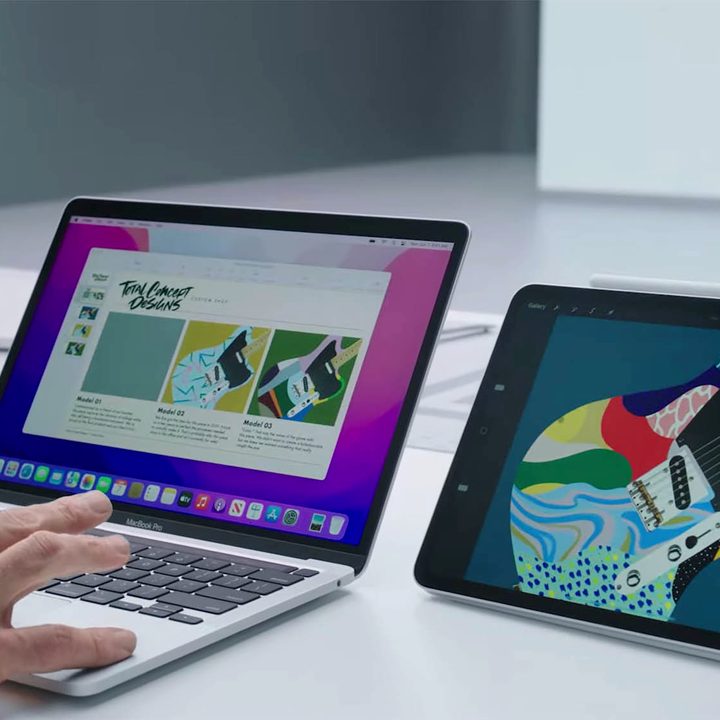
Apple demonstrating Universal Control with a MacBook Pro and iPad next to each other on a desk.
Apple

“When you think of technologies like Bluetooth low-energy, know where devices are, all of these low-level technologies, as well as kind of this Handoff experience, Universal Control is really just the next step for continuity,” Bhardwaj explained.

Recommended Videos

If you’re unfamiliar, AirDrop lets you quickly share files between two Apple devices without resorting to email or messaging apps. With Handoff, meanwhile, you can start work on one device and instantly pick it up on another by simply opening the relevant app, while Sidecar essentially turns an iPad into a second screen for a Mac (or into a drawing pad if you have an Apple Pencil).

Once Apple had those technologies nailed down, it was able to move on to something even better — in this case, Universal Control. It’s an apt demonstration of how Apple builds its devices to work together in pretty seamless ways.

Bhardwaj went on to outline Apple’s thinking when creating the Universal Control system: “We designed Universal Control with Mac and iPad in mind. So think of it more of pairing these two devices together and then taking full advantage. Lots of Mac users have an iPad, so extending this capability to them is a really powerful experience.”

While that may be the case, you can actually use Universal Control between up to three Macs at once if you like, without requiring an iPad to be present. In that instance, it works like a built-in KVM switch, except one that doesn’t require any fiddly setup. You can’t use it to control an iPhone, though.

Still, it’s easily one of our favorite features in MacOS Monterey and iPadOS 15, and it shows how Apple’s tight-knit ecosystem can create some pretty amazing experiences.

Alex Blake
Alex Blake has been working with Digital Trends since 2019, where he spends most of his time writing about Mac computers…
I let Radial menu take over my Mac, and I’m never going back
One mouse jiggle, endless shortcuts. My Mac has never felt this fast.
Radial app running on Mac

I have been testing Radial for the past week, and it's quickly become one of those apps I didn’t know how I could live without. It's a radial menu for macOS that puts your shortcuts, scripts, and automations right where your cursor is, so you never have to go hunting through menus to find what you need.

The app just received its 5.0 update, adding AI actions powered by Claude, window layouts, variables, a redesigned settings interface, a new Atmosphere background effect, and a squircle menu shape. I got to try most of these, and here's what I found.

Read more
Android desktop mode made me miss my laptop in record time
I tried writing and publishing from Google’s phone-to-monitor setup, and the future of mobile computing immediately started sweating.
Computer, Electronics, Laptop

Android 17 desktop mode has a very simple pitch. Plug your phone into a monitor, add a keyboard and mouse, and watch the slab in your pocket pretend to be a computer. I wanted to give that pitch a fair shot, so I tried using it for an actual workday instead of a cute demo.

The goal was boring on purpose: write an article, edit it, build the page in WordPress, upload whatever needed uploading, and publish the thing without running back to my laptop like a coward.

Read more
As AI turbocharges digital abuse, UK agencies urge parents to limit who sees kids’ photos online
The National Crime Agency and Internet Watch Foundation are asking parents to tighten privacy settings as AI-generated abuse material rises.
Social Media

Parents who post pictures of their kids online are being told to rethink the habit. The UK's National Crime Agency and the Internet Watch Foundation have issued new guidance urging families to lock down their social media accounts, warning that publicly shared photos are increasingly being pulled and altered by AI tools to create child sexual abuse material.

The two organizations say most parents have no idea this is happening. Criminals no longer need to contact a child directly to generate such material. They can scrape an ordinary photo and run it through widely available nudify apps.

Read more

