For a couple of years, Nvidia’s Deep Learning Super Sampling (DLSS) has been a reason to buy an RTX GPU. AMD’s updated FidelityFX Super Resolution 2.0 (FSR 2.0) changes that. I took it out for a spin in Deathloop, which is the first game to receive support, and this upscaling tech is the DLSS killer I’ve been waiting for.
Of course, there’s a substantial difference between the two features from a technical standpoint, but what I’m focusing on here is image quality and performance.
FSR 2.0 is basically a branded version of Temporal Super Resolution (TSR), which first showed up in Ghostwire Tokyo in March. Although I need to see more games with it to fully count DLSS out, Deathloop is an extremely impressive showing, both in terms of image quality and performance.
FSR 2.0 performance
Deathloop has FSR 1.0, FSR 2.0, and DLSS, so I was able to do some side-by-side comparisons in terms of performance and image quality. I looked at the Quality and Performance modes with each of the upscaling methods, which provide 1.5x and 2x scaling, respectively.
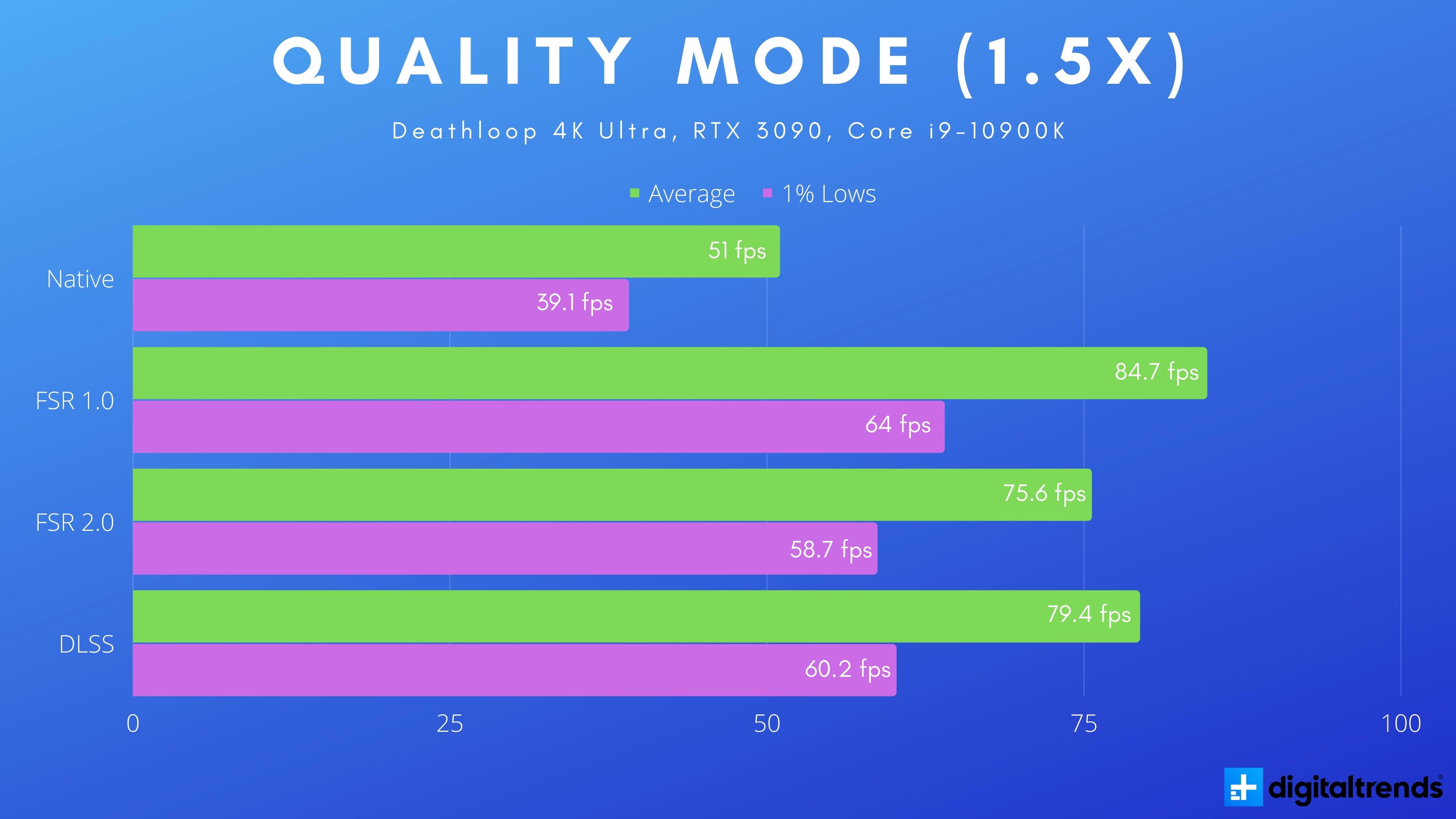
Starting with Quality mode, it’s not a surprise that FSR 1.0 leads with a 66% improvement in my average frame rate versus native 4K. DLSS came in second place with a 55.7% increase, while FSR 2.0 trailed with a 48.2% increase. FSR 2.0 is behind, sure, but all three upscaling modes offered a massive increase in my frame rate, even at their most modest quality modes.
Performance mode is where the image quality of FSR 1.0 started to fall apart. And in fairness, this is where DLSS starts to see some limitations, too. Even with 2x scaling of the native resolution, the three upscaling methods fall in line like they did with the Quality preset. DLSS and FSR 2.0 are much tighter, though, offering a 96.3% and 92.9% increase, respectively.

It may look like a loss for FSR 2.0, but as you can see in my charts, I ran these tests with an Nvidia RTX 3090. FSR 2.0 isn’t locked to AMD’s graphics cards, unlike DLSS, which only works with RTX 20- and 30-series GPUs. DLSS offers slightly better performance, but a 4.9% difference (at most) is hard to justify a purchase given how expensive Nvidia’s graphics cards are right now. And it’s even more difficult to justify considering you can use FSR 2.0 with the six-year-old GTX 1070.
FSR 1.0 leads, but it’s important to remember the image quality. Our FidelityFX Super Resolution review showed how this upscaling method falls apart at aggressive quality modes. FSR 2.0 may not offer as much performance, but it looks much better.
FSR 2.0 image quality
FSR 1.0, FSR 2.0, and DLSS all increase performance — no surprise there, as they’re all rendering fewer pixels. The real comparison is image quality, which is originally what put so much distance between DLSS and FSR 1.0. FSR 2.0 changes that with a much smarter approach to supersampling that incorporates temporal data.
First up for image quality is Quality mode. The images below are of one of the better areas in Deathloop to look at image quality due to all of the fine detail in the background. In FSR 1.0, you can see the “Expand your mind” sign washing out in a mess of pixels, as well as the railings on the dock in the lower left.

FSR 2.0 and DLSS is where things get interesting. They look almost identical. The main difference is that it looks like FSR 2.0 is leaning heavier on sharpening. There’s a little more clarity on larger textures (see the buildings on the right) and much more detail on Cole’s jacket. Consequently, the sharpening also pronounces the aliasing on the wires toward the top of the image.
While playing, it’s impossible to see differences between FSR 2.0 and DLSS. FSR 2.0 pushes the sharpening a bit more, but both supersampling methods look remarkably close to native resolution. What’s shocking is that AMD is achieving this image quality without training some AI model or charging extra for dedicated Tensor cores.
Quality mode is one thing, but I wanted to push FSR 2.0 as far as I could. I took some screenshots with the Performance mode, too, and I zoomed in 267% to really pixel peep. But still, I can’t find meaningful differences between FSR 2.0 and DLSS.

This level of zoom shows just how terrible FSR 1.0 really is, but again, DLSS and FSR 2.0 look almost identical. I think FSR 2.0 actually looks a bit better. It doesn’t show the aliasing around the floor lights like DLSS does, and it still maintains small details like the label on the bottle toward the right. Keep in mind how much I zoomed in here, too: If you’re struggling to spot a difference here, you definitely won’t see a difference while playing.
FSR 2.0 is the new champion
From the moment I saw TSR in Ghostwire Tokyo, I knew FSR 2.0 would impress. I didn’t know it would impress this much, though. DLSS used to be a reason to spend more on an Nvidia GPU, but even with the minor performance differences, FSR 2.0 makes that feature obsolete.
DLSS is still better technically, so if you have access to it, you should use it. FSR 2.0 means that gamers don’t have to choose any more, though. The only downside of FSR 2.0 at the moment is that it’s not available in more games. Hopefully, this promising showing in Deathloop changes that.