Spoiler tags are a vital part of online communities where all kinds of current entertainment are discussed, and that includes Discord.
If you’re active on a server where you discuss beloved TV shows, the latest movies, new video games, or even tragic or triggering content, it’s important to know how to create spoiler tags to keep your community happy.
When implemented, these tags cover Discord content with a black bar or a spoiler warning that other people on the server can click to reveal. Here’s how it works, the best ways to do it, and how to control spoiler settings if your own preferences are a little different.
How to do spoilers on Discord
Make sure you are signed into Discord and ready to create a message. You may want to create a private server or join an innocuous community while you are testing out spoiler tags to get a feel for how they work. When you’re ready, here’s what to do:
Step 1: Type out your message in the chat box as you normally would (this applies to text only, but you can use text-to-speech on Discord).

Step 2: Highlight the part of your text you want to cover as a spoiler. It can be the entire message or just part of it. This is easiest using your mouse, but if you are on mobile, you should be able to do a long press and move your finger to highlight the right section.

Step 3: A small menu will pop up over the highlighted text with several formatting options. On the right side, you will see a square with an eye icon inside. That’s the spoiler button. Select it, and the text you highlight will be automatically blocked until someone selects it. On mobile, this may just be an option that says Mark as spoiler.

Step 4: Note that you will still be able to see your own text in the text box, but it will now have two bars on either side where spoilered. This is the Markdown syntax indicating where spoilers are, and it’s an alternative to clicking if you are a fast typer. Just start your spoilers with “||” and end them with “||” and you should be good to go. Enter your text into the chat, and the spoilers should work just fine. This may be a better option on the mobile app, where fingers can make mistakes.
How to spoiler an image on Discord
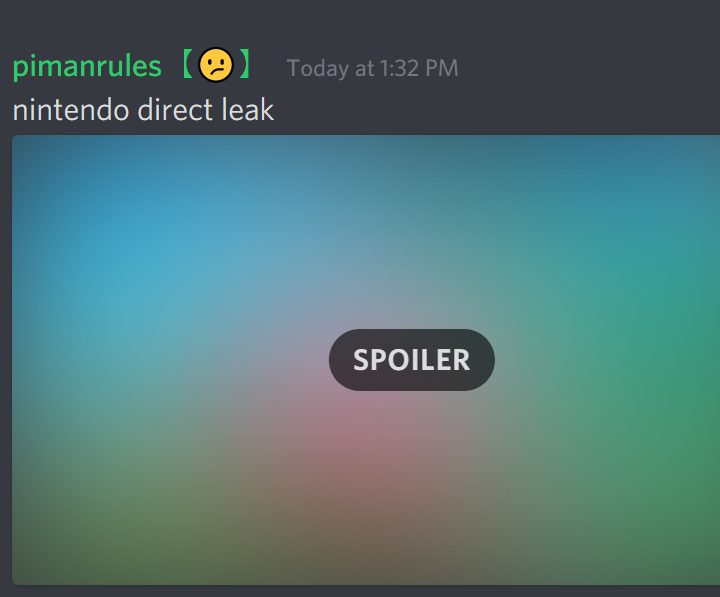
You can also spoiler images in Discord, and the process is more or less the same. Add an image to your message while you are creating it, and select it to see your formatting options. Again, look for the Eye icon, which is usually on the left this time. Select it, and the image will be displayed as a blue with a spoiler warning on it.
You can also spoiler almost all URLs if you don’t want people to automatically see a link. Just add the “||” Markdown language we showed above on either side of the URL, and it will be hidden.

How to skip spoilers on Discord
Finally, Discord allows you to control how you see spoilers, which can save a lot of time in certain communities depending on your preferences.
Step 1: Head to User settings, then select Text and images on the left-side menu.
Step 2: Here, look for the Show spoilers content section. You’ll have a few different choices here, including On services I moderate and Always, depending on how you want to view spoilers.
Step 3: These options only exist on the desktop version of Discord at this time, so don't try looking for them on mobile. There are other options, though - for example, you could use strike through text on Discord, although this is usually used for comic effect.
Want to learn more about how to use Discord? Why not learn how to pin a message on Discord to make your server information more readily accessible. Dealing with a troubling user? Here's how to report them.