When it comes to its features, TikTok is most known for all the fun bells and whistles you can add to a video that you create for its short-form video-sharing platform.
But what about the app’s video-watching features? Those might be lesser known to you (or just less noticeable) because they’re part of a more passive way of experiencing TikTok. But despite how easily video-watching features can fly under the radar, there is one new TikTok feature, that’s worth knowing about. It’s called “Clear Mode.”
And in this guide, we’ll get you up to speed on every thing you need to know about Clear Mode as we go over what it is and how to use it.
What is Clear Mode on TikTok?
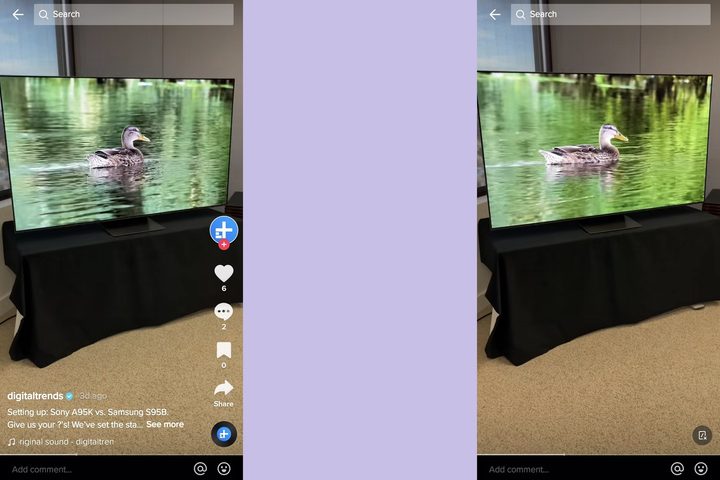
So normally when you watch a TikTok video, the video will play, but the playback screen will also be cluttered with a number of TikTok’s usual app icons and other elements like hashtags and captions. All this clutter can kind of get in the way of watching a TikTok video more fully. Clear Mode is a relatively new feature on TikTok that allows users to temporarily remove that visual clutter for a more streamlined, less cluttered viewing experience. (Though it should be noted that when enabled, Clear Mode doesn’t remove all of TikTok’s usual icons, just most of them.)
It’s also worth mentioning that Clear Mode only stays enabled for the video you’re currently watching. Once you swipe to the next video, you’ll have to enable it again.
How to use Clear Mode
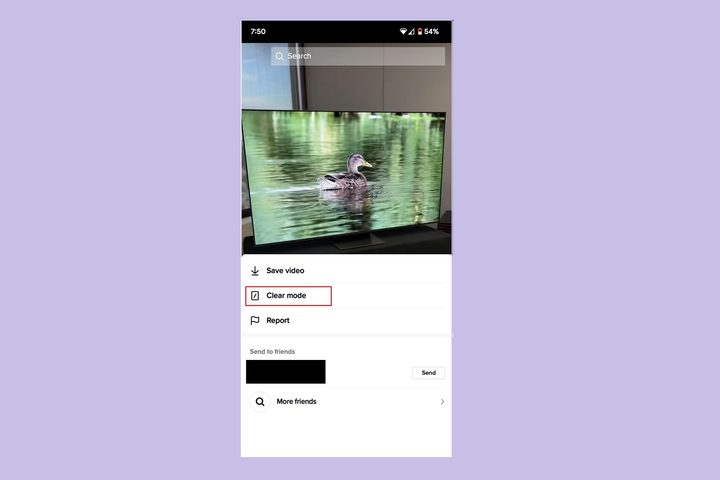
Clear Mode is actually pretty easy to turn on. Here’s how to do it:
The following instructions should work for both Android and iOS users.
Step 1: Long press on a TikTok video that you’re watching.
Step 2: A menu should appear. From that menu, select the Clear mode option.
That’s it! If you want to exit Clear Mode, just select the Dark circle icon in the lower-right corner of your screen. This icon should look like a dark circle with a rectangle and small x inside of it. You can also just long press the video again, and when the menu appears, just select the Exit option.
Availability
TikTok’s new Clear Mode feature should be fully available and accessible for both Android and iOS users. Digital Trends did contact TikTok about the current status of Clear Mode’s rollout and we received a response. While TikTok did confirm that Clear Mode should be available on all devices, it noted the following:
“There may be a small number of users who don’t have access to the feature yet, but they should be able to use Clear Mode in the coming weeks.”