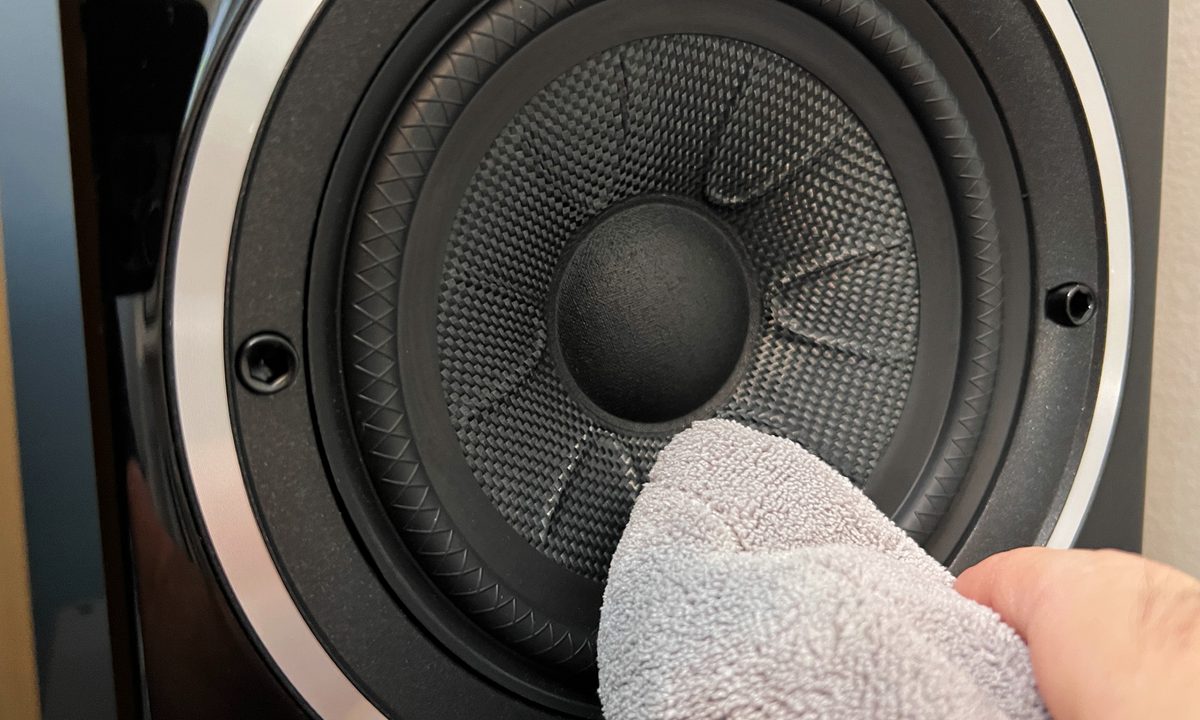
It's probably likely that your awesome hi-fi speakers are heard far more than they are seen, and that's just fine. But what isn't fine is that you may not have noticed all the dust, pet hair, and grime building up on your speakers cabinets, grilles, cones, tweeters, woofers, and connections that can potentially affect their sound.
Whether it's a set of tower speakers, bookshelves (like in the images below), or even certain Bluetooth speakers, giving your speakers a cleaning every once in a while is a great way to ensure they look and sound great for years to come. And it's relatively easy with a few common tools you may already have on hand. Here's how to clean your speakers.

Clean your speaker cabinets
While all that audio magic happens inside your speaker's cabinets, it's their exterior beauty that makes a great pair of speakers look awesome in your setup.
With regular maintenance, you shouldn't need anything more than a damp microfiber cloth or even some clean cotton rags to dust off your speaker's cabinets. Whether they're made of wood or an MDF composite, this is your safest bet. Here's how to safely get them looking their best
Step 1: First, you'll need two . Take the first one and moisten it with some lukewarm water. Make sure to ring it out so it's just slightly damp, not soaking. For wood cabinets, if you have a safe wood cleaner or , you can add it to the cloth (be sure to check with the manufacturer's recommendation on what's safe first).

Step 2: Work your way around the speaker, wiping in the same direction of the wood grain, if it is wood.
Step 3: Now grab the second, dry microfiber cloth and go over the speaker cabinet again to pick up any residual moisture. The microfiber cloth will also attract any loose lint, too.
Clean your speaker grilles
Some hi-fi nerds think that keeping the grilles — those soft fabric or hard-shell covers that mount on the front of your speaker cabinets — covering up those sweet-looking drivers underneath is sacrilege. Sure, they can look boring, but many add an air of sophistication to a pair of speakers while also protecting the woofers and tweeters beneath. But speaker grilles can also attract dust, debris, and pet hair, so it's nice to keep them clean. Here's how to do it without damaging them.
Step 1: If your speaker grilles are of the fabric variety and there's just some light dust or pet hair on them, you can gently roll a sticky lint brush over them once or twice. Be sure do this with a clean layer on the roller (not after you've just rolled your sweater).

Step 2: For a bit more thorough of a cleaning, we recommend removing the grilles from the cabinets first. Many grilles are attached in different ways, so if you're unsure how to get them off, consult your speaker's manual. For the most part, though, they'll be attached by rubber prongs into holes on the corners of the cabinet face. Lightly pull the grilles from the top and bottom of the cabinet's fasteners. If there are screws fastening them, remove them and get the grilles off.


Step 3: With the grilles off, lay them down flat on a clean surface. Using a vacuum with a soft, clean brush attachment, gently run the vacuum over the surface of the grill cover, being careful that the suction isn't pulling too hard on the fabric.
Step 4: You can also go over them with your damp microfiber cloth. But to remove more stubborn grime or stains, grab your cloth, and with some warm water and mild detergent, gently work over the grille in a circular motion. With another clean cloth slightly wet with some clean water, rinse the treated area and let it air dry.
Step 5: Metal or plastic grilles can be more easily washed with water and detergent and set to air dry or patted down with a clean cloth.

Clean your speaker woofers
Speaker woofers, or cones, are the larger drivers in a speaker cabinet, responsible for all that beautiful low-end and mid-frequency sound and volume. They can be made of a variety of materials, including wood, silicone, polymer, kevlar, and paper. Some are more delicate than others and can be easily punctured if you're not careful, but many are sturdier than you think.
Step 1: For more delicate woofers/cones, like paper ones, it's best not to use anything wet or damp; rather, try using a soft-bristled brush (like a paintbrush or makeup brush) to dust off any dust or debris. You can also use a can of compressed air for electronics to blow out any debris.

Step 2: For cones made of more resilient materials, like wood or polymers, you can first brush them off or give them some air, too. But then feel free to grab your trusty damp microfiber cloth and give them a gentle wipe as well. However, be careful not to touch the dome center portion, as this can cave in.
Step 3: Give the cone another wipe-down with the dry microfiber cloth.

Step 4: Lastly, you can also wipe down the surrounding soft rubber or foam ring around the woofer with a safe rubber care product.

Clean your tweeters
This is the tricky part. Woofers and mid-drivers are usually pretty rugged, but tweeters — the tiny driver usually at the top of the cabinet that handles all the treble and high frequencies — are another story. Made of sensitive cones and domes, membranes, coils, and other delicate parts, you generally don't want to touch or wipe them at all. Instead, air is your best friend.
Grab that can of electronics compressed air again and, being sure to hold it at least a few inches from the tweeter, give it a few quick blasts. If you're careful, you can also give them a light wipe with a soft-bristled brush, perhaps one of those photographers' blower brushes from a .

Keep in mind that this post applies to pretty basic cleaning of most speakers. Of course, use discretion if there's a particular grimy or stubborn stain or buildup, and you might want to consult a professional. The last thing you want to do is damage a pair of expensive speakers. It may seem daunting, but keeping your precious speakers clean and dust-free will ensure they sound their best, and you only have to do it a couple of times a year.