
Microsoft Copilot and Google Duet are the two most prominent artificial intelligence assistants put out by the various tech giants since OpenAI debuted its ChatGPT chatbot in 2022. They’re set to bring that powerful natural language assistance into the enterprise in ways that can enhance productivity, improve the digital fluency of workers, and leverage existing data in new and exciting ways.
But which one is best? Both offer comparable features at a comparable cost, but they aren’t interchangeable and even getting access to either tool requires a bit of luck. Here’s how these two awesome AI tools compare.
Availability and pricing
At the time of writing, both Google Duet and Microsoft Copilot are considered preview features at their respective organizations. That means that in order to use them, you need to sign up. In the case of Microsoft, you’ll need to be a business Microsoft 365 subscriber and be part of the Windows Insider program. You’ll need to be part of the Dev channel and have the latest release for Windows 11.
Then you can wait to see if Microsoft sends you the version of Windows 11 with Copilot, or you can take some steps to download it yourself via Github.
Google Duet requires similar hoop jumping to try the tool out. You’ll need to be signed up to Google Cloud, and then submit a request to preview Google Duet via the application page.
Both Google and Microsoft have priced their respective AI assistants at $30 per user, per month. You’ll get $300 of free Google Cloud credits when signing up, but it’s not entirely clear how long that will last you. However, in Microsoft’s case, that’s on top of an enterprise or business license for Microsoft 365, which in itself can be tens of dollars per user.
Which apps do they work with?
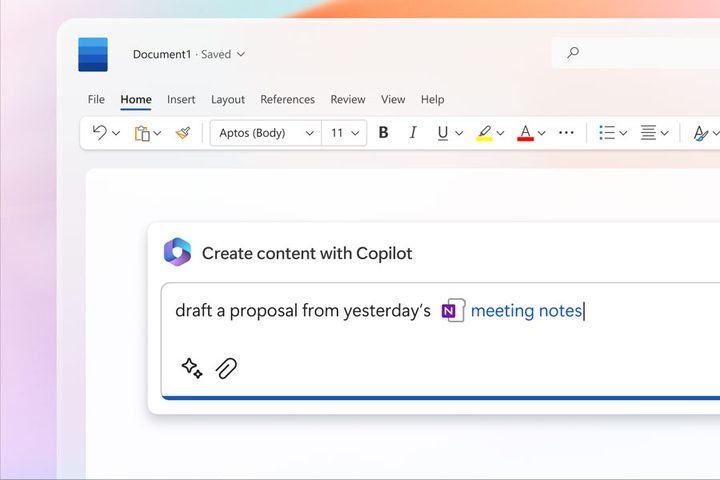
Microsoft and Google’s AI assistants are currently entirely proprietary, in that they only work with their own applications. Microsoft’s Copilot embeds itself in Windows 11 and can help make adjustments to the operating system, answer questions about its operation, or help you learn new features. It is also embedded with Microsoft 365 and Microsoft’s suite of Office tools. That includes Word, Excel, PowerPoint, Outlook, and Teams.
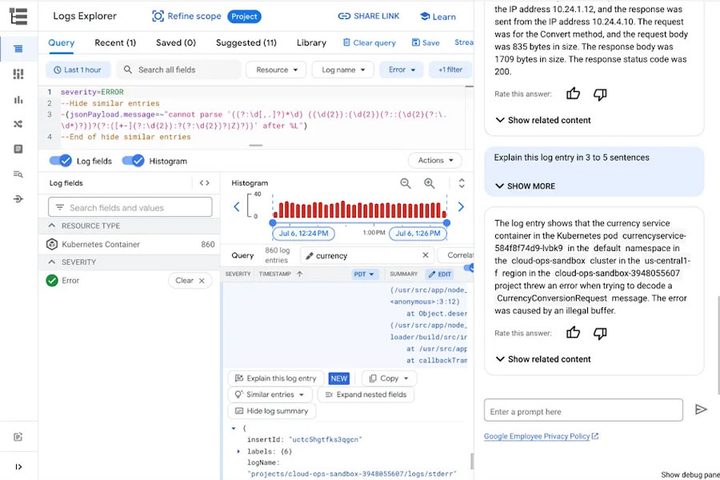
Google Duet works with Google Sheets, Docs, Slides, Gmail, and Meet. There’s no official Duet for Chrome yet, and no word on whether we’ll see an equivalent Google Duet feature in Chrome OS — although that would be a big selling point for some of the best Chromebooks.
What can they do?
Each of the AI assistants is designed to augment its various apps and services with AI. In the case of text editors like Word and Docs, Duet and Copilot can be used to generate text, proofread and edit existing documents, make suggestions about grammar and word use, or suggest changes to the document structure. In Sheets and Excel, the AIs can look for trends in the data, or extract information from it that may not be immediately obvious, as well as finish incomplete cells or correct errors. They can also reformat or change the data and how it’s visualized to make it easier to get useful information from it.
In Gmail and Outlook, the AIs can help you write emails, or check them over to make sure they’re written well or cover the information that you wish to impart. Microsoft Copilot can also pull in information from other documents you store in the cloud, making it incredibly versatile. In Slides and PowerPoint, the AIs can create slides for your presentations, or you can convert between apps — turn a PowerPoint presentation into a Word Doc, or have a Google Sheet display its information in a Slides presentation that makes it easier to digest.
Outside of basic app integration, Google Duet also offers code-writing assistance. That helps programmers start writing code based on a text prompt input, or it can analyze your existing code to finish it or make suggested changes to improve efficiency. It can provide those recommendations in real-time, too, making it a little like an auto-complete for coding. It can also look for vulnerabilities in your code, and suggest fixes. It currently supports Bash, C, C++, C#, Go, Java, Javascript, Python, and SQL, among many others.
This can also be used to develop entirely new apps to use in Google’s AppSheet platform. Just give a text prompt input for the kind of app you want, and Duet can help make it for you. You can also have Duet create custom templates for Sheets and other services, making it really useful for organizing complicated data.
Duet also offers chat assistance, so you can talk to it in natural language, ask questions, and request guidance on how to use Google applications, including Google Cloud. You can use it in Google Meet, too, although at the time of writing, there aren’t many integrated features. You can have it generate backgrounds for video calls based on prompts, but that’s about it for now.
In comparison, Microsoft Copilot can do many of the same things, but does a slightly better job of integrating data from various applications. So you can have it write an email for you that leverages data from your Excel spreadsheets, or make sure that your emails are all written in the same style as you previously used.
It’s the Teams integration that really stands out for Copilot, though. Using natural language prompts you can have it schedule meetings for you, create meeting agendas, launch tasks for various team members, and draft emails to clients based on what was discussed in a Teams chat. The Copilot can create summaries of meetings and draw data from outside documents — whether it’s from a spreadsheet or old email — all in real time.
Copilot can also be used to make changes to Windows 11 or help you learn about how to utilize some of its features.
Duet vs. Copilot, which is best?
Both Microsoft Copilot and Google Duet are powerful natural language artificial intelligence that can help boost productivity in a range of proprietary applications. Neither are easy to get access to, and for larger organizations, giving lots of employees access could get very expensive. Their potential is huge, though, so when it comes down to picking which one you should use, it’s important to get it right.
The best smart AI assistant is likely to be the one that augments the tools you use. If you’re a regular user of Google’s services and apps, then Duet is likely better for you. If you use Teams and Microsoft Office applications, Copilot is by far the better choice.
If we had to pick a true winner though that offers a better service, Microsoft Copilot currently has the edge. It’s better at pulling data from different apps to augment the one you’re using, and the way it enhances Teams goes well beyond what Duet can do. For now.



