I don’t blame you if you’re fed up with all of the AI talk. It started with ChatGPT, it moved to Bing Chat, and now you can’t open up Apple News without a deluge of AI news. It’s overwhelming. And now, Microsoft wants you to use AI as an assistant throughout all of Windows 11. No thanks.
Call me a cynic, but I pushed back. Bing Chat following me around Windows 11 didn’t sound like a good time, but I swallowed my pride, decided to do my job as a tech journalist, and kindly asked what it could do at Microsoft’s September 2023 event. And Windows Copilot blew me away.
Let’s set the stage correctly here: Windows Copilot is Bing Chat on your desktop. That’s something Microsoft fully admitted when I asked, saying that it uses “the same backbone” as the AI chatbot in Edge. What’s special isn’t the AI model, but instead how it’s integrated into Windows.
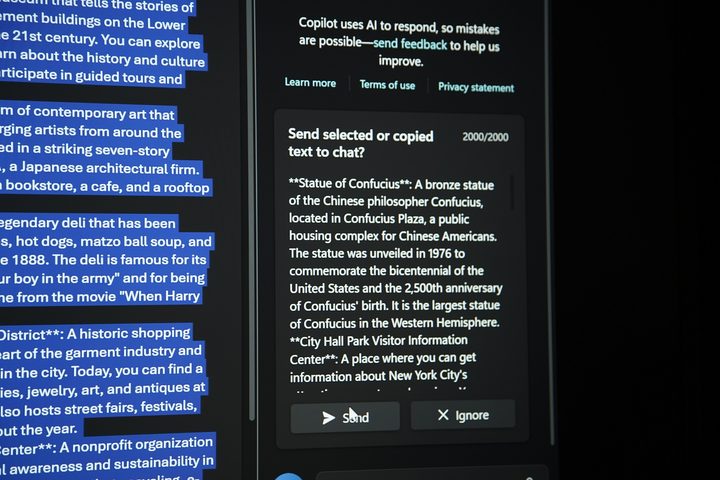
The clipboard is the best place to start. With Windows Copilot open, it’s always aware of what you have copied to the clipboard. You can copy a section of text, and Copilot will automatically ask what you want to do with it. Microsoft demoed this by copying a list of tourist attractions close to the venue before asking Bing Chat (ahem, Copilot) to create a table with the distance of each from lowest to highest. The AI actually remembered a previous version of this demo, automatically calculating the walking distance instead of by car.
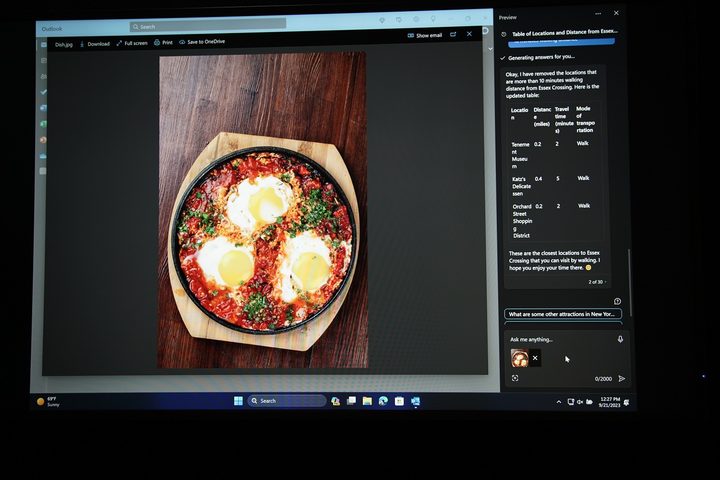
That’s a neat party trick, but Copilot opens up a lot more with the various ways you can interact with it. There’s the clipboard, but you can also drag and drop a photo straight into Copilot. This can be any photo, not just one stored on your desktop. Find a picture of a dish and ask, “How do I make this?” and Copilot will get to work identifying what the photo is and generating a list of recipes.
This works with Snipping Tool — Windows 11’s screenshot utility — as well. Grab a photo from any section of your screen, and Copilot will automatically pick it up. You read that right. You don’t need to save the photo and drag it in. It’s just there.
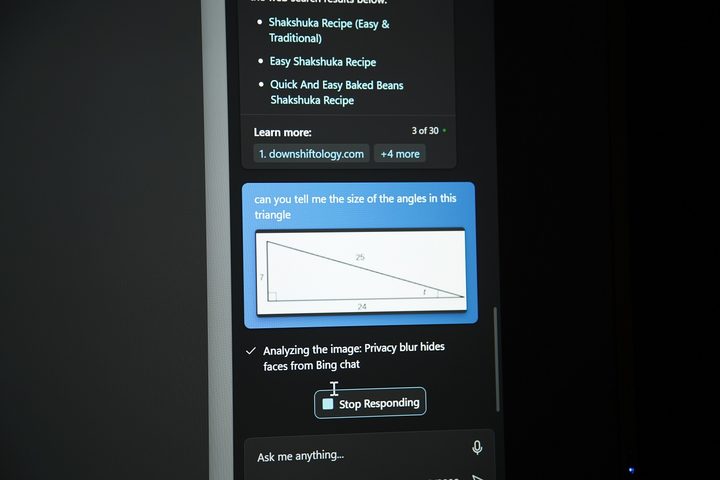
Microsoft demonstrated this ability with a geometry problem. It used the Snipping Tool to grab a picture of a triangle and asked Copilot to calculate each angle. Not only did Copilot do the calculation, but it also explained the math behind it and linked to several YouTube explanations. This is all happening on your desktop, as well.
The important thing to keep in mind here is that all of these interactions are just context for Copilot. You still provide the prompt. The deep integration with Windows makes something that has been unnatural up to this point — with tools like ChatGPT and Bing Chat — feel like a natural extension of the OS.
That extension goes outside of the cherry-picked prompts that Microsoft has, too. If you’re having problems with your PC, you can ask Copilot about them and it will point you toward the troubleshooters built into Windows. With these suggestions, it isn’t pulling from the internet. It knows the OS, and it can direct you where you need to go in the event the Windows Search falls short (as it so often does).
And, Copilot remembers you. There’s a chat history in Copilot (which you’re free to delete if you wish) that brings additional context into the prompts you enter. It’s the same context Bing Chat can provide, except it spans all of your interactions, not just the singular conversation you’re having.
I already mentioned the example above about Copilot remembering the prompt to offer walking distance. It’s not far-fetched to imagine it will remember if you want to avoid highways when asking for directions, for example, or that you prefer baked recipes over fried ones. It breaks down the walls of Bing Chat.
With that said, Copilot is still something that we need to see over time. I already had my unhinged interaction with Bing Chat, and it’s possible there are problems lurking with Copilot, as well. Thankfully, we won’t have to wait long, as Copilot is set to launch as a feature update to Windows 11 on September 26.