1. Home
  2. Computing
  3. News

Does the Vision Pro require a computer or phone?

Add as a preferred source on Google
A developer points to a Mac screen while a Vision Pro rests on the desk.
Apple

The Vision Pro is an exciting new headset that Apple calls a spatial computer, but you might be wondering if the computing really happens on this compact device or if it needs to connect to a computer or a phone for processing. That’s a fair question to ask since many AR and VR devices require a separate device for power and computing.

The Vision Pro and the Apple ecosystem

Spatial FaceTime on Apple Vision Pro headset
You can still FaceTime friends, family, and co-workers in the Vision Pro. Apple / Apple

So, how does the Apple Vision Pro work, and what’s needed to use it as a spatial computer? The good news is this $3,500 device is complete right out of the box. You don’t need to buy an iPhone or a Mac to use it. It has an M2 processor inside, uses hand gestures for controls, and the entire operating system is self-contained.

Recommended Videos

This differs from some VR headsets that require the performance of a gaming PC with a fast, discrete graphics card to handle the processing demands of two high-resolution screens. For example, the Valve Index and Varjo Aero won’t work without a computer. There are other standalone VR headsets like the Meta Quest 3 that share more in common with the Vision Pro by using low-power processors like the Qualcomm Snapdragon XR2 Gen 2 chip.

Most smart glasses also need to be connected to a phone to enable all the features. The Ray-Ban Meta Smart Glasses can record video without a phone, but have to connect to answer calls, transfer images, and use Meta AI. Smart glasses like the Xreal Air 2 must be connected to a phone or other device to get power and a video signal.

Vision Pro with a Mac
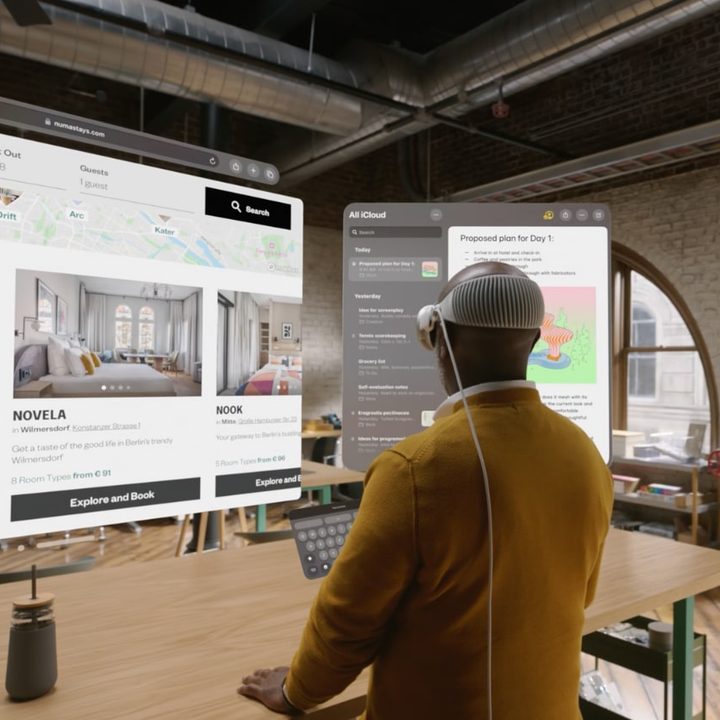
A man wearing the Vision Pro looking at virtual screens.
Apple

The Vision Pro is a complete spatial computer in itself, but it doesn’t run macOS. That means you might still want to connect your Mac or MacBook, especially for faster typing and productivity. Apple lets you see your Mac desktop in a Vision Pro window, like a remote desktop app. It can mirror the window, allowing you to control it fully — though you can’t extend the window as you would with an external monitor. As a sidenote, you can also opt for connecting a wireless Bluetooth keyboard instead.

So, if you’re using your Vision Pro and wish you could open an app that’s not yet available in the Vision App Store, you can still use it while wearing the headset by connecting to your computer. That means your headset can run iPhone and iPad apps, native Vision Pro apps, and macOS apps via your Mac.

The Vision Pro does require an external battery pack, which comes bundled with the Vision Pro.

If you do own other Apple products, you can get a head start on enjoying the Apple ecosystem. When you set up your Vision Pro, you can sign into iCloud to access your photo library, music playlists, contacts, and messages, just like you can on an iPhone or a Mac.

Alan Truly
Alan Truly is a Writer at Digital Trends, covering computers, laptops, hardware, software, and accessories that stand out as…
4 desk lamps I’d actually recommend for your back-to-school study setup
Good lighting won't do your homework, but it'll help you actually finish it.
desk lamp with white wall behind it

Back-to-school season means new notebooks, a planner you'll abandon by October, and way too many hours spent hunched over a desk lit by nothing but your laptop screen. If you've ever pulled an all-nighter or squinted through an assignment at 2 AM, you already know a good desk lamp isn't optional. It's survival gear.

I went through a bunch of options this year and picked four that actually earn a spot on your desk, whether you're working with a dorm-room budget or setting up a proper home office.

Read more
China’s Moonshot just handed developers a near-frontier AI model to download
Kimi K3 is now available to download, modify, and host independently
Art, Drawing, Plant

Moonshot AI has released the full weights for Kimi K3, giving developers the freedom to download, modify, fine-tune, and host the model themselves. The move comes shortly after K3’s debut, when Moonshot’s benchmarks placed it close to Claude Fable 5 and GPT-5.6 Sol, and even ahead in a handful of tests. K3 has 2.8 trillion parameters and a 1-million-token context window.

Downloading K3 is easy, but running it is not

Read more
Shopping for a Back-to-school laptop? These are the laptops I’d recommend
Whether it's lectures, late-night assignments, or streaming after class, these laptops are built to make the next few years a little easier.
Best laptops for back to school 2026 featuring Apple 2026 MacBook Neo

A laptop is probably the one purchase that'll have the biggest impact on the school year. It'll be there for lectures, late-night assignments, group projects, Netflix binges, and everything in between. The trick is finding one that fits both the workload and the budget. After narrowing down the options, these are the five laptops I'd actually recommend for Back-to-School, whether the priority is getting the most value, joining the Apple ecosystem, or investing in a machine that'll comfortably last through graduation.

Acer Chromebook Plus 515

Read more