We all know that Spotify is the biggest player in the music streaming business, but did you know that it's also the second-largest provider of audiobooks in the world after Amazon-owned Audible?
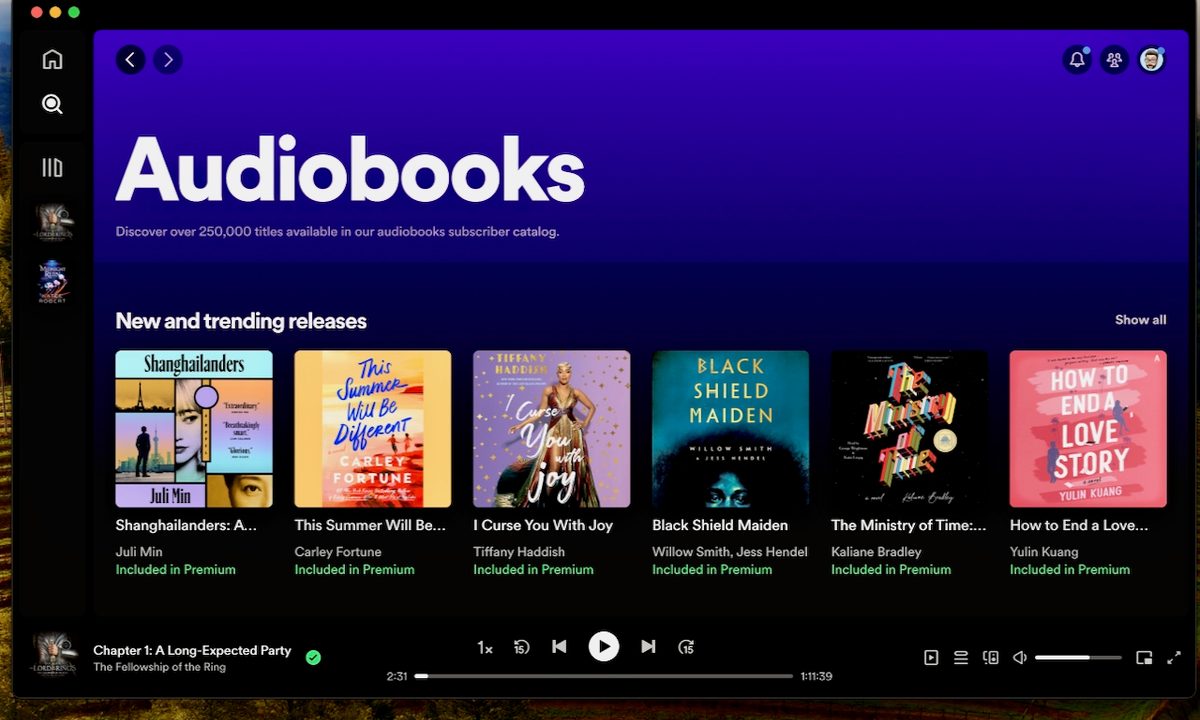
With more than 375,000 total titles to choose from, Spotify Premium members can listen to up to 15 hours of audiobooks per month as part of their paid service, from a catalog of 250,000 titles. But even if you're not a paying Spotify Premium customer, you can still buy from the full range of audiobooks through the Spotify web player, and it's easy to do. Here's how to buy and listen to audiobooks on Spotify.

How to purchase audiobooks without a Spotify Premium plan
As we mentioned above, you don't need to subscribe to Spotify Premium to buy and listen to Spotify's audiobooks. But to purchase audiobooks without a Premium plan, you have to do it through the Spotify Web Player. Here's how.
Step 1: On a computer or smartphone, open your preferred browser and navigate to the Spotify Web Player.
Step 2: If you don't have a Spotify account already, you'll need to sign up for one. Don't worry, just get the free tier. It's easy.
Step 3: Now you'll need to find an audiobook. Once you're signed up and logged in, in the Search section select Audiobooks. Once here, you can browse titles by new releases and other categories, or you can simply search for the title you want.
Step 4: Once you've found the audiobook you want, you'll see the price, a description of it, rating, and more info. You can even play a sample of it. If you want to buy it later, you can select the "+" symbol.

Step 5: If you're ready to purchase, select the Buy button. You'll be taken through the purchase process, entering in your payment details (you can pay by credit, debit card, or PayPal).

Step 6: Check your email for a purchase confirmation. The audiobook titles will be unlocked and you can play it on Spotify — in the app or web player — anytime.

How to get audiobooks if you have Spotify Premium
If you're a Spotify Premium subscriber, you're entitled to 15 hours of audiobook listening per month and you can choose from Spotify's library of more than 250,000 titles of the total 375,000 (some titles you have to pay for no matter what). Finding and listening to audiobooks is much easier as a subscriber and can all be done in the Spotify app, on mobile or desktop, and in the web player.
Step 1: Just like the above steps, browse your way to the Audiobooks section and find a title you want.

Step 2: Select the title, but this time you won't see a "Buy" button, and you'll notice that it will say "Included in Premium."
Step 3: From right here, you can just hit the Play button, and off you go. Or, you can select the "+" icon to add the audiobook to your library. This way it will be easier to find later, whenever you're ready to listen.


How to listen to audiobooks on Spotify
This is the easy part. Whether you've purchased titles through the web player or you're a Premium subscriber, playback of audiobooks is the same. For our example below, we'll show it on mobile.
Step 1: While logged in to your Spotify account — on the web player, or on the desktop or mobile apps — go to Your Library and select the Audiobooks tab. From Home, you can also select the Audiobooks filter to see any titles you've saved.
Step 2: Next, all you have to do is select your title and hit the Play button.


Step 3: When playing, you can skip chapters, or select the "1x" button to increase or slow down the playback speed. You can also skip ahead and back by 15 seconds at a time.
Step 4: Lastly, if you want to download the title for offline listening, just select the down arrow icon.
And that's all there is to it. Getting access to Spotify's library of audiobooks is definitely easier if you're a paying subscriber, and a Premium individual plan is relatively cheap at $11 per month (check out our post on all the pricing details though). But even if you're not interested in the music benefits and just want to pay as you go, finding, buying, and playing audiobooks on Spotify is a pretty straightforward process.