  1. Home
  2. Computing
  3. Deals

This MSI ‘starter’ gaming laptop is discounted to $550 at Best Buy

Add as a preferred source on Google
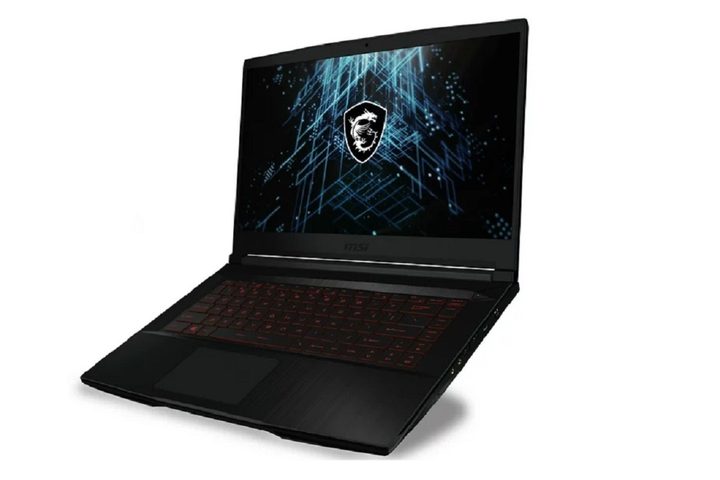
MSI GF63 Thin 11SC-693 Gaming Laptop on a white background.
MSI

While some of the best gaming laptops can cost thousands of dollars, you don’t necessarily have to pay an arm and a leg to get yourself one. In fact, there are some solid options for entry-level gaming laptops that are very budget-friendly, like the MSI THIN GF63. While it’s not that powerful, it does have a great discount from Best Buy that brings it down to $550 from the usual $700, which saves you $150 in the process.

Buy Now

Why you should buy the MSI Thin GF63

One of the most important parts of any gaming laptop is the GPU, and in this case, the MSI Thin GF63 comes with a slightly older GPU, the RTX 2050, which is admittedly an older card, but if you’re not expected to play the latest AAA, that’s not an issue. As an older card, you can expect something along the lines of medium settings at 1080p for older titles and some free-to-play games, so it’s a good starter option to get you going. The screen is a solid 15.6 inches with an FHD resolution, and it even has a 144Hz refresh rate, although that’s going to be difficult to hit even with graphical compromises.

On the other hand, processing power is quite good, with a 12-gen Intel Core i5-12450H, which is a solid mid-range CPU that pairs very well with the RTX 2050 while also providing more than enough power for productivity tasks. Unfortunately, it only comes with 8GB of RAM, and it’s not even DDR5 memory, so it’s not going to provide a very smooth experience. Luckily, you can upgrade these laptops down the line, so at least the RAM can be brought up to a more reasonable 16GB later on if you feel like you want that. Luckily, the 1TB of storage is more than enough for most with this sort of laptop, although you can grab yourself one of these external hard drive deals for a bit more versatility.

While the MSI Thin GF63 is not going to win any awards, it is a good starter laptop for those who want to try out gaming without investing huge sums of money, especially with the discount from Best Buy that brings it down to $550. Of course, if you want something a bit more substantial, then you should check out these other great gaming laptop deals as well.


Buy Now

Albert Bassili
Former Deals Writer
Albert’s been a tech and gaming writer for over a decade, writing for websites such as CNET, PopSci, and How-To-Geek, and…
Anthropic confirms Claude acts differently depending on your language and which model you pick
A new study shows Claude's isn't nearly as consistent as you might assume.
Claude app on iPhone

If you've ever felt like Claude gave you a completely different vibe on one day than another, you weren't imagining it. Anthropic just published research confirming that its chatbot's personality shifts depending on which model you pick and which language you type in, and the pattern is consistent enough that it's worth knowing before you ask your next question.

The model you pick decides how Claude responds

Read more
This website is a goldmine if you love Mac menu bar apps
Discover hundreds of menu bar apps, from tiny utilities to powerful productivity tools, all in one place.
MacMenuBar website open on Mac

The menu bar is the most underrated part of macOS. It sits quietly at the top of your screen, and most people never do anything with it other than checking the time and battery percentage. But if you find the right apps, that thin strip becomes the fastest way to get things done on your Mac.

The problem is finding those apps. The Mac App Store is not great at surfacing them, and hunting through random blog lists is a chore. And while I have shared my favorite Mac utilities that include menu bar apps like Supercharge and CleanShot X, there’s an even better place to find the best apps for your Mac’s menu bar.

Read more
How to install macOS 27 Golden Gate public beta on your Mac?
From a smarter Siri to a more reliable Spotlight, here's your full walkthrough for installing macOS 27 Golden Gate's public beta today.
macOS 27 Golden Gate

Along with iOS 27’s public beta, Apple has also released macOS 27 Golden Gate’s public beta build, so that early adopters can get their hands on the new features, including Siri AI, and provide timely feedback to help ensure a stable iOS launch in September. 

If you’re sold on all the new features but don’t want to put your faithful MacBook through developer beta duty, a public beta offers a much more refined experience. To install macOS 27’s public beta, follow the steps given below. 

Read more