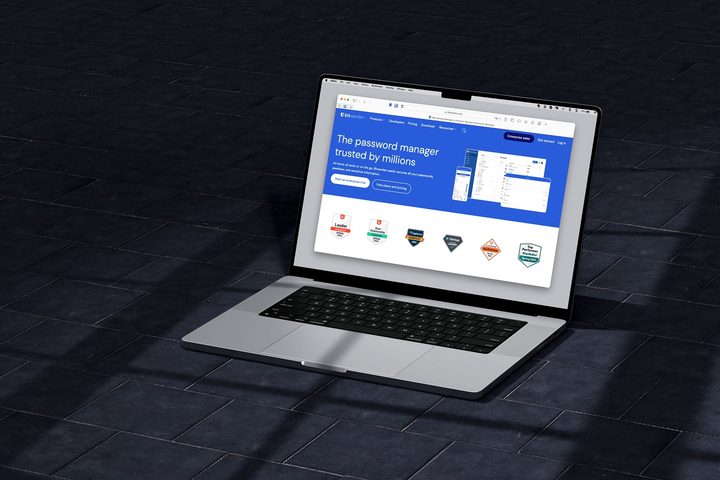
Has someone recommended Bitwarden to you or have you seen it in your searches for the best password manager? If so, you’re likely wondering how safe it is to use, especially considering it’s widely available for free.
We’ll walk you through the safety, compliance, and security features that Bitwarden uses along with a concern you should consider. It’s then up to you to decide if Bitwarden is a safe and secure option for you.
What is Bitwarden?

Bitwarden is an affordable password manager available for your desktop, mobile devices, and as web browser extensions. It provides features such as unlimited passwords and devices, autofill, passkey management, a password generator, device syncing, vault storage, and one-to-one data sharing.
Businesses can also receive single sign-on (SSO) and API integration, user account management, health reports, account recovery, and password sharing.
Now, the big question is, is Bitwarden safe to use? Let’s take a look at the security features.
Bitwarden security features

Known for its open-source model with a codebase on GitHub, Bitwarden hasn’t been involved in security breaches like similar tools. This is because of its commitment to security and the following safety measures:
Zero-knowledge encryption: Bitwarden uses AES 256-bit end-to-end encryption in its zero-knowledge based system. Not only does the company employ the industry-standard for encryption, but it cannot see your passwords.
Master password hash: Bitwarden salts and hashes your master password before it’s transmitted to the servers and uses PBKDF2 SHA-256 or Argon2 for the key that encrypts your Vault data. The number of client-side iterations was increased to 600,001 in 2023, and with the server iterations set to 100,000, that makes a total of 700,001 iterations by default. Plus, these are one-way hashes, so they cannot be reversed to expose your master password.
Vault security: Bitwarden not only provides end-to-end encryption for your vault but also a two-step login, Vault Timeout feature, unlock with a PIN code or biometrics, and a clipboard clear that you can set from 10 seconds to five minutes.
Third-party security audits: Bitwarden conducts annual audits with security firms such as Cure53 and Insight Risk Consulting along with source code assessments and penetration testing for its servers and applications. You can review both the security audit and SOC 3 reports on the Bitwarden website, and request SOC 2 reports if you’re interested.
Bug Bounty Program: Bitwarden works with HackerOne and a program where hackers search for and report weaknesses and vulnerabilities in its system.
Compliance: Bitwarden is compliant with GDPR, Privacy Shield Frameworks, HIPAA, and CCPA, and is a member of the FIDO Alliance.
Bitwarden security concern
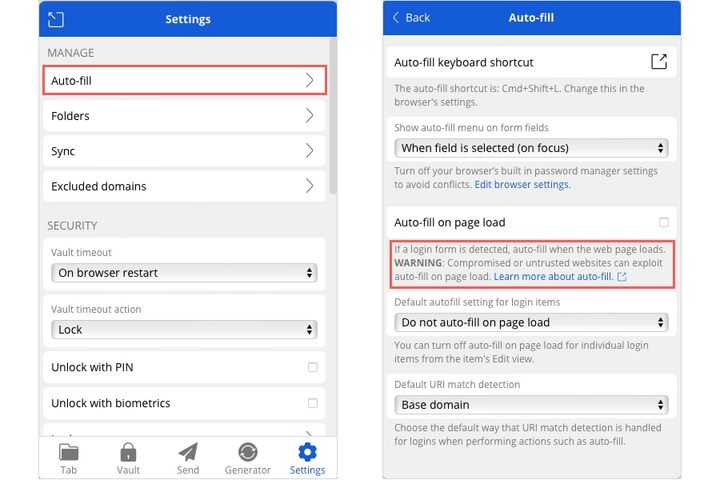
While Bitwarden is considered to be a safe password manager overall, there is one aspect of security that became a concern in 2023, which involved its web browser extension.
The possible risk exists within the page load feature for autofill. It was determined that iframes (inline frames) could gain access to your login credentials because the tool fills in those credentials both on the web page and within the iframe. This could open the door to hackers stealing passwords.
It’s important to note that you’ll find the autofill-on-page-load feature disabled by default and does warn users about the potential risks when enabling it.
For complete details on this specific concern, check out our article on the Bitwarden autofill risk.
Bitwarden plans
Bitwarden is a free password manager with paid options for both individuals and businesses.
For personal use, you can upgrade from the free plan for $10 yearly for features like file attachments, emergency access, and an integrated authenticator.
For businesses, you can choose the Teams plan at $4 monthly per user for secure data sharing, event log monitoring, and directory integration. The Enterprise plan is $4 monthly per user and includes the Teams plan features plus passwordless SSO, account recovery, and enterprise policies.
Should you use Bitwarden?
Because Bitwarden is a password manager with an extensive feature set for free, it’s enticing for those in the market for such a tool. With its cross-platform availability, unlimited passwords and devices, biometric login, and protected vault, you can easily access your logins and manage your secure data from anywhere.
Bitwarden does meet and even surpass the industry standards with its safety and compliance features. And, considering the security measures Bitwarden uses, you may be able to look past the potential risk with the browser extension — or just don’t use that feature or the extension at all.
Listed as one the best LastPass alternatives as well as one of the best password managers overall, you should consider Bitwarden if you’re in search of a secure, dependable tool.
From a personal perspective, I’ve been a Bitwarden user for many years, find it to be a superb password manager, and feel completely safe using it.