I’m ready to rip through Elden Ring’s Shadow of the Erdtree expansion on PC, but that experience goes beyond just a code to add to my Steam library. Over the past two years, I’ve run through Elden Ring about four times — once on my own and three more times with friends with the Seamless Co-op mod. And throughout my journeys in the Lands Between, I’ve learned of two critical apps that vastly improve the experience on PC.
One is a free app and the other is a paid app, which I recommend using in tandem. They both aim to improve the smoothness of Elden Ring and add features that aren’t available in the PC port.
The freebie
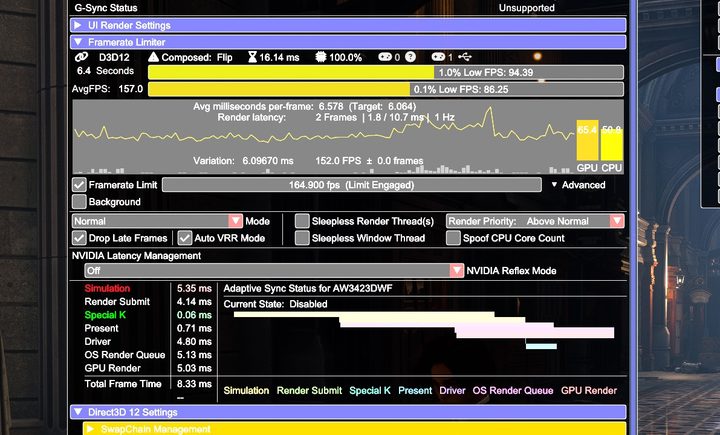
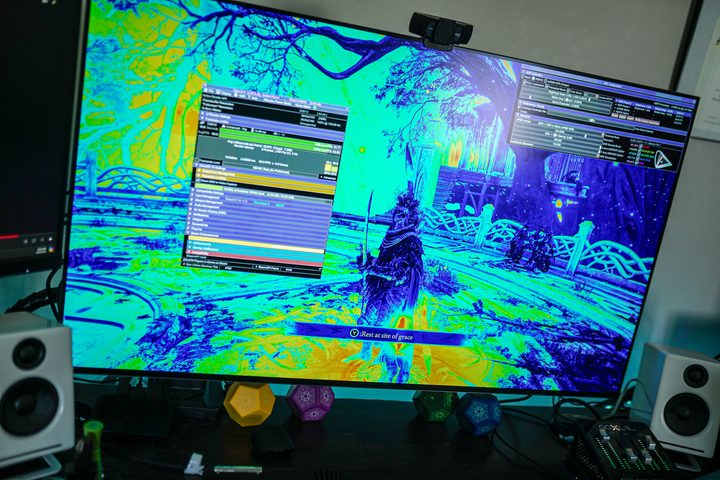
Let’s start with the freebie. The app in question is Special K, which is described as the “Swiss Army Knife” of PC mods. It’s a powerhouse utility that can do just about anything. It can force Nvidia Reflex in games, modify and lock inputs to different displays, and inject HDR where it isn’t available. It’s so dense that I’ve written specifically about Special K for my ReSpec column previously — and even then, I was only able to scratch the surface of what it’s capable of.
Special K is a global tool; you can use it with any game short of those with anti-cheat software. However, it includes a handful of adjustments for specific titles, including Elden Ring. The most immediately noticeable one is an unlocked frame rate. Elden Ring is capped to 60 frames per second (fps) on PC, but Special K can remove the cap.
It also enables a few quality-of-life features. Special K includes optional PlayStation button prompts if you’re using a DualSense or DualShock controller, which aren’t available in Elden Ring natively. You can also disable the game’s interface for screenshots through Special K.
The Shadow of the Erdtree update broke the frame rate unlock initially, and if you’re using the stable version of Special K right now, the app won’t work in the game at all. An experimental version of the app is available that works with the latest version of Elden Ring through Special K’s Discord server.
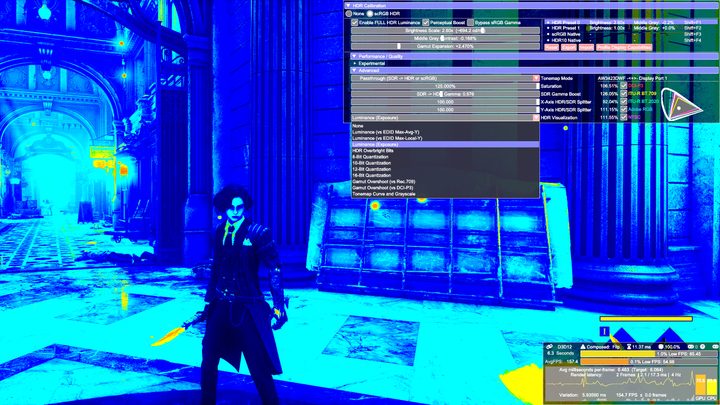
One of the main issues with Elden Ring on PC is stuttering, and Special K can help with that. It includes an extremely in-depth frame rate limiter. Without getting too far in the weeds, setting an fps cap is a lot more involved than you probably assume, and some frame rate limiters are better than others. Special K’s is probably the best you can get right now.
It helps tremendously to smooth out Elden Ring, particularly when you’re traversing the open world. If you want a deeper look at why Special K’s frame rate limiter is so good, I’ll point you to this in-depth post on the topic.
You can find a lot of applications for Special K in Elden Ring — I also use the mod’s HDR capabilities in the game, for example — but it carries a big caveat. Special K is a mod at the end of the day; it messes with game files. Because of that, you have to set Elden Ring to offline mode before loading the mod, and you can’t play online. That means no summoning your friends for boss fights, no messages on the ground, and no PvP. The mod’s creator also says you should disable the Easy Anti-Cheat software that the game launches to avoid any potential bans.
Those downsides are justified with how powerful Special K is. However, if you’re just looking for a smoother experience and don’t want to risk a ban, you still have an option — provided you can part ways with $7.
Frame generation without strings attached

Lossless Scaling is a $7 app on Steam that provides upscaling and frame generation across games. Unlike Special K, it doesn’t mess with any game files. It sits on top of the game, so you’re safe to use it when playing online without risking a ban. It’s particularly useful in Elden Ring where you don’t have access to performance-boosting features like Nvidia’s DLSS or AMD’s FSR.
The upscaling bit of Lossless Scaling is useful, but it’s the frame generation that stands out for Elden Ring. The app includes its own machine-learning-based frame generation model, and it gives you the option to either double or even triple your frame rate. It works in the same way as something like DLSS 3.5 or FSR 3. The game renders two frames, Lossless Scaling compares them, and it spits out either one or two frames between the two. And just like that, you’re seeing two or three times as many frames.

Lossless Scaling accomplishes the same thing as DLSS 3 or FSR 3, though with some quality loss. The frame generation happens when you actually see the frame on your screen, so elements like the HUD are part of the process. With the in-engine frame generation tools, those elements are generally kept out. Still, Lossless Scaling works shockingly well considering how it works.
And it’s the reason I don’t use Special K’s unlocked frame rate. With Lossless Scaling, I’m able to get the smoothness of 120 fps and the consistency of 60 fps. Assuming you’re able to hit the frame rate cap in Elden Ring consistently, Lossless Scaling provides a near-seamless boost to the smoothness of the game.
There are still caveats here, particularly if you can’t hit the 60 fps cap in the game. Lossless Scaling needs a consistent stream of frames to work properly, so if you have a highly variable frame rate — let’s say you’re bouncing between 35 fps and 50 fps — the tool won’t work well. It really shines when you’re hitting the 60 fps cap in Elden Ring.
Regardless of how you want to approach improving the smoothness and features of the game, I won’t be booting up Shadow of the Erdtree without Lossless Scaling and Special K at the ready. These are two of the most useful apps for gaming on PC, and they shine particularly bright in a game like Elden Ring that’s lacking PC-exclusive features.