When you’ve lost essential files that you absolutely must restore, you need the best data recovery software available. It pays to shop around. I’ve reviewed all the top brands and found that prices, features, and usability vary greatly.
Stellar Data Recovery Premium is better than ever after recent updates, and EaseUS Data Recovery Wizard Pro continues to be a leading solution. Both offer advanced features to recover data from hard drives, SSDs, and USB drives, even from a PC that won’t start up. They support a wide range of file formats and guided me through scanning for missing data, previewing, and restoring files.
To help you make an informed choice, I’ll compare subscription plans and share my hands-on experience of using the apps and interacting with customer support. By the end, you’ll know which is the right data recovery software for you.
Tiers and pricing
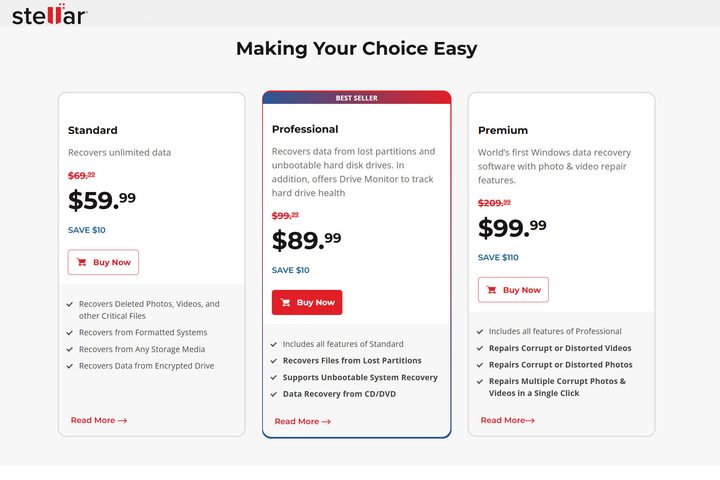
Stellar Data Recovery offers three price tiers. The Standard plan lets you restore an unlimited number of files for $60 annually. If your missing data is on a computer that won’t boot up or a lost partition, you’ll need the $90 Professional plan. The $100-per-year Premium plan includes a tool to repair corrupt photos and videos.
If you’re certain you’ll only need to use EaseUS Data Recovery Wizard Pro a few times, look for a pop-up offer for a $40 weekly plan. If that’s not available, the least-expensive option is a $70 monthly subscription. If you’re paying that much, the $100 annual plan has better long-term value. You can even break out of the subscription cycle entirely with a lifetime upgrade for $150.
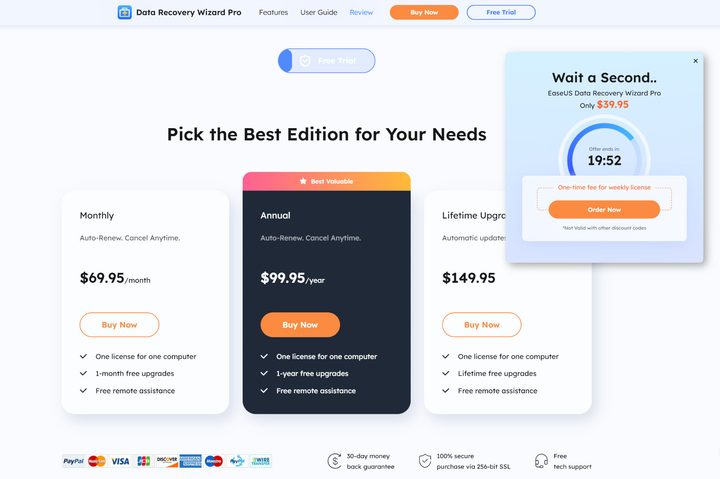
While Stellar Data Recovery Standard cuts $40 off the one-year EaseUS Data Recovery Wizard Pro annual plan, you’ll need to upgrade to Stellar Data Recovery Premium to get every feature.
You’ll pay $100 annually to get the most effective recovery tools for either app, so it’s important to compare features, performance, and support to find out which offers the best value.
Features
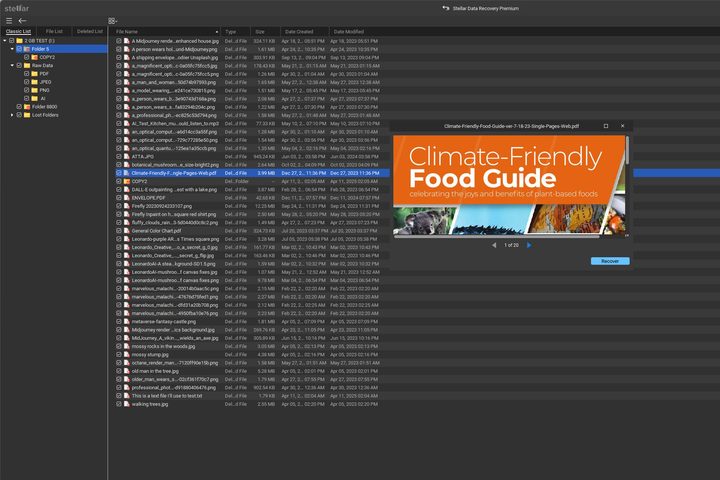
In my Stellar Data Recovery Premium review, the app successfully restored files and folders from an external hard disk drive (HDD) and thumb drive, passing multiple tests with no problems. The process is clear: I select the type of file to recover or all types, choose a drive, then start the scan.
I can browse the folders and files it finds and open a preview window to see a photo or other media. That works, but isn’t ideal. Some apps, like the free and low-cost DMDE data recovery, include a preview pane so I can quickly cycle through several images without opening and closing windows.
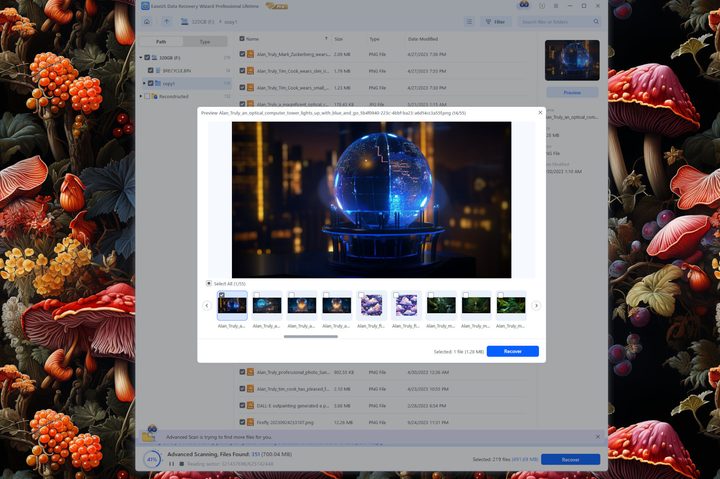
EaseUS Data Recovery Wizard Pro uses a similar process and effortlessly restores lost data from HDDs and thumb drives. I get thumbnail previews in the file view and can open a preview gallery to quickly browse larger images of recoverable media.
It’s not surprising that the two top data recovery apps gave equal results in these tests. It’s much easier to restore files lost from an HDD than from a solid-state drive (SSD). While an SSD is much faster, an HDD still has some advantages.

Restoring missing SSD files is the real challenge for data recovery software, and both of these apps performed admirably. Stellar Data Recovery Premium passed my deleted file test, finding every lost photo. Although no previews were available, Stellar’s included photo repair tool was able to recover those images. Unfortunately, my documents and audio files were unrecoverable.
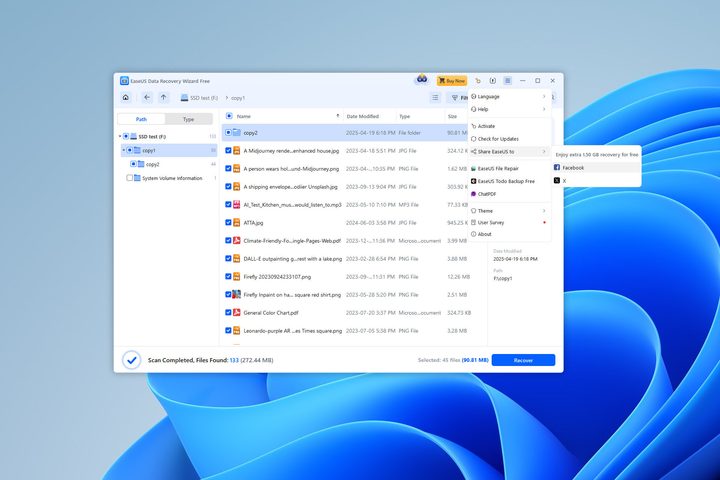
EaseUS Data Recovery Wizard is the only app I’ve tested that can restore all my deleted SDD files, regardless of the type, and without launching another app. I got the same performance, up to 2 GB of recovered data, from the free version, retrieving PDFs, JPEGs, PNGs, MP3s, and text files. It even restored my original nested folder structure.
Customer support and usability
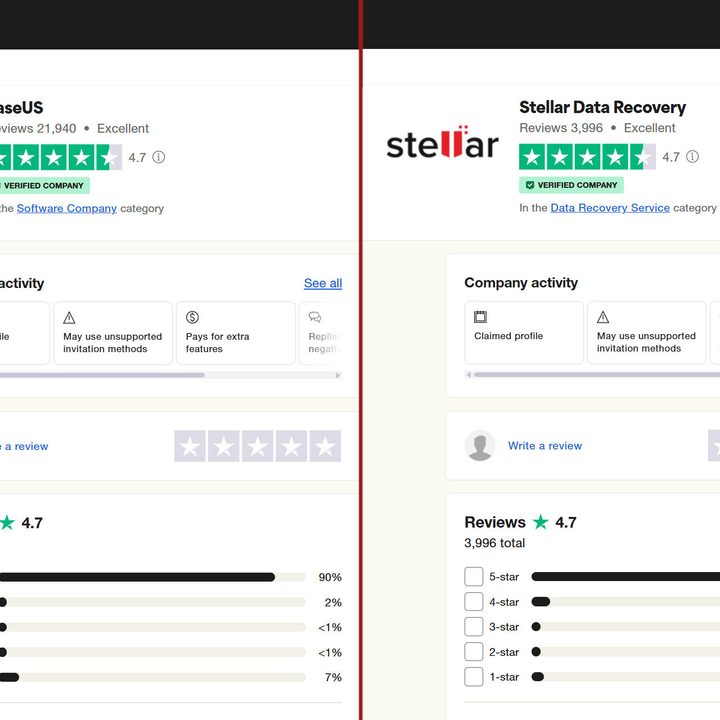
Stellar Data Recovery earned 4.7 stars in Trustpilot, matching the 4.7 rating of EaseUS. EaseUS maintained that high score across over 21,000 reviews. Stellar has nearly 4,000 reviews, which is still a good sample size. Both companies are trusted by their customers.
In my own testing, I was impressed by Stellar’s 24/7 live chat. A live agent responded quickly and shared detailed instructions to access the advanced file repair feature. While EaseUS was just as fast and helpful, live support is limited to 9.5 hours a day on weekdays.
Both have website support centers where you can browse help guides and community forums.
Free versions
Stellar Data Recovery’s free version has the same features as the Standard subscription plan, but limits how much you can restore to 1 GB. That’s enough for hundreds of photos and documents. Video takes more space, so you might need to subscribe.
The free version of EaseUS Data Recovery Wizard has a similar restriction, but the cap is at 2 GB. Twice as much data for free is a nice incentive to try EaseUS.
It’s great that both companies provide the option to try restoring files before subscribing. If you need to more data, Recuva’s free version allows unlimited recovery.
Which data recovery app is best?
The most important function of data recovery software is getting your files back. Stellar Data Recovery Premium was perfect in my HDD tests and, surprisingly, repaired some lost SSD photos. Live chat is always there if you need help, which is a great option when crucial files are missing.
EaseUS Data Recovery Wizard Pro was even more impressive, matching Stellar’s performance for HDDs and thumb drives, and retrieving even more SSD data in my deleted file test.
While pricing is quite similar for both, EaseUS offers a $40 weekly subscription, which is ideal for short-term use. If you anticipate needing to recover data for more than a year, EaseUS has a $150 lifetime plan that offers the best long-term value.
Overall, EaseUS Data Recovery Wizard Pro is the best solution for both free and paid plans, but Stellar Data Recovery Premium is a strong contender with frequent updates that could tip the balance in the future.
If you need a solution that works on a Mac, check our guide to the best data recovery software for macOS.